Inspiring
February 12, 2026
Answered

expand image

  • February 12, 2026
  • 3 replies
  • 109 views

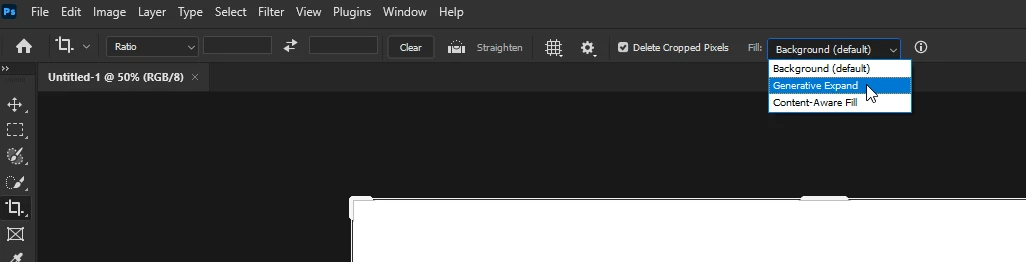
how can i quickly expand my image in photoshop? when i try generative fill it creates a new image!

 

    Correct answer Ged_Traynor

    @hendy_5450 try using the crop tool and select generative expand


    3 replies

    Stephen Marsh
    Community Expert
    Community Expert
    February 18, 2026

    Another option is a canvas extension script that I created using either content aware or generative fill:


    https://community.adobe.com/t5/photoshop-ecosystem-ideas/ai-generating-bleed-area-beyond-trim-line/idi-p/14547217#U15312767

    c.pfaffenbichler
    Community Expert
    Community Expert
    February 15, 2026

    If the problem hasn’t been resolved yet please post screenshots (including the pertinent UI elements like Toolbar, Layers Panel, Options Bar, Properties Panel, …) to clarify. 

    https://helpx.adobe.com/photoshop/desktop/create-open-import-images/create-images/explore-beyond-the-canvas-with-generative-expand.html

    Ged_Traynor
    Community Expert
    Ged_TraynorCommunity ExpertCorrect answer
    Community Expert
    February 12, 2026

    @hendy_5450 try using the crop tool and select generative expand


    Inspiring
    February 18, 2026

    i tried this so many times, all i get is empty layers

    c.pfaffenbichler
    Community Expert
    Community Expert
    February 18, 2026

    Could you please post a screenshot with the pertinent Panels (Toolbar, Layers, Options, Channels, Options Bar, …) visible?