t.ammann@bluewin.ch
Participant
November 9, 2024
Question

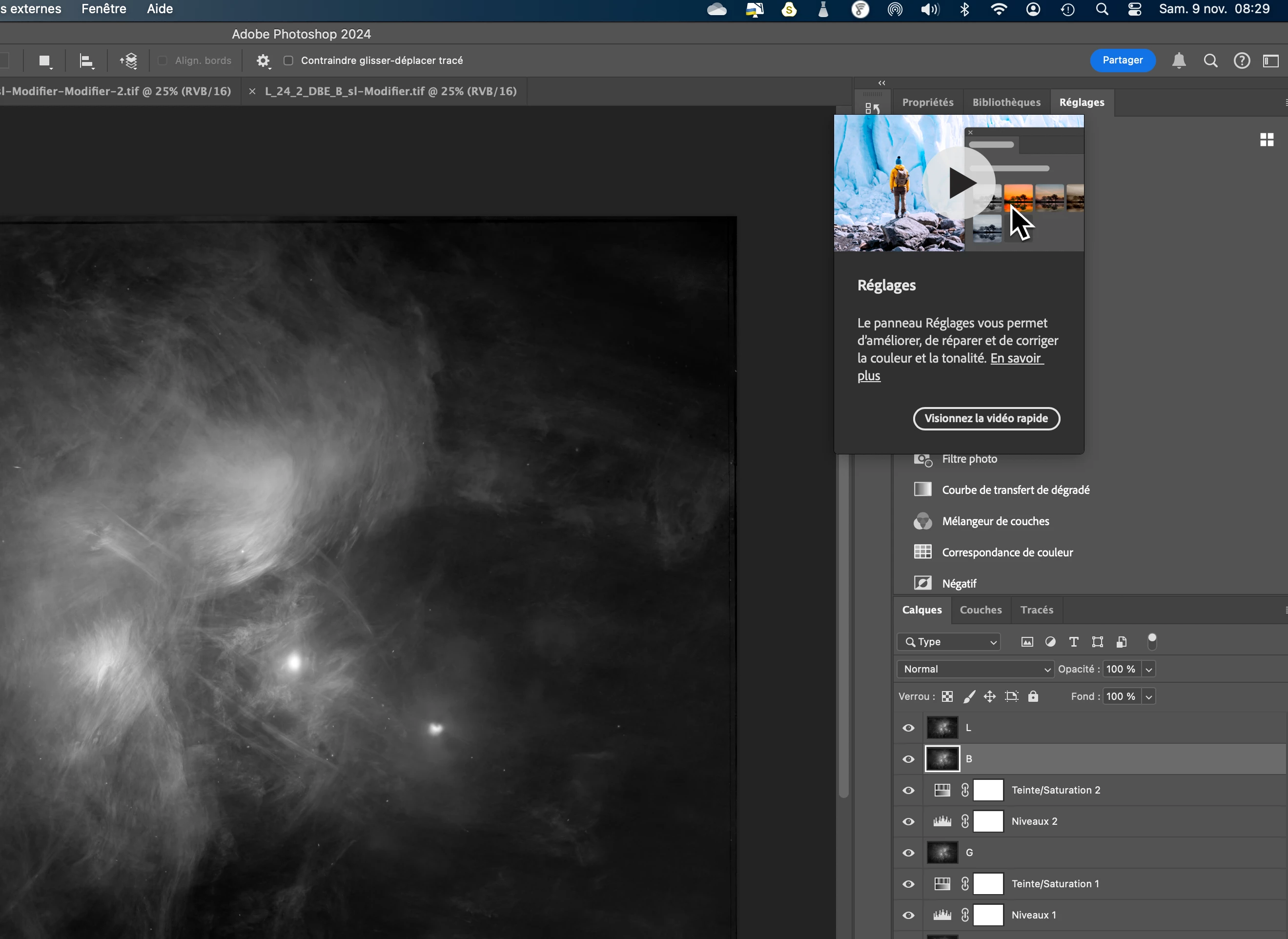
Explication video shows every time, even after seeing
  • November 9, 2024
  • 1 reply
  • 105 views

 How tu make that the little video doesnt'open anymore when I click 'règlages' ?

This topic has been closed for replies.

1 reply

Community Expert
November 9, 2024

Goto to the "Tools" section in the "Preferences" and disable the option "Show Rich Tooltips".


My System: Intel i7-8700K - 64GB RAM - NVidia Geforce RTX 3060 - Windows 11 Pro 25H2 -- LR-Classic 15 - Photoshop 27 - Nik Collection 9 - PureRAW 6 - Topaz Photo AI
t.ammann@bluewin.ch
Participant
November 9, 2024

29 / 5 000
Résultats de traduction
Résultat de traduction
Thank you very much - very useful!

Thomas Ammann - dipl. ing. rural EPF/FUS/SIA - <Mod: Personal informations removed>


[Moderator]

[personal information removed per policy - 

https://community.adobe.com/t5/adobe-community-professionals/email-signatures-and-personal-information/td-p/4786467

[This is a public forum, not Adobe support, please do not post personal information]