Known Participant
November 2, 2017
Answered

Export layer to a folder:

  • November 2, 2017
  • 2 replies
  • 2257 views

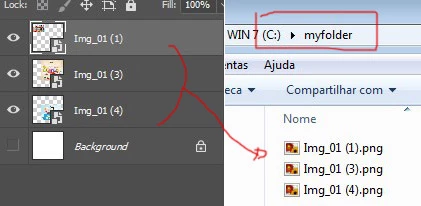
Hello friends! Would a script.jsx be possible to export only the active layer in the document with its respective transparency "Alpha Channel" within a folder in the path previously established in the script ?: If possible with a "trim" effect with no spaces on the 4 sides in the final file

Example: "C: //myFolder//myFile.png"

Thank you!

This topic has been closed for replies.
Correct answer SuperMerlin

SuperMerlin Pardon! the file name.png will not be static, "myfile_layer.png" I used this example only as an illustration: Personal forgiveness.

What I really need is to export each selected layer in this path: ("/ C / myfolder /"); whenever I execute the script: Each file will be saved with the one of the respective layer:


Ah, in that case the script would be...

#target photoshop; 

if(documents.length) main(); 

function main(){ 

var OutputFolder =Folder("/C/myfolder/");

if(!OutputFolder.exists) OutputFolder.create();

var LayerName = activeDocument.activeLayer.name; 

dupLayers(); 

//trim excess alpha 

app.activeDocument.trim(TrimType.TRANSPARENT); 

var saveFile = File(OutputFolder + "/" + LayerName + ".png"); 

SavePNG(saveFile); 

app.activeDocument.close(SaveOptions.DONOTSAVECHANGES); 

}; 

function SavePNG(saveFile){ 

    pngSaveOptions = new PNGSaveOptions();  

activeDocument.saveAs(saveFile, pngSaveOptions, true, Extension.LOWERCASE);  

function dupLayers() {  

var desc143 = new ActionDescriptor(); 

var ref73 = new ActionReference(); 

ref73.putClass( charIDToTypeID('Dcmn') ); 

desc143.putReference( charIDToTypeID('null'), ref73 ); 

desc143.putString( charIDToTypeID('Nm  '), activeDocument.activeLayer.name ); 

var ref74 = new ActionReference(); 

ref74.putEnumerated( charIDToTypeID('Lyr '), charIDToTypeID('Ordn'), charIDToTypeID('Trgt') ); 

desc143.putReference( charIDToTypeID('Usng'), ref74 ); 

executeAction( charIDToTypeID('Mk  '), desc143, DialogModes.NO ); 

};

2 replies

Legend
November 2, 2017

Why not use the built-in script in Photoshop that is called.

in CS6: Menu->File->Scripts->Export Layers to Files...

in CC2018:Menu->File->Export->Layers to Files...

?)

Ps-DesignAuthor
Known Participant
November 3, 2017

Hello r-bin great suggestion, very last but in my specific case, I need this script because I will have to save each type of layer in different places, even if it is manually, because it is a kind of Library classified by category with different folders. Thanks for listening.

SuperMerlin
Inspiring
November 2, 2017

This example saves the selected layer to the main files folder with the layerName.png also with trim.

#target photoshop;

if(documents.length) main();

function main(){

try{

    var docPath = activeDocument.path;

    }catch(e){

        alert("You need to save the document before using this script!");

        return;

        }

var LayerName = activeDocument.activeLayer.name;

dupLayers();

//trim excess alpha

app.activeDocument.trim(TrimType.TRANSPARENT);

var saveFile = File(docPath + "/" + LayerName + ".png");

SavePNG(saveFile);

app.activeDocument.close(SaveOptions.DONOTSAVECHANGES);

};

function SavePNG(saveFile){

    pngSaveOptions = new PNGSaveOptions();

activeDocument.saveAs(saveFile, pngSaveOptions, true, Extension.LOWERCASE);

}

function dupLayers() {

var desc143 = new ActionDescriptor();

var ref73 = new ActionReference();

ref73.putClass( charIDToTypeID('Dcmn') );

desc143.putReference( charIDToTypeID('null'), ref73 );

desc143.putString( charIDToTypeID('Nm  '), activeDocument.activeLayer.name );

var ref74 = new ActionReference();

ref74.putEnumerated( charIDToTypeID('Lyr '), charIDToTypeID('Ordn'), charIDToTypeID('Trgt') );

desc143.putReference( charIDToTypeID('Usng'), ref74 );

executeAction( charIDToTypeID('Mk  '), desc143, DialogModes.NO );

};

Ps-DesignAuthor
Known Participant
November 2, 2017

How wonderful! Hello SuperMerlin, you always very objective! Thank you. My goal is to create a library and for this to work 100% well, I need to modify the script so that all files are directed to that path: "C: /myfolder/myfile_layer.png". Could you show me how to make it possible? Thank you one more time.

SuperMerlin
Inspiring
November 2, 2017

Haveing a static file name means the file would be overwritten on the second time the script would be run, this example give you the choice to abort.

#target photoshop;

if(documents.length) main();

function main(){

var OutputFolder =Folder("/C/myfolder/");

if(!OutputFolder.exists) OutputFolder.create();

var FileName = "myfile_layer.png";

dupLayers();

//trim excess alpha

app.activeDocument.trim(TrimType.TRANSPARENT);

var saveFile = File(OutputFolder + "/" + FileName);

if(saveFile.exists){

var result =  Window.prompt("File exist overwrite file y/n","y");

if(result == "y"|| result == "Y" ){

     saveFile.remove();

     }else{

         app.activeDocument.close(SaveOptions.DONOTSAVECHANGES);

         return;

         }

     }

SavePNG(saveFile);

app.activeDocument.close(SaveOptions.DONOTSAVECHANGES);

};

function SavePNG(saveFile){

    pngSaveOptions = new PNGSaveOptions();

activeDocument.saveAs(saveFile, pngSaveOptions, true, Extension.LOWERCASE);

}

function dupLayers() {

var desc143 = new ActionDescriptor();

var ref73 = new ActionReference();

ref73.putClass( charIDToTypeID('Dcmn') );

desc143.putReference( charIDToTypeID('null'), ref73 );

desc143.putString( charIDToTypeID('Nm  '), activeDocument.activeLayer.name );

var ref74 = new ActionReference();

ref74.putEnumerated( charIDToTypeID('Lyr '), charIDToTypeID('Ordn'), charIDToTypeID('Trgt') );

desc143.putReference( charIDToTypeID('Usng'), ref74 );

executeAction( charIDToTypeID('Mk  '), desc143, DialogModes.NO );

};