

SacerdoteDan
Participant
February 7, 2024
Answered

Exporting DDS file with Nvidia Texture Tools Plugin

  • February 7, 2024
  • 1 reply
  • 3945 views

Hi, this is my first post here and i'm really needing this help.
I always used this plugin that Nvidia provides to open and export dds files, but when i change the GPU in my computer a error message is showing everytime i try to save as dds.
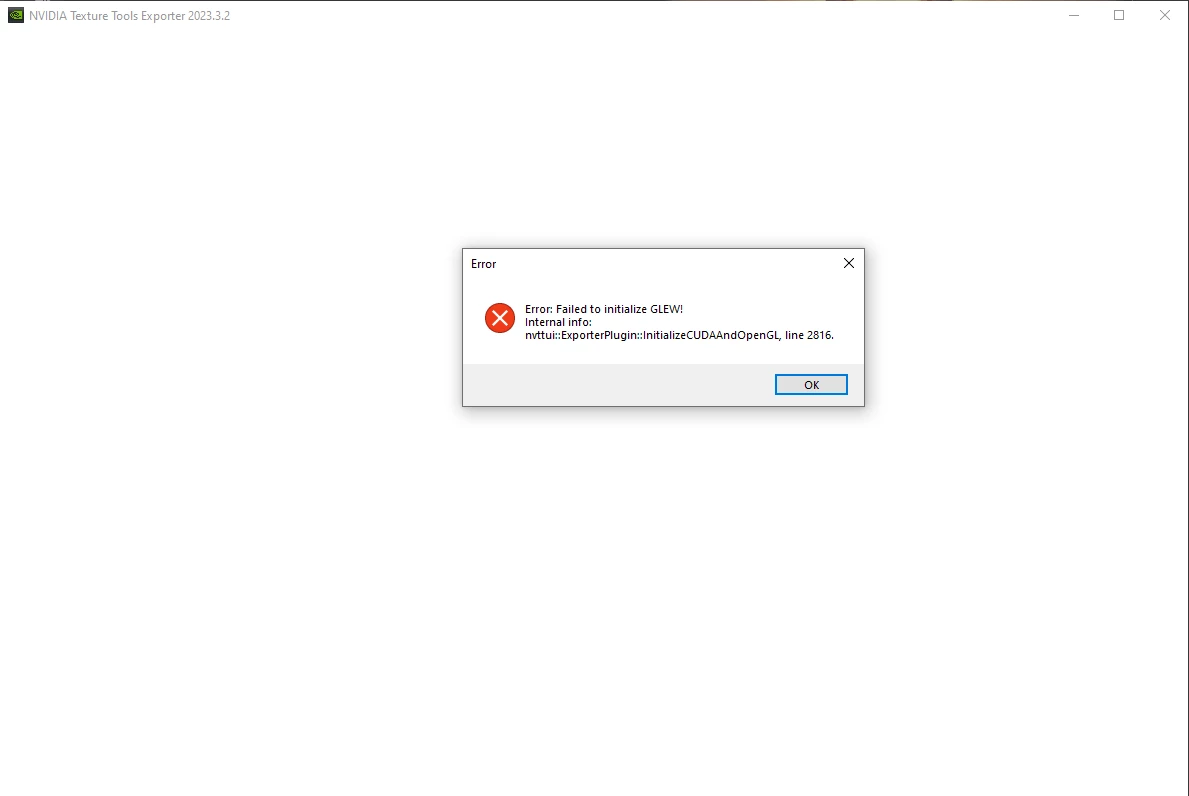
It's started exactly after i change the GPU of my machine, when i try to save with Alt + Ctrl + S (Save as Copy).

My photoshop is in the last version at the moment, 25.4.
The Nvidia Plugin also is the last version, 2023.3.2
Windows 10 pro Version 10.0.19045 Build 19045

My setup:
Ryzen 5 4600g
Rx 6600
16gb Ram

This topic has been closed for replies.
Correct answer Sameer K

Hey, @SacerdoteDan. Welcome to the Photoshop Community. I'll help you figure this out. 


I've researched the error code & it may not be related to Photoshop. I found this conversation in Nvidia Forums:
https://adobe.ly/42xBdbr


The original reporter used AMD RX 7800XT & you're using RX 6600; the fix is determined by rolling back or updating the GPU drivers. 

Let me know how it goes. Thanks! 

Sameer K

1 reply

Sameer K
Community Manager
Sameer KCommunity ManagerCorrect answer
Community Manager
February 7, 2024

Hey, @SacerdoteDan. Welcome to the Photoshop Community. I'll help you figure this out. 


I've researched the error code & it may not be related to Photoshop. I found this conversation in Nvidia Forums:
https://adobe.ly/42xBdbr


The original reporter used AMD RX 7800XT & you're using RX 6600; the fix is determined by rolling back or updating the GPU drivers. 

Let me know how it goes. Thanks! 

Sameer K

SacerdoteDan
Participant
February 8, 2024

hii, thank you so much for your help sir, i was afraid that the RX 7800XT driver version that you mencioned was no compatible with the RX 6600, but in the end it's all the same, so it worked perfectly, thank you again!