
Participating Frequently
October 16, 2020
Answered

Extend script to format a file in a couple of different ways or an Action if possible

  • October 16, 2020
  • 1 reply
  • 477 views

Hello community.,


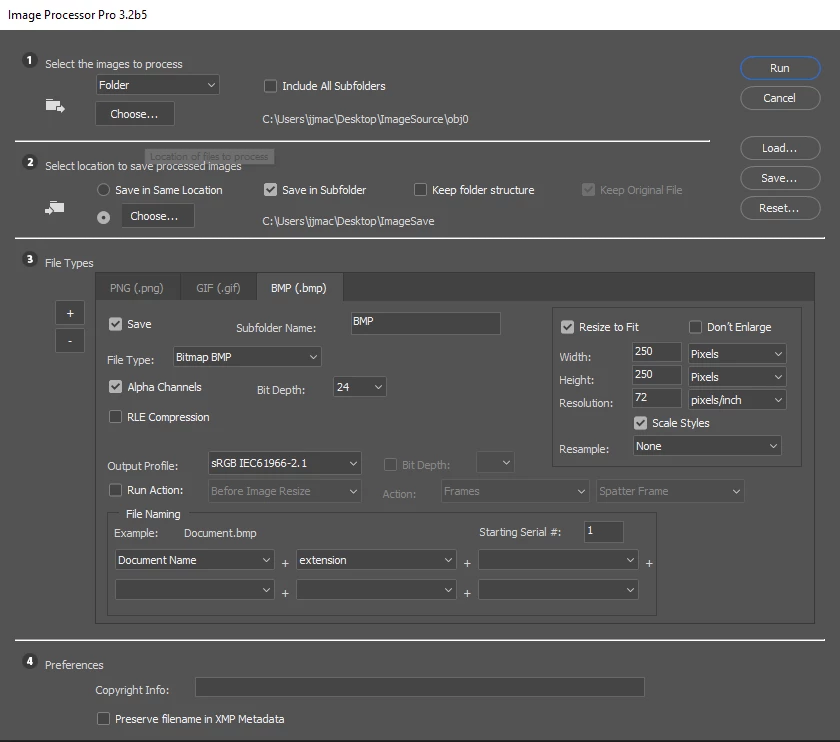
I havean issue where I have a lot ofArt work that I need to be able to automate/reformat. Bassically I need to script that if I run it on a photoshop file. It will resize the image to H/W whatever is bigger to 400 then export to PNG to a folder. Then resize the H/W to 250 from whatever the bigger number is and export to a GIF file in a folder. Last but not least Keep the resize to 250, flatten, then export to a BMP file to a folder.


I have an action that will save as as a BMP, but I cannot setup an action for the export function.


Any help is greatly appreciated.
This topic has been closed for replies.
Correct answer JJMack

It works flawlessly for PNG and GIF, it makes BMP images comeout Black and white for some reason. I've tried all of the output profiles but same result.


For the BMP if you want color use the 24bit option.

1 reply

JJMack
Community Expert
Community Expert
October 16, 2020

Download and install the plug-in image processor Pro.  All you need to do then is use menu File>Automate>Images Processor pro and set its dialog to save  your flat files.

JJMack
Participating Frequently
October 16, 2020

Does this work for CC2020? When I look for where to download it from I can only find a sourceforge location that says it works for CC2015. This will be an ongoing process, that needs to scale into further versions.