
Verto
Known Participant
October 28, 2020
Question

Extensions panels clipped after installing Photoshop 2021

  • October 28, 2020
  • 4 replies
  • 1732 views

Hello friends.


After installing / updating photoshop to the new version of 2021 (in windows 10), some extension panels appear cropped, without being able to use the functions found in the cropped area.


I leave some image captures of one of the panels that offer that error. In this case it is Tony Kuyper's panel 7, but the same error appears in other panels.
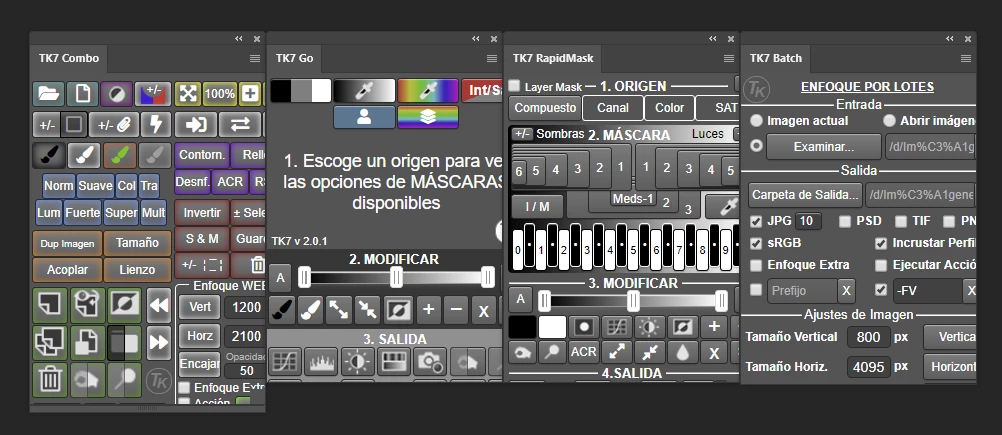


Can anyone help to solve this problem?

Thanks and greetings to the community.

This topic has been closed for replies.

4 replies

Verto
VertoAuthor
Known Participant
November 23, 2020

In the Adobe Photoshop Familiy forum, a fix to the bug in the new version of Adobe Photoshop has been published.

It can be found at this link:

https://feedback.photoshop.com/conversations/photoshop/photoshop-2021-legacy-cep-plugins-broken/5f9487af917fbb287b4e8291?commentId=5fbbb98931a2440fc000254b

Tom Winkelmann
Inspiring
November 24, 2020

So, as I suspected, a scaling problem 😉

Verto
VertoAuthor
Known Participant
November 5, 2020

Hi.

I still have the same problem, and after having consulted some programmers of the extensions that present this error, they tell me that everything is correct and that they cannot do anything. They tell me to contact Adobe to fix the problem.


Does anyone have any solution

Tom Winkelmann
Inspiring
November 5, 2020

Maybe a scaling problem?

Do you use any typ of scaling in Windows or Photoshop?

Verto
VertoAuthor
Known Participant
November 5, 2020

Thanks for your attention, Winkelmann.


I don't use any kind of scaling. In the previous version of Photoshop, you did not have this problem, but with the new version, several panels have this problem.

mglush
Community Expert
Community Expert
October 28, 2020

Hi!

Have you tried resetting your preferences? Here is help on how to: https://helpx.adobe.com/photoshop/using/preferences.html

Please let us know if this fixes the issue, or if you are still having the problem.

Michelle

Verto
VertoAuthor
Known Participant
October 28, 2020

Hola.

Gracias por responder. He restablecido las preferencias como me indicó, pero sigue ocurriendo el mismo error.

¿Alguna otra solución?

Verto
VertoAuthor
Known Participant
October 28, 2020

Add that, the error occurs even with panels of Photoshop itself. For example, the "Adobe Color wheel" panel also has the same error, and it is not possible to resize it to show the cropped areas.

mglush
Community Expert
Community Expert
October 29, 2020

Have you tried resetting your workspace? (Windows>Workspace) and then changing it to a different workspace and then changing it back?

Michelle