Participant
November 20, 2017
Answered

Eye Dropper Tool

  • November 20, 2017
  • 1 reply
  • 1885 views

Hello, I am relatively new to Photoshop an whilst attempting to learn an teach myself i hurt my hand in an unrelated accident, I stopped at took a break for a while an am back now only to open Photoshop an find things are not as I had left them prior to this I have had no issues and have changed nothing. When trying to edit an already existing photo an capture a color hue using the eye dropper tool when I try an go anywhere over the image I am given a prohibited sign  of a white circle with a horizontal line through it, I have never seen this before an am unaware of how to fix this I thought it might have been the photo an went ahead an downloaded one provided by Adobe for practice manipulation an am seeing the same thing, and lastly, now my brushes an presets are all one the upper right hand side when before they were on the left, all the "tools" are still on the left but when i click the paint brush it shows settings on the right now. Hope this makes sense... Joe

    This topic has been closed for replies.
    Correct answer davescm

    It sounds like you may be trying to use the 3D Material Eyedropper tool

    rather than the eyedropper tool:

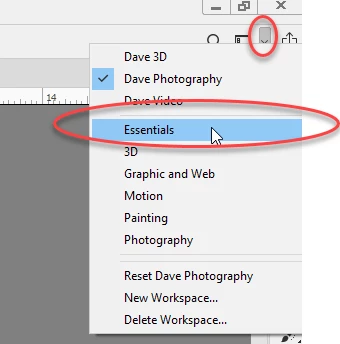
    Go to the top right of the Photoshop Window - click the down arrow to see a list of workspaces and choose Essentials

    Dave

    1 reply

    davescm
    Community Expert
    davescmCommunity ExpertCorrect answer
    Community Expert
    November 20, 2017

    It sounds like you may be trying to use the 3D Material Eyedropper tool

    rather than the eyedropper tool:

    Go to the top right of the Photoshop Window - click the down arrow to see a list of workspaces and choose Essentials

    Dave

    MeekosAuthor
    Participant
    November 20, 2017

    Dave, that was incredibly fast an I think this shows your proficiency in Ps, I Thank you an greatly appreciate the help, i'm not sure how but I must have hit something by accident. Thanks again!

    davescm
    Community Expert
    Community Expert
    November 20, 2017

    You're welcome - glad to help

    Dave