markh56447284
Participant
February 4, 2018
Answered

eyedropper not picking up color

  • February 4, 2018
  • 7 replies
  • 41963 views

When I try to pick up a color with the eyedropper a gray and white circle circle the curser, how do I fix that?

    This topic has been closed for replies.
    Correct answer davidc27776971

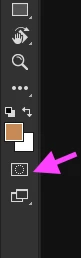
    Make sure 'Edit in quick maske mode' tool is turned off. Can be turned on and off by letter Q on the keyboard.

    And yes it can be on while using another tool which will give you headaches.
    7 replies

    Glevity
    Known Participant
    January 13, 2024

    This forum helped but I am wondering why it was changed in the first place. Happened right after I updated(which is ALWAYS the cause of some problem or another with Adobe as regular users will know). My question is HOW does this setting get changed, obviously if I had to look up how to to change it back it wasnt something done on my end.. so what caused this change in the first place?

    Participant
    August 25, 2023

    PECourtejoie
    Community Expert
    Community Expert
    June 10, 2021

    Yes, and another puzzler to add to the list here is that you can click on the background color well in the top left of the Color panel, then photoshop will sample background colors instead.

    The solution is to click on the foreground well in the color panel.

    I hope this will help others.

    Participant
    April 23, 2021

    This question is kinf of old now, but I found a similar issue. My eyedropper tool was able to sample a color, but it was not the right color...


    Turns out to be that for some reason it was sampling 101 by 101 average, so changed it back to point sample and it started picking the color I was trying to get.


    Hope it helps someone.

    Participant
    June 10, 2021

    Thank you so much.

    Have just saved my university deadline work XD

    Participant
    June 10, 2021

    So I guess it was not too late to post the answer haha, I'm glad it helped. Keep it up! 👌

    ursular77898578
    Participant
    November 21, 2019

    Thank you so much. Ever since adobe updated to PS CC 21.01  I have been strugling with not being able to pick up any color other then on current layer. what a simple fix." try setting the Sample to All Layers on the same bar."

    Thanks again!!!

    davidc27776971Correct answer
    Participant
    February 2, 2022

    Make sure 'Edit in quick maske mode' tool is turned off. Can be turned on and off by letter Q on the keyboard.

    And yes it can be on while using another tool which will give you headaches.

    Participant
    October 15, 2022

    thank you soo muuch!!! 

    melissapiccone
    Community Expert
    Community Expert
    February 5, 2018

    Also, make sure you aren't a mask - can't sample colors on a mask, only grays.

    Melissa Piccone | Adobe Trainer | Online Courses Author | Fine Artist
    Participant
    January 26, 2021

    How do you make sure your not in a mask?

    Barb Binder
    Community Expert
    Community Expert
    February 4, 2018

    Hi Mark:

    That circle is the HUD (Heads-Up Display). If you don't want to see it, uncheck Show Sampling Circle on the Options Bar at the top of your document window.

    If the Eyedropper isn't selecting a color when you click on the image, try setting the Sample to All Layers on the same bar.

    ~Barb

    ~Barb at Rocky Mountain Training