


Known Participant
December 30, 2025
Answered

"F" Key and Screen Modes

  • December 30, 2025
  • 1 reply
  • 447 views

In older versions of Photoshop, the "F" key used to cycle through the three different Screen Modes. In the newer versions, it doesn't work. Is there a way to bring it back? I tried to assign just the F key in Keyboard Shortcuts, but it won't allow it. It says that a modifier key must be used in conjunction with a letter. in older versions, it was just the F key.

Correct answer Ged_Traynor

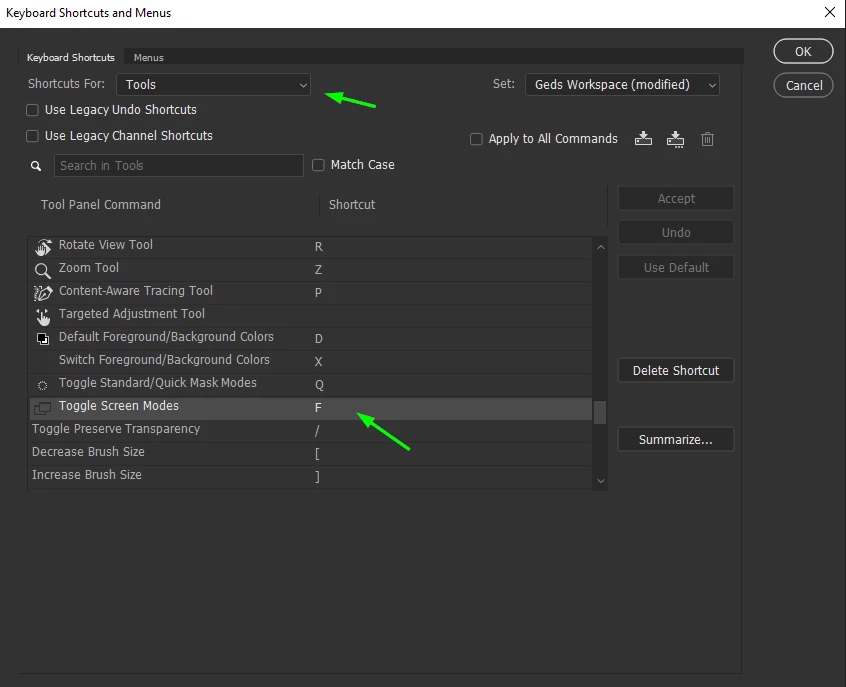
@GDBart have you checked the keyboard shortcut settings, make sure F is the assigned key

2025-12-30 10_39_34-Keyboard Shortcuts and Menus.png

If it's not that, I would try manually resetting your Photoshop preferences
https://helpx.adobe.com/ie/photoshop/using/preferences.html#Manually
Remember to back up your settings before doing the preference reset
https://helpx.adobe.com/ie/photoshop/using/preset-migration.html

1 reply

Jeff Arola
Community Expert
Community Expert
December 30, 2025

In Photoshop 2026>Settings>Workspace do you have Enable Native Full Screen checked?

If so, try unchecking Enable Native Full Screen, then restart Photoshop and try the F key.

GDBartAuthor
Known Participant
December 30, 2025

Hi Jeff, and thank you for the reply. No, Enable Native Full Screen was not checked, so for the heck of it, I checked it and restarted PS. Unfortunately, it didn't help, so I unchecked it and restarted PS again, just to return it to the previous state.... see attched screenshot. Btw, is this just my problem or does your F key not work either?

Ged_Traynor
Community Expert
Ged_TraynorCommunity ExpertCorrect answer
Community Expert
December 30, 2025

@GDBart have you checked the keyboard shortcut settings, make sure F is the assigned key

2025-12-30 10_39_34-Keyboard Shortcuts and Menus.png

If it's not that, I would try manually resetting your Photoshop preferences
https://helpx.adobe.com/ie/photoshop/using/preferences.html#Manually
Remember to back up your settings before doing the preference reset
https://helpx.adobe.com/ie/photoshop/using/preset-migration.html