
EmergeMe
Inspiring
October 27, 2023
Answered

Failing graphics processor compatibility check

  • October 27, 2023
  • 10 replies
  • 1555 views

Photoshop 25.1.0

Windows 11 Pro, 22621.2506

NVIDIA GeForce RTX 3080 Ti, Driver 31.0.15.3758


As of the latest release I am recieving an Unknown GPU issue:
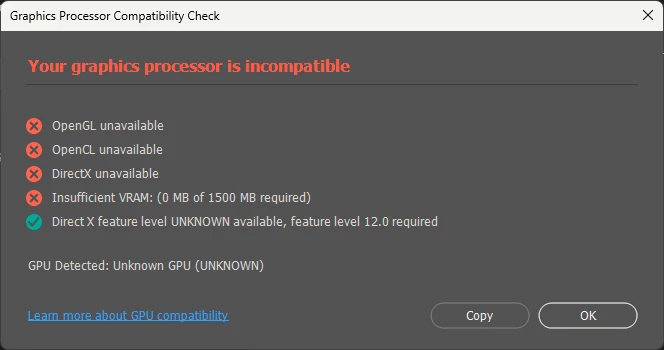


I have an NVIDIA GeForce RTX 3080 Ti on Windows 11 and it was working fine yesterday. This problem just started happening when I updated PhotoShop. As far as I know, I do not have the Microsoft OpenCL/OpenGL Compatibility Pack installed. Any advice?

This topic has been closed for replies.
Correct answer EmergeMe

Good news. NVIDIA just released a new driver (31.0.15.5123) which seems to have eliminated the Graphics Processor error for me.

10 replies

EmergeMe
EmergeMeAuthorCorrect answer
Inspiring
January 29, 2024

Good news. NVIDIA just released a new driver (31.0.15.5123) which seems to have eliminated the Graphics Processor error for me.

Inspiring
January 14, 2024

Installing the OpenCL™ and OpenGL® Compatibility Pack from the Microsoft Store is the only thing that resolved the graphics processor is incompatible error for me. I would try that if you have Windows and did a clean install of the driver. 

Participant
November 3, 2023

I have the same issue with PS 25.1.  Reverted to PS 25.0 and it works fine. Seems to be a real PS 25.1 BUG. For reference, LrC 13.0.1 has no problem.

NVIDIA GeForce RTX 3070 Ti on Windows 11, eGPU. Studio driver 31.0.15.4601

D Fosse
Community Expert
Community Expert
October 27, 2023

I see one other thread with the same problem. So maybe this is a real PS bug. 


Revert to the previous version until this is resolved. Uninstall, and install from "previous versions" in the CC app.

EmergeMe
EmergeMeAuthor
Inspiring
October 27, 2023

Ah, OK. I found it. Thanks.

Unfortunately, still not working.

D Fosse
Community Expert
Community Expert
October 27, 2023

It's in your user account, not program files.


I'm on a phone, so can't show screenshots now.

EmergeMe
EmergeMeAuthor
Inspiring
October 27, 2023

I did reset the preferences. But, I do not see a "Settings" folder:

To which folder are you referring?

D Fosse
Community Expert
Community Expert
October 27, 2023

You did reset preferences? Move the whole settings folder to the desktop for a complete reset.

EmergeMe
EmergeMeAuthor
Inspiring
October 27, 2023

Thank you, but no joy. Same issue.

D Fosse
Community Expert
Community Expert
October 27, 2023

Reinstall the driver, and reset PS preferences.


There is no "pack" This is the driver not being recognized.


Install the Studio driver, choose custom install and check "clean install".