
maria0101
Known Participant
May 10, 2018
Answered

Fastest way to cut out garment from shadowy and white background

  • May 10, 2018
  • 3 replies
  • 735 views

Went to an interview yesterday and was given 20 minutes to work on something similar to this for a fashion company. It just stumped me. I usually like to take my time, put a layer mask on, select it with quick selection, or magic wand it, and even get the pen out and paint it away. But that usually takes me more than 20 minutes.

In a fast paced job, when someone shoves this on your pile, what's the quickest way of just selecting the garment?
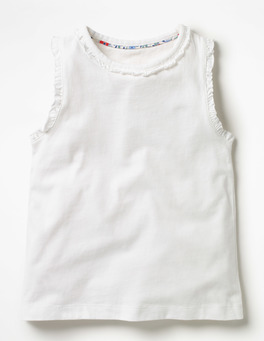
18gspr_g0360_wht.jpg

Image wasn't this exactly but was near enough (there was even lace at the bottom!!) I had trouble with the selection of the background bleeding into the garment, and the greys messing it up. I wonder if you were to set the contrast to the highest settings to use as for selection, but I am still having issues with the whites and greys blending into each other.

I was kicking myself after the interview so I'd really appreciate some tips! Many thanks in advance!!

This topic has been closed for replies.
Correct answer davescm

HI

I used the pen tool and Bezier handles to make curves.

There is a good explanation here :

Draw with Pen tools in Photoshop

Unlike Theresa, when using the pen tool I tend to use the mouse, rather than a pen & tablet which I keep for freehand drawing and painting. I keep one hand on the mouse and the other over the modifier keys (Alt/Shift/Ctrl), iot is surprising how quick and accurate you can be with a bit of practice.

Talking of practice, if you want to try out the pen tool, come on the forum and join our "Something for the weekend challenge" this coming weekend. It is a bit of fun and this week will be ideal for a bit of pen tool practice

Good luck with the job interviews.

Dave

3 replies

davescm
Community Expert
Community Expert
May 10, 2018

Hi

Pen tool - less than a minute

The pen tool takes a bit of practice at first but is well worth getting to know

If there had been lace I would have tackled that separately - look for the best contrast in the channels panel

Dave

davescm
Community Expert
Community Expert
May 10, 2018

I've just seen Theresa's post above mine - 100% agree

Dave

Theresa J
Community Expert
Community Expert
May 10, 2018

I would draw a path around the shirt using the pen tool. Then I would convert the path to a selection for a layer mask. If needed I would paint or use the smudge tool on the layer mask to clean up detail areas around the sleeve.

This would take me 5 minutes tops, only because I have been drawing pen path outlines around subjects for 25 years. My experience with paths pre dates Photoshop. In the early 90’s I worked in prepress for a trading card company. Every athlete, on every trading card got a path outline drawn first. The outline was then used for color correction. I probably drew 10,000 outlines in those years. Sometimes today I look at an image like this and I think, “I’m not in the mood to draw a path today. I can probably do this just as fast with quick select.” Then I end up spending extra time painting the mask to clean it up. Starting with a path almost always saves me time in the long run. It is a great skill to have, though admittedly it can be challenging to learn. Working with a Wacom tablet helps immensely. Any new skill comes down to lots and lots of practice.

maria0101
maria0101Author
Known Participant
May 10, 2018

Thanks for the great answer! I have used the pen tool before but mostly with larger lines, so I place the pen tool down and then I can curve it after. Do you do this or do you draw the path freehand?

JonathanArias
Legend
May 10, 2018

don't kick yourself.

they gave you something like this as a test of your skills? they wanted to see how fast you could do it?

I agree with your described course of action as to how you would do it. i would do it that way too. i don't think it would take 20 minutes to do it. Maybe you just need more work experience to pick up more speed?

melissapiccone
Community Expert
Community Expert
May 10, 2018

I agree, that is how I would do it, too. But, it would take me about 5 minutes... I happen to be very speedy, but 20 minutes is a bit excessive. Learn keyboard shortcuts and modifers, are you using a wacom tablet - that will speed you up, too.

Melissa Piccone | Adobe Trainer | Online Courses Author | Fine Artist
JonathanArias
Legend
May 10, 2018

i think the OP just needs more work experience to pick up speed

that is all our line of work gets narrow down to at times.."how fast can you do this?"