Thomas 42541987
Known Participant
January 19, 2026
Answered

Feature idea: Please add generative credits information / counter in Photoshop

  • January 19, 2026
  • 2 replies
  • 65 views

Hello everyone,

I think it would be a nice thing if everyone could see their account balance for premium feature credits directly in Photoshop. I find the current solution via Firefly to be very inconvenient.


Kind regards,

Thomas

Correct answer J E L

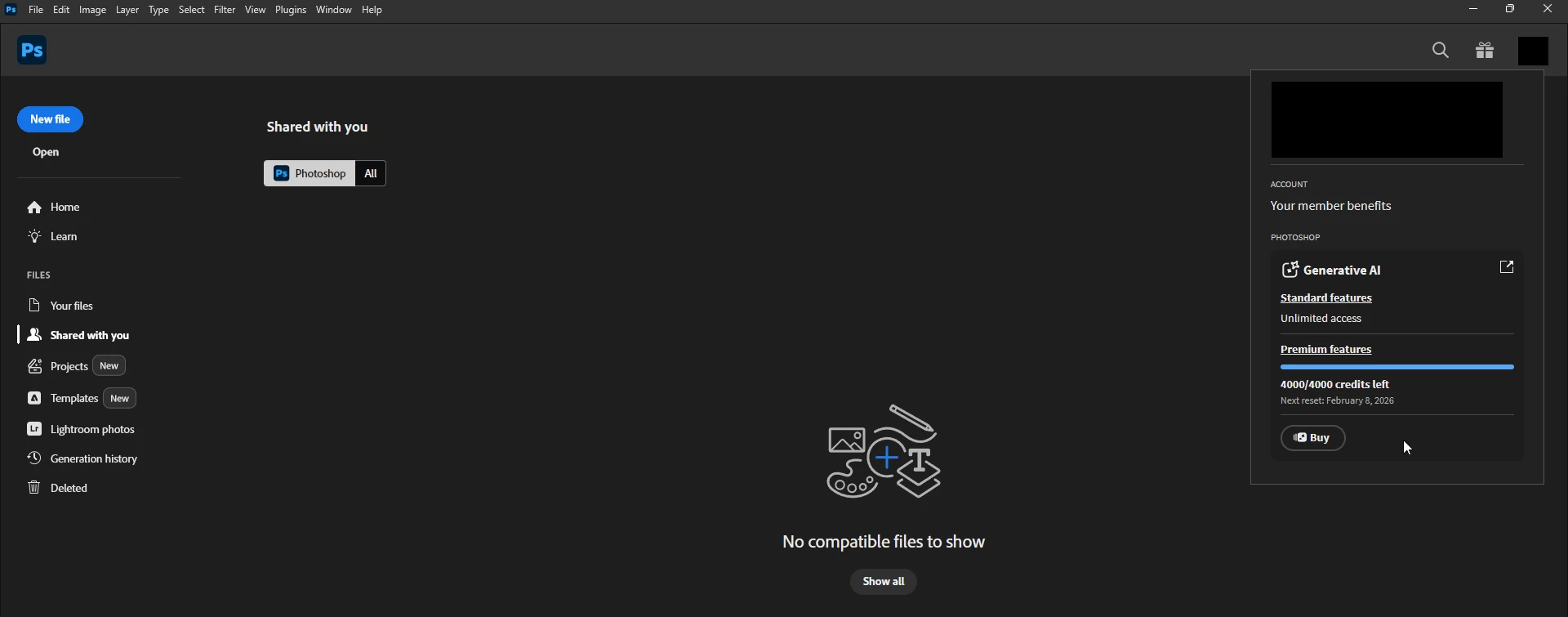
Hi @Thomas 42541987, it's already possible to do this! 


  • Launch Photoshop or click the Home button (house icon) in the upper-left corner if you're already in a document.
  • Navigate to the Home Screen (you cannot check credits from the main editing workspace).
  • In the upper-right corner, click your Profile button (your avatar or profile icon). Your generative credit balance will appear, showing total credits included in your plan and credits remaining in the current cycle.
  • Click Buy if you’ve used all credits and want to purchase more.


JEL_3-1768862953941.png

2 replies

creative explorer
Community Expert
Community Expert
January 20, 2026

@Thomas 42541987 as per @J E L — you can also go to your online account, https://www.adobe.com/home and click on your avatar to see what's left

creativeexplorer_0-1768904279574.png


m
J E L
Community Expert
J E LCommunity ExpertCorrect answer
Community Expert
January 19, 2026

Hi @Thomas 42541987, it's already possible to do this! 


  • Launch Photoshop or click the Home button (house icon) in the upper-left corner if you're already in a document.
  • Navigate to the Home Screen (you cannot check credits from the main editing workspace).
  • In the upper-right corner, click your Profile button (your avatar or profile icon). Your generative credit balance will appear, showing total credits included in your plan and credits remaining in the current cycle.
  • Click Buy if you’ve used all credits and want to purchase more.


JEL_3-1768862953941.png