Participant
March 15, 2025
Answered

File assocications

  • March 15, 2025
  • 2 replies
  • 342 views

Going crazy here. Nothing seems to help.


Hi Hive mind. Please help. My Photoshop has gone weird. If i am in the program, i can open files from the program no issue. But i cannot open any files in with photoshop from outwith the program. Make sense ? If i click on any file it will ask ( as normal ) what program i want to use to open file. In that menu, photoshop only shows as photoshop.exe. I click on that and nothing. If i look for the option of find another program on this pc, i can find photoshop but again i only have photoshop.exe. Have uninstalled and reinstalled multiple times but still exactly the same. Have tried redoing the default app to open files option but nothing. Any ideas please ? Thanks in advance

Correct answer Trevor.Dennis

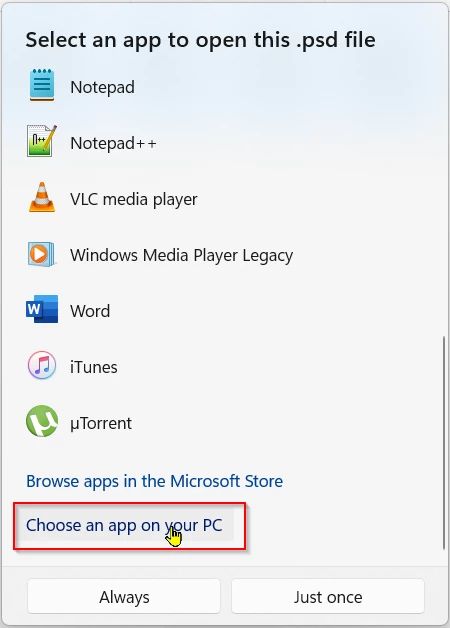
If Photoshop does not show as an option after right clicking a file and chosing Open With scroll on down and click on Choose an app on You PC


This will open File Explorer.

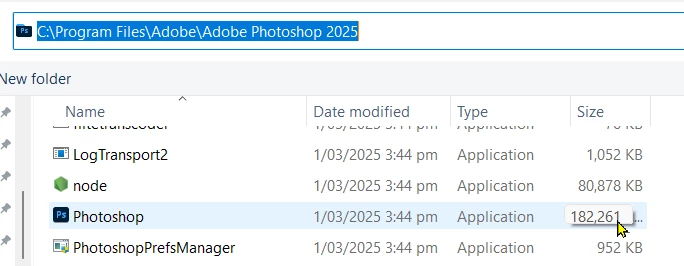
Navigate to the Photoshop.exe file, select it and click on Always

2 replies

D Fosse
Community Expert
Community Expert
March 15, 2025

How does it look in Windows settings > default apps by file type? Can you set Photoshop version there?


Participant
March 16, 2025

Hi there,

No. Photoshop doesn't show up in apps. Have uninstalled everything, run the creative crowd cleaner but still same issue. Photoshop still opens fine and I can open any files. But if I try and open a file or associate a file with photoshop it doesn't seem to exist. I get photoshop.exe as an option but that does nothing. No idea what to do. Other adobe apps are fine.

Thanks


Trevor.Dennis
Community Expert
Trevor.DennisCommunity ExpertCorrect answer
Community Expert
March 17, 2025

If Photoshop does not show as an option after right clicking a file and chosing Open With scroll on down and click on Choose an app on You PC


This will open File Explorer.

Navigate to the Photoshop.exe file, select it and click on Always

Ged_Traynor
Community Expert
Community Expert
March 15, 2025

@colinw39480121 try manually resetting your Photoshop preferences
https://helpx.adobe.com/ie/photoshop/using/preferences.html#Manually
Remember to back up your settings before doing the preference reset
https://helpx.adobe.com/ie/photoshop/using/preset-migration.html