
Participating Frequently
November 14, 2019
Answered

File name and extension highlight when saving on macOS 10.15 Catalina

  • November 14, 2019
  • 35 replies
  • 12409 views

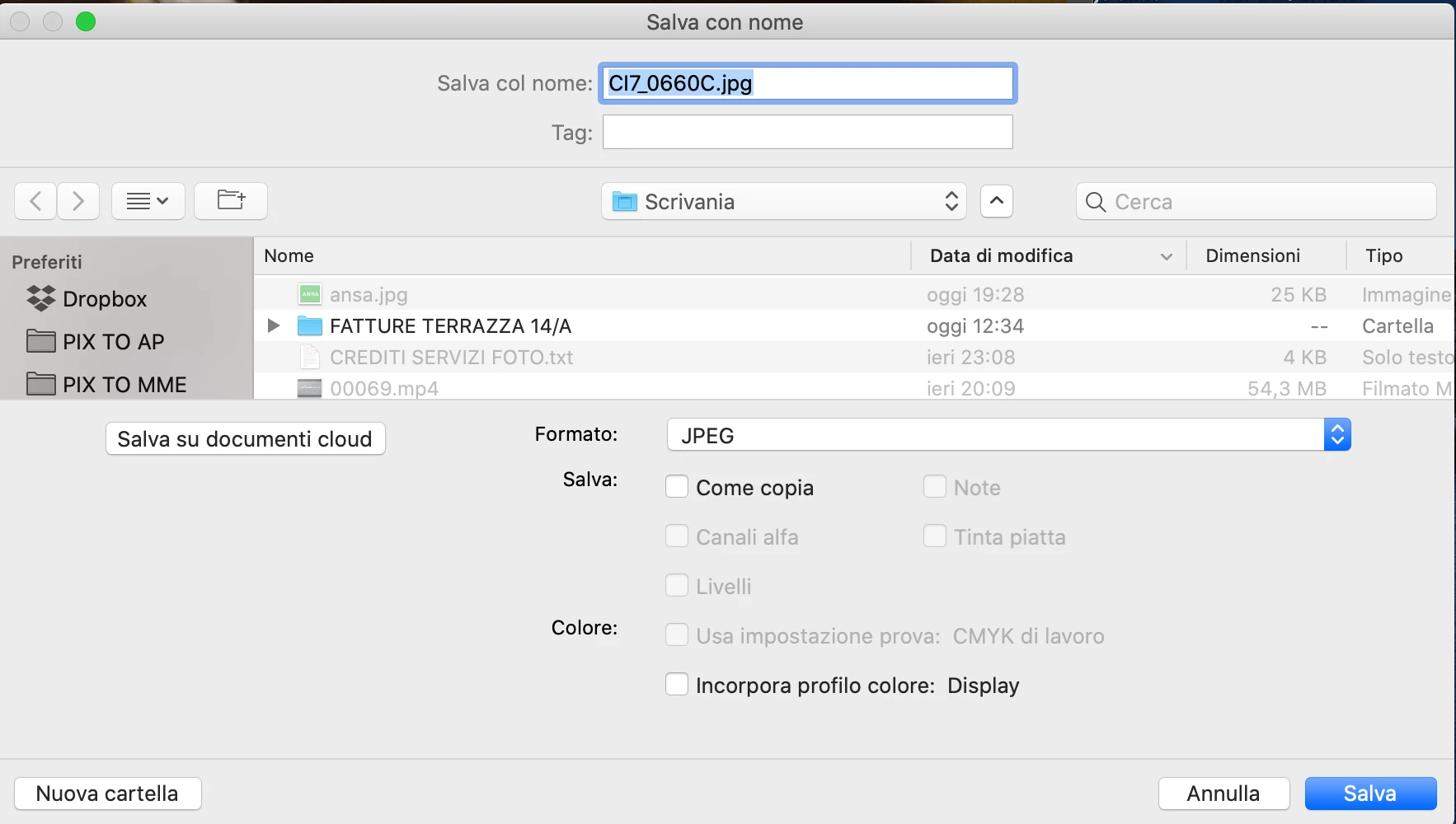
Hello. After last updates (Osx Catalina and CC 2020), when the save window appear, the focus, highlite, is on all the file name and extension instead only the filename. I suspect the issue is related to Catalina, but I ask if anyone has noticed the same thing. My working speed is affected and I would like to know if anyone has a solution to ensure that only the file name is highlighted (in save and export).
Thank you
 

This topic has been closed for replies.
Correct answer Martie Seesing

I have no solution for the highlighting, but if you save the image the extension will be attached in the proper way. 

35 replies

Participating Frequently
March 17, 2022

Fixed with Monterey Osx

delixirsorbano
Participant
March 17, 2022

Negative.

Participating Frequently
March 16, 2022

This has been going on for years. Please fix, Adobe.

Hans Bos Amsterdam
Known Participant
March 16, 2022

It is unbelievable, there are quite some things that Adobe has altered to their (i thought) very basic standard thongs like: filenam, printing pdf, and such but you strt to wonder if all adobe personel and test panels use PC maybe? Because aren;t we all going nuts with this highlighting issue?


DTP-1984
Known Participant
December 18, 2021

I have confirmed this is fixed with Monterey 12.1.  This also was a problem with Affinity Publisher and it also now works perfectly. So this was not an Adobe problem. It was Apple. Please mark this as the correct answer as the one that is marked correct is not correct. 

Known Participant
December 18, 2021

Thanks for the confirmation. I'm a long-time Apple user. Apple poor team coordination relative to OS changes and upgrades continues to create havoc for  developers and their users. This yearly upgrade cycle leaves a lot of software bugs in its wake. Add the dumbing down of the OS and voila. Astonishing given their multi-trillion market cap. 

MJ S
Known Participant
February 13, 2022

I originally posted about this issue a couple of years ago, and found that it has continued through multiple apps regardless of OS. So, it's confirmed not just Adobe, not only from my original post but from responses to this one.


What I found, which still drives me crazy (short trip), is that even when the entire file name is highlighted, and even if I don't type in the extension (which makes me twitch, but oh well), the extension is included in the file name after the fact.


I don't know why, and I don't know if my muscle memory will catch up to this, but there you have it.


So, to recap, in several apps on different OS's, the highlight that used to automatically highlight the file name and not the extension now highlights everything. However, if you have test.jpg and end up just typing "test" and find that file, it will still show the jpg extension in the file name.


Do I still find myself trying to go through the extra steps to preserve the extension in the file name? Yes.

Is it necessary? No.

Will I learn to just trust the process and not worry about the file extension when I've already designated one? ...eventually?


*twitch*

Hans Bos Amsterdam
Known Participant
November 24, 2021

Hi Carmelo,

I hope you're doing fine, I was wondering: did you get any solutions yet? Best! Hans


DTP-1984
Known Participant
November 18, 2021

Not fixed with Indesign 17.0.1 running Monterery 12.0.1. Lets hope for the .1 fix.  Also I notified Affinity team. (Affinity Publisher). Let's see who wins this fix it race. It must have something to do with Apple also since it's on two platforms. Perhaps some Apple updates will get it working. 


DTP-1984
Known Participant
November 18, 2021

Ten hours after I reported this to Affinity, they got back to me and they are on it.  The bigger you get, the more you lose it. Apple the same. I remember a video of Steve Jobs in 1997 or 98 after coming back to Apple. He said please let us know what you want.. what your problems are and we will listen. We want to know.  NOW?  ugh.   Apples beautiful label colours highlighting the whole line are long gone and nothing done. Just those stupid tiny colour dots (tags) Plus NOW in Monterey the colours are all dimmed. Mushy.  Who the heck is deciding this crud?  oops.. sorry for getting off topic. 😮 

I wish I was working for one of these big companies, in charge of filtering the important stuff to the top.  Tiny text, colours, context boxes un-resizable, fonts too small.  It just goes on. Who are these designers that have learned to white space it all and tone down colours and make it "un-gawdy" and un-useable. 

gedeonm
Participating Frequently
November 18, 2021

Well, I'm glad SOMEONE is listening because Adobe sure isn't. 😕😕

TedConverse
Participant
November 18, 2021

Hello Adobe? Do you even monitor your forums?

DTP-1984
Known Participant
November 14, 2021

Affinity does the same thing. So it's not just an adobe problem. Yet Apple preview app does work when saving. I'm in Monterey 12.0.1 and Indesign 17.0 - yes I am brave. But updating fixed my 2020 macbook pro to be as speedy as it's supposed to be. Recommended to upate as soon as Monterey 12.1 comes out. 

Participating Frequently
November 15, 2021

I've used Affinity Photo consistently this year, and this is not an issue in Monterey (nor was it ever an issue in Big Sur) that I have ever personally experienced.


If others are having issues outside of Adobe, then this is truly an even bigger problem. 

DTP-1984
Known Participant
November 18, 2021

I use affinty publisher.  Both Adobe and affinty publisher show the highlight for a split second.  Strange. 

DTP-1984
Known Participant
November 12, 2021

Correct answer is NOT the correct answer. There is no answer for solving the non-highlighted name issue. 

JTM888
Participant
March 1, 2021

I'm not sure this is a Catalina issue, because saving a file on your desktop? Never had the file extension highlighted, even over multiple files. This is an ADOBE issue that is affecting all their major apps. And why the complete and utter radio silence? I have not seen anybody from Adobe address this or indicate that they are trying to fix the problem.  Really weird it should go this long – with so many affected by it – without some kind of update.

Inspiring
March 1, 2021

@JTM888 wrote:

This is an ADOBE issue that is affecting all their major apps.


Just a bit curious: how can the Adobe apps affect Firefox and its dialogs, as depicted above in this thread?

Known Participant
February 9, 2021

Still experiencing this problem, and couldn't agree more that it should have been fixed by now.

Oh, and the proper extension doesn't always just appear.  If it is a JPG, you have to type JPG in.  This is also something else to remember and keep up with that shouldn't be.