
Participating Frequently
November 14, 2019
Answered

File name and extension highlight when saving on macOS 10.15 Catalina

  • November 14, 2019
  • 35 replies
  • 12409 views

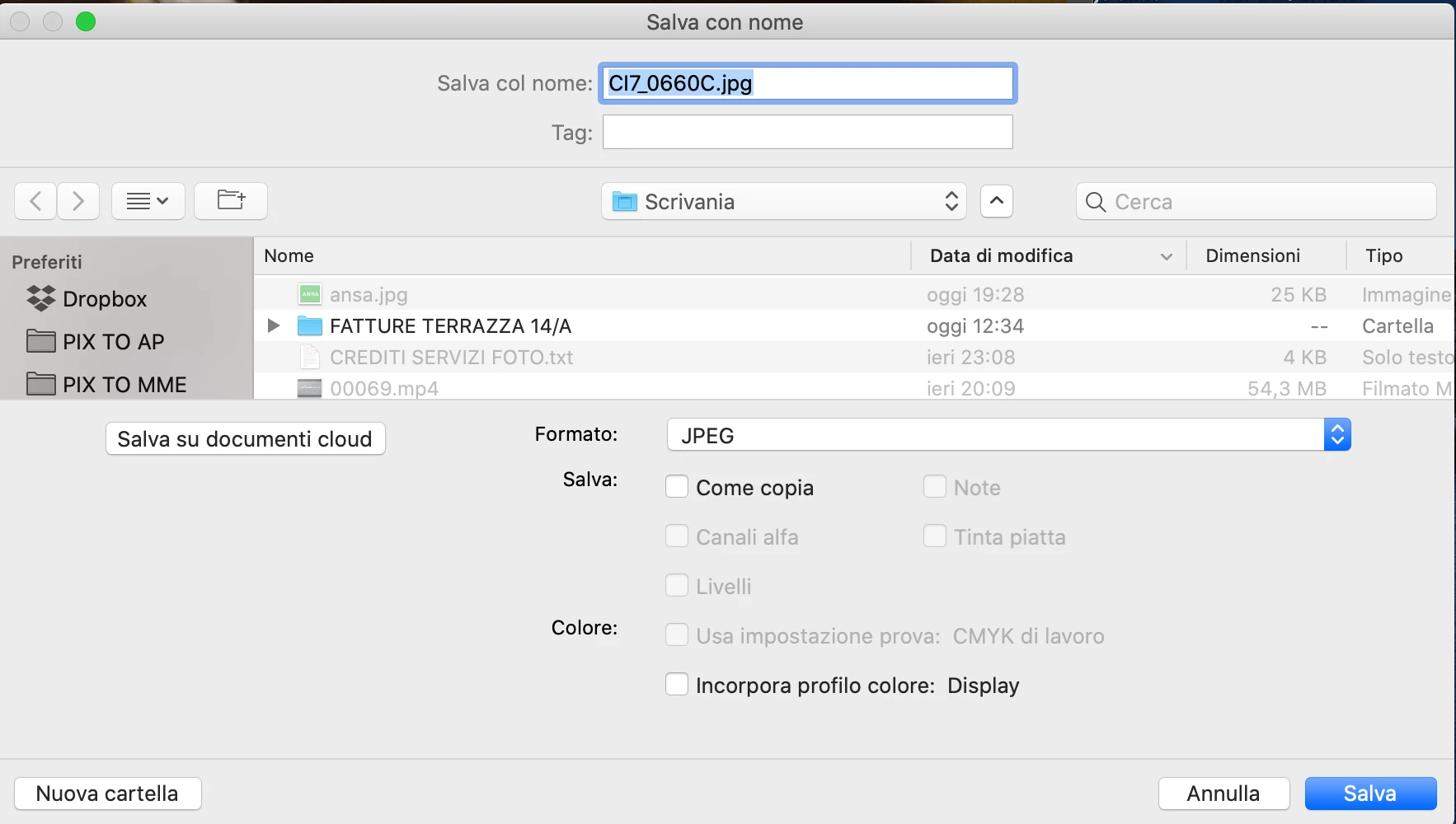
Hello. After last updates (Osx Catalina and CC 2020), when the save window appear, the focus, highlite, is on all the file name and extension instead only the filename. I suspect the issue is related to Catalina, but I ask if anyone has noticed the same thing. My working speed is affected and I would like to know if anyone has a solution to ensure that only the file name is highlighted (in save and export).
Thank you
 

This topic has been closed for replies.
Correct answer Martie Seesing

I have no solution for the highlighting, but if you save the image the extension will be attached in the proper way. 

35 replies

Participant
February 9, 2021

Yet another reason to strongly consider a switch to Affinity. I honestly don't know how this problem (among others - i.e. Adobe Dreamweaver taking an hour and a half just to open) can persist for over a year with no solution. I can't imagine this is a huge ask from Adobe's development team. Then again... it is Adobe.

Participating Frequently
August 13, 2021

Adobe is under zero obligation to actually adress user feedback. Enterprise and coporations are the money, and pleabians like us who actually use the bloated apps follow along. Or make our own. 


Affinity is pretty awesome and everyone reading these words should at least look up some tutorial videos and give their suite a try. We need more competition in this space. I wish Macromedia had not sold their souls. 

gedeonm
Participating Frequently
January 14, 2021

After having updated to Big Sur and PS 2021 I've been experiencing this problem as well and boy, is it aggrevating. Did a hive mind search on Twitter and people are telling me Adobe knows about it and its on the list to fix. 


Guess I have to live with it for now but boy, this one is frustrating. 😕😕

gedeonm
Participating Frequently
February 9, 2021

It's now almost a month later and this bug continues to plague me. Slows me way down and results in error-prone saves which I then have to rename or re-save. Hope this gets fixed soon.

Participating Frequently
January 11, 2021

This is NOT the "correct answer." Why was this labeled as "solved" when it is still a major bug? 

Participating Frequently
January 8, 2021

why was this answer deemed "correct"? it does not address the OP problem. I just upgraded to Big Sur and now have this problem.


Very annoying workflow interruption.

sgjr712
Participant
December 11, 2020

I'm on Big Sur and still having the highlight issues when saving, so it is killing my work flow also. AND . . . still having the issue of save as not overitten the file, but rather making another copy. SO, that issue is still not fixed after all this time. 
For the highlight issue, I found that if I hit the tab key three times after hitting save as psd,  the save as window with the file name highlights. Sometimes, it just randomly highights on it's own out of nowhere though. Very strange and seems like it should be a very easy fix for Adobe. Does Adobe even review these comments and resolve these issues? I've never seen an issue/bug posted that was fixed. 

Known Participant
December 28, 2020

I just wanted to say thanks for this solution.  It really helped me.  Mine wasn't highlighting at all.  This will save me lots of time.  Thank you sgjr712.  Also, Adobe, you do need to fix this.  Also, the huge issue with the fact that I can no longer see text highlighted while working in Photoshop?!?

Participant
November 4, 2020

Geez! I thought it was just me but this is annoying but I did try the sugesstion to overtype filename and it did add the extension in InDesign. Haven't tried the other apps yet. I'm using Catalina 10.15.7.

Participant
September 25, 2020

Agreed this is driving me nuts as well, seem to be an issue with Catalina. So one slight workaround which may help. When the dialogue box apears 'arrow left' curser to left, 'option shift arrow right' to highlight to end of word or to '.' then type new name and save done. Hope that helps

Participant
November 21, 2020

Great tip - working perfectly! Thanks!

PinkGecko
Participant
September 22, 2020

I think I hav the TRUE ANSWER, as this is should not be marked as resolved. 


I think you will find the issue you describe only appears in Photoshop >> Save for Web (Legacy)....

Seems Adobe have not updated this type of file export.


In all other cases:

  1. Finder >> Preferences >> Advanced >> CHECKED: Show all file name extentions
  2. Photoshop >> [with open file] Save As (or Export As)
  3. Filetype retains original type (in this case .psd)
  4. Tap on file you wish to replace, or name file whatever you wish
  5. Select filetype in dropdown menu below and automatically the suffix changes to correct filetype. 


Tip: Replace "Save for Web (Legacy)"  with "Export As" in Photoshop File Export menu. 


Hope this helps.

MJ S
Known Participant
August 24, 2020

I thought this was isolated to Adobe products, but I just did extensive testing in Apple native and third-party apps, and found the anomaly in several. I'm on 10.15.6. I will be submitting a report to Apple. I wasn't seeing it in any of the other apps I use on a regular basis for saving or renaming, so it didn't even occur to me that it might be an issue with a component of the OS itself. I so rarely use Firefox, especially for download or saving out images or other files, but sure enough, it happens for me in Firefox as well.

juliew34345023
Participant
August 24, 2020

Since I last posted, just about all of my Adobe Creative Suite applications have this issue. But it could well be an Apple issue. I'll be following to see what you find out. Maddening!

gener7
Community Expert
Community Expert
August 21, 2020

I notice that all is normal in CC 2018 and CC 2019, just CC 2020 has this problem.


As discussed here: https://feedback.photoshop.com/photoshop_family/topics/file-name-and-extension-higlight-when-saving-on-osx?topic-reply-list[settings][page]=2#topic-reply-list


"The workarounds that I have been using are to either change the Format pop-up to something else and then changing it back (like Photoshop to Large Photoshop Document then back to Photoshop) or to move the text prompt with right arrow once, then left arrow four times, then shift up arrow.   Both get you to where you have just the filename selected without the ".psd".  Neither is ideal, of course."


Known Participant
August 24, 2020

I attempted to sign-in to the Photoshop Family site, but that doesn't work either. Adobe batting 1.000 here. 

gener7
Community Expert
Community Expert
August 24, 2020

I think you have to sign up separately for that community, it is not part of the Adobe Forums and doesn't use your Adobe ID

Click on "sign up" and choose your options.