Bachonysus
Participating Frequently
August 6, 2025
Answered

File saves as Tiff when using keyboard shortcut, not as a PSD file.

  • August 6, 2025
  • 1 reply
  • 152 views

On an image sent to phtoshop via Lightrooms "Edit In" I can save it back to the original folder using Command - S keyboard shortcut and it will save in PSD format.  However, when I am on my MacBook Pro and using the same workflow it saves as a Tiff.  What do I need to do in order to save the file as a PSD on my MacBook Pro?

Correct answer Per Berntsen

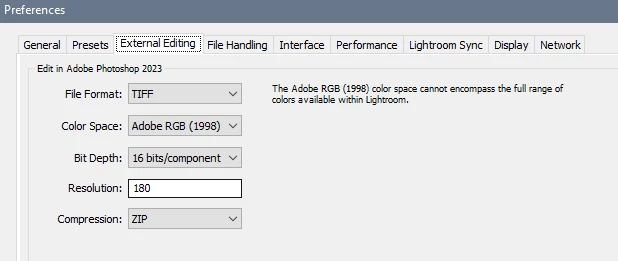
If you're using Lightroom Classic, you set the file format in Preferences > External editing.

There's probably a similar setting in the cloud version of Lightroom.


1 reply

Per Berntsen
Community Expert
Per BerntsenCommunity ExpertCorrect answer
Community Expert
August 6, 2025

If you're using Lightroom Classic, you set the file format in Preferences > External editing.

There's probably a similar setting in the cloud version of Lightroom.


Bachonysus
Participating Frequently
August 6, 2025

That worked great!  I would never have thought to look in Lightroom.  Thank you very much!!

Inspiring
August 6, 2025
quote

I would never have thought to look in Lightroom.


By @Bachonysus

 Wasn't the name of the app where you select "Edit in" a clue?