

Mass.Illusion
Known Participant
October 24, 2024
Question

Files stored offline even though they're set to online only. Taking up gigs of storage after 2025 UD

  • October 24, 2024
  • 1 reply
  • 550 views

Hi,

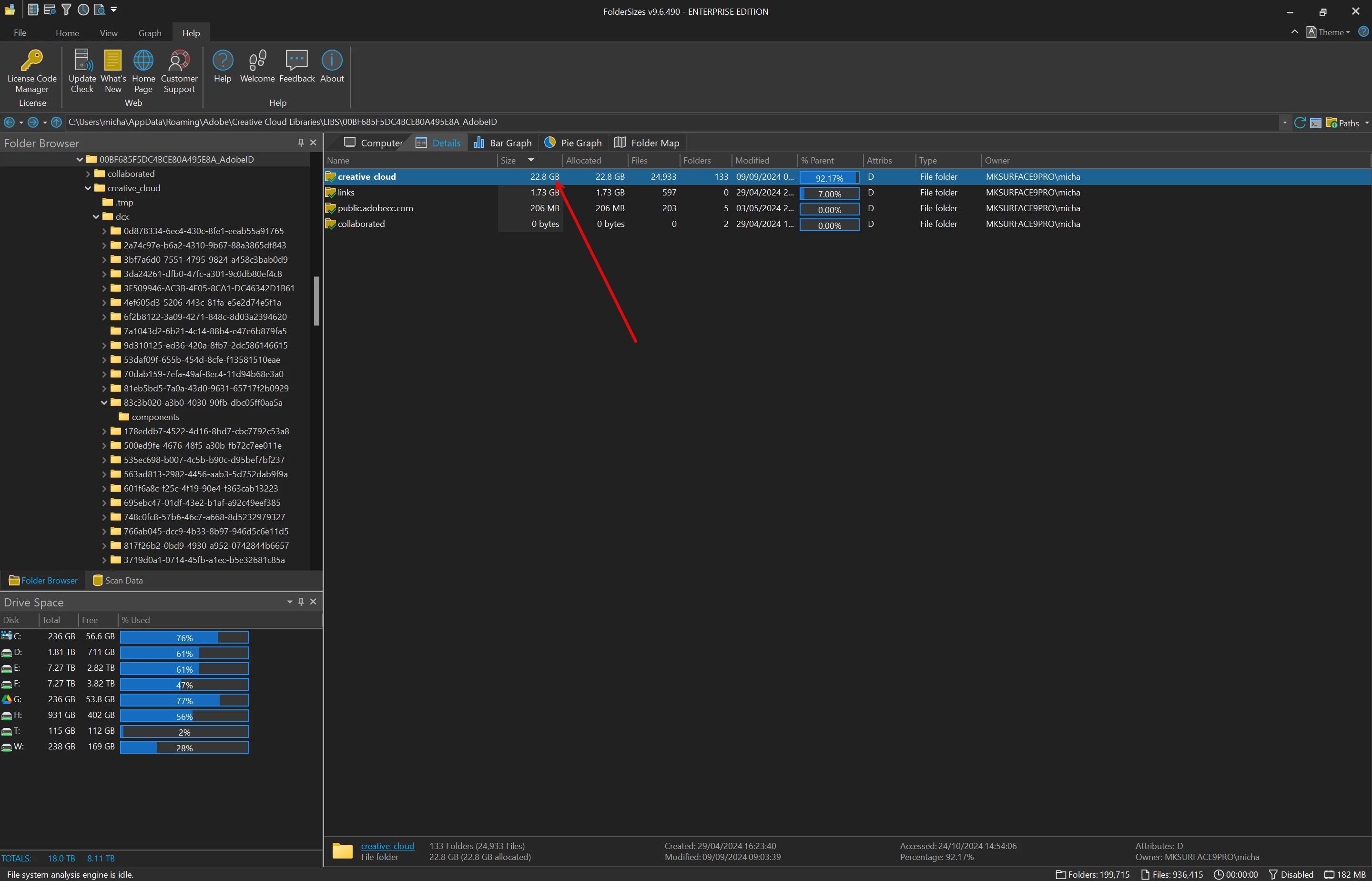
I don't know if this is a bug, but my creative cloud files are set to ONLINE ONLY, yet there's over 20gb of offline files stored locally.

I sometimes use my Microsoft Surface Pro to use my Adobe software, It has limited storage compared to my desktop I need every gigabyte. 20+gigs of offline storage causes major issues, like low disk warnings when using Photoshop because of the file sizes I work with. I am unable to work properly. I know I can upgrage the SSD, but it's not an option right now.


It seems to have happened with the latest 2025 update, as there was no offline files before.


You can see here, that the folders are set to Online Only, every file I have stored in my Creative Cloud Library are set the same way, to ONLINE ONLY.



I don't want to delete the offline files as I don't know if they wiill delete them online too.

Does anyone have a fix? or have the same issue? All my settings are set to be online only, so I don't understand why there's over 20gb of stored files.


Thanks.

Mike.

1 reply

Mass.Illusion
Known Participant
October 25, 2024

After looking into this further, files should no longer be synced. But obviously they are. Since my post earlier, I've had to remove all Adobe products from my Surface 9 Pro as it continued to download files filling up my SSD. I also read this is a common problem, but if it was discontinued, why are they still being downloaded? Cloud storage is just that, in the cloud. It's very silly to copy these to local storage as they are already stored elsewhere offline on my devices. Now we have multiple copies. 


Adobe? 


https://helpx.adobe.com/creative-cloud/kb/eol-creative-cloud-synced-files.html

___________________________________Motion Picture VFX Artist/Graphic Designer.__________________________________Motion Picture VFX Artist/Graphic Designer.
Anshul_Saini
Community Manager
Community Manager
November 5, 2024

Hi Mike,


I understand how frustrating it must be to deal with unexpected offline storage on your Microsoft Surface Pro, especially with limited storage capacity. It sounds like you’ve encountered a significant issue since the 2025 update, and I appreciate how inconvenient this is for your workflow.


Just to clarify, the Creative Cloud Files service reached its end of life on February 1st of this year. This means that files stored in Creative Cloud Files functioned similarly to a network drive, much like Dropbox or Google Drive. Now, all those files are stored on your device, so you can backup or resave them because the Creative Cloud Files service has reached its EOL.


To manage your files moving forward:


1. Check for Cloud Documents: If you save your Photoshop files as Cloud Documents, they will be stored in the cloud instead of locally. You can check which of your files are Cloud Documents using this link: Adobe Cloud Documents. You can delete any local copies from your device once you confirm they’re safely stored in the cloud.

2. Resave Local Files as Cloud Documents: If any files remain that are taking up space, you can open them in Photoshop and resave them as Cloud Documents. This should free up your local storage, allowing you to delete the originals from your local folders.


I realize this might seem like a tedious process, but it is currently the best workaround to resolve the issue of unnecessarily using local storage. Please feel free to reach out if you have any further questions or need assistance with the process. I’m here to help!

Best,

Anshul Saini

Mass.Illusion
Known Participant
November 5, 2024

Hi, 


Thank you for the response. 


Tedious is an understatement. Especially with thousands upon thousands of images, Photoshop/Illustrator/After Effects/Premiere files. You expect myself and other users to go through every file this way? This is a very poor and unacceptable way to manage files. Every single file that's added to my library gets duplicated offline. So, this means there's now 3 copies with 2 taking up space. The original I added to my library, the library file stored online and now the one that's downloaded to the offline Creative Cloud Folder. And more if you count our own personal/business/network backups. Not to mention switching from a personal account to a business account which downloads even more files. 


None of my other cloud providers (I use a lot, depending on clients, so that's OneDrive, Google Drive, Dropbox, Box, and a couple more) store files on my device unless I choose to have that  option. Which I do not. So your explanation of how your cloud service works is not like the other services I use.


I can no longer work on the move/travel. This has halted productivity for me when I go mobile. I have to wait until I get back to my workstation or go home. I think Adobe needs to rethink how they store users files. 


Creative Cloud files are supposed to be just that, in the cloud. We do not need another offline copy of our own files. As a backup, Adobe should have backups in place for users files/all files of our Libraries/Online saved files. 


After much research, I've read over 60 other user complaints from those users using devices like the Surface Pro, iPads, Laptops, and PCs that have limited storage. There's probably thousands more, but after reading as many as I did, I know it's not an isolated problem. 


Adobe are causing problems for users with limited storage devices. This needs to stop. Adobe needs to give the option not to store files locally. It defeats your cloud option. I posted on a legal forum. A few lawyers stated that forcing this option on users may be unethical and could be grounds for legal action due to how Adobe's products can limit productivity by filling up people's storage when you provide an online system to store files offsite. 


I know we can pause the sync, but this is not good enough, especially with multiple devices having the same creative cloud copies downloaded on our ssd's/hard drives/offline storage. If I cannot work on my device on the move, I lose time and money. I cannot work like this when travelling a lot. This is something that Adobe needs to take into account, and fix the way that Creative Cloud stores users files, especially when they are meant to be stored online. 


Mike. 


___________________________________Motion Picture VFX Artist/Graphic Designer.__________________________________Motion Picture VFX Artist/Graphic Designer.