


Participant
March 6, 2025
Answered

Fill/Stroke Flyout Palette Issue

  • March 6, 2025
  • 3 replies
  • 218 views

(Pshop 25.12.1, OS Ventura 13.4.1)


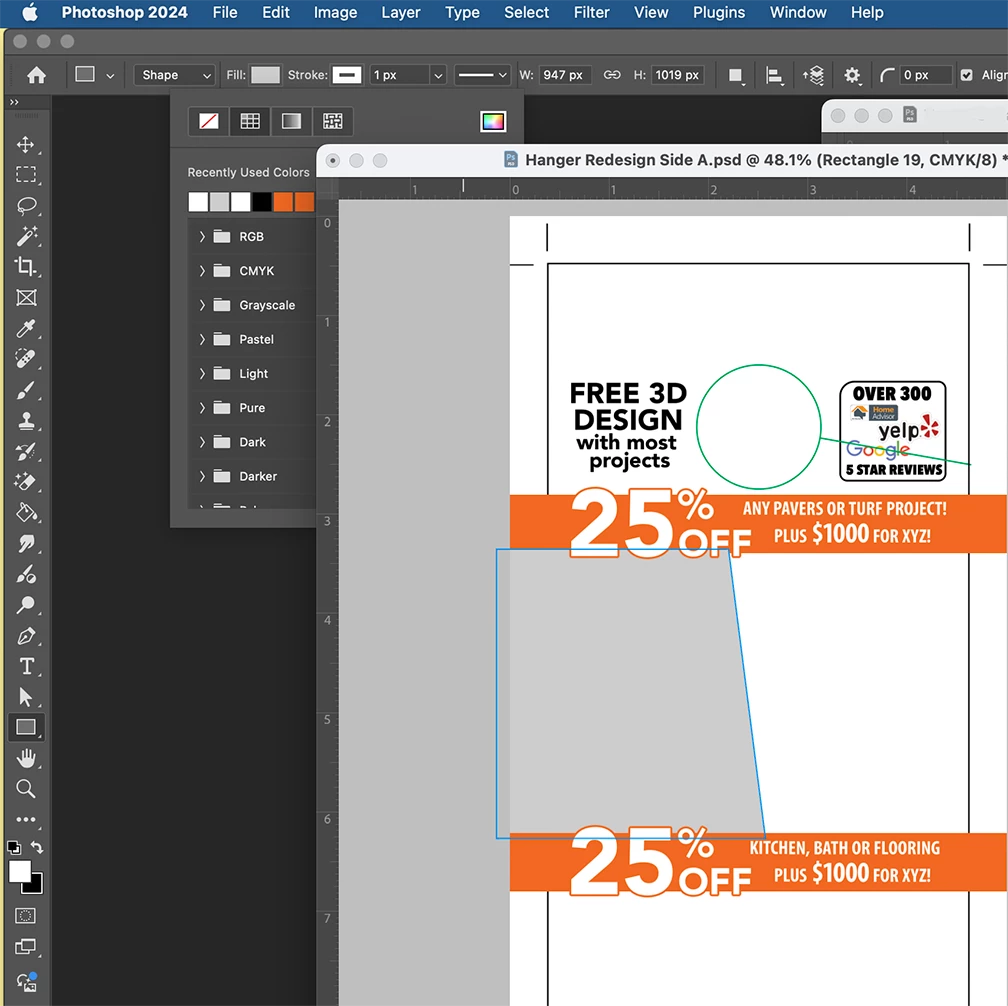
I noticed that the little flyout/pop-up palette for the Fill & Stroke feature accessed at the top of my work window does not open in front of the document I'm working on (see pic). Isn't this wrong? Shouldn't the pop-up palettes always open in front of an open document, so I don't have to move the open document out of the way to access the palette?

 

Correct answer MassC

Hey @shlomi_0348


That doesn't seem to be an issue in Photoshop 26.4.1. Please try updating to the latest version and let me know if it still happens. 


^CM

3 replies

Jeff Arola
Community Expert
Community Expert
March 7, 2025

Seems that was a bug in Photoshop 2024 (ps ver 25.12 and 25.12.1) carried over from the Photoshop Beta version of the same time period as documented in this thread:

https://community.adobe.com/t5/photoshop-ecosystem-bugs/p-ps-v25-12-tool-menu-appear-behind-image-a-problem-coming-from-beta/idi-p/14855013


One way to deal with it is to turn off the Application Frame.

(Window>Application Frame)

Another is to use tabbed document windows


with the Application Frame off


Nancy OShea
Community Expert
Community Expert
March 7, 2025

This is not unique to your version of Photoshop.  It's occurs in other versions as well when your image is floating freely in the ether instead of docked to the application frame.


Try this:  Go to Window > Arrange > Consolidate All to Tabs.  That should fix the problem


Nancy O'Shea— Product User & Community Expert
MassC
MassCCorrect answer
Legend
March 6, 2025

Hey @shlomi_0348


That doesn't seem to be an issue in Photoshop 26.4.1. Please try updating to the latest version and let me know if it still happens. 


^CM

Participant
March 7, 2025
quote

Hey @shlomi_0348


That doesn't seem to be an issue in Photoshop 26.4.1. Please try updating to the latest version and let me know if it still happens. 


^CM


By @CMass

That did the trick. Thank you!!