
Participant
February 2, 2022
Question

Filter > Distort no longer working

  • February 2, 2022
  • 2 replies
  • 2176 views

I have a doc in which I've been using the wave smart filter to create a jagged edge. 


I opened the file again today to continue working on it and the wave filter is greyed out with a warning symbol next to it. (Nothing happens if I click the symbol though) If I turn the filter off then on again, it stays off.
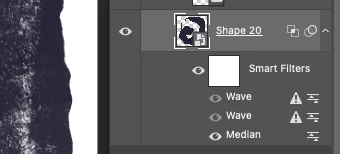
If I go into Filter > Distort, the distort option is greyed out.
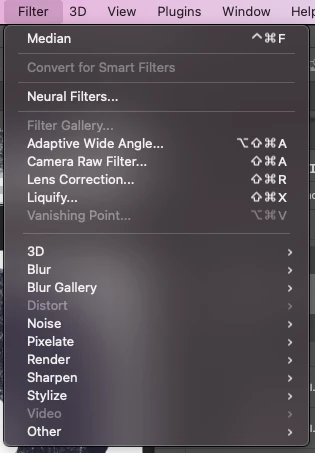
 

What's going on? Nothing has changed in the file. Could it be that my file is too large to handle any more wave distortion? It is 900MB and a psb file, as I need each image to be super high res for my client.


the layers are shape layers converted to smart objects, and the doc is RGB/8bit. Let me know if any further information is needed.

This topic has been closed for replies.

2 replies

anastasiaa67607051
Inspiring
July 31, 2023

I am having the same issue with similar specs to my file. 

Trevor.Dennis
Community Expert
Community Expert
July 31, 2023

It's usually best to start a new thread with issues like this as there have been several updates since then.

Tell us what Photoshop version you are using, plus is it the full release or beta?

What operating system?


Explain exactly what you are seeing, and if you are able, a full res screen shot of your entire workspace with the layers panel visible.

S_Gans
Community Expert
Community Expert
February 3, 2022

Does the Distort filter show up when you're INSIDE the smart object? When you try it on another image? If those answers are "yes", we have to consider that there's some part of the Smart Object reference that's not the way it was.

Curious - I see some texture in your screenshot. I wonder if maybe you had a linked image in your smart object, that your current image can't find??? 

Adobe Community Expert / Adobe Certified Instructor