Inspiring
March 28, 2025
Answered

Filter Gallery Gone!

  • March 28, 2025
  • 3 replies
  • 976 views

Hi All,

It's March 28, 2025.

Just noticed the Filter gallery is gone!

It is displayed under Filters but when clicking on it nothing happens.

Any Suggestions, please

Correct answer Glenn 8675309

of course I had an image open.

But I can't send you screenshot now since I'm at home (where it works) and not at work

where the problem occurs. 


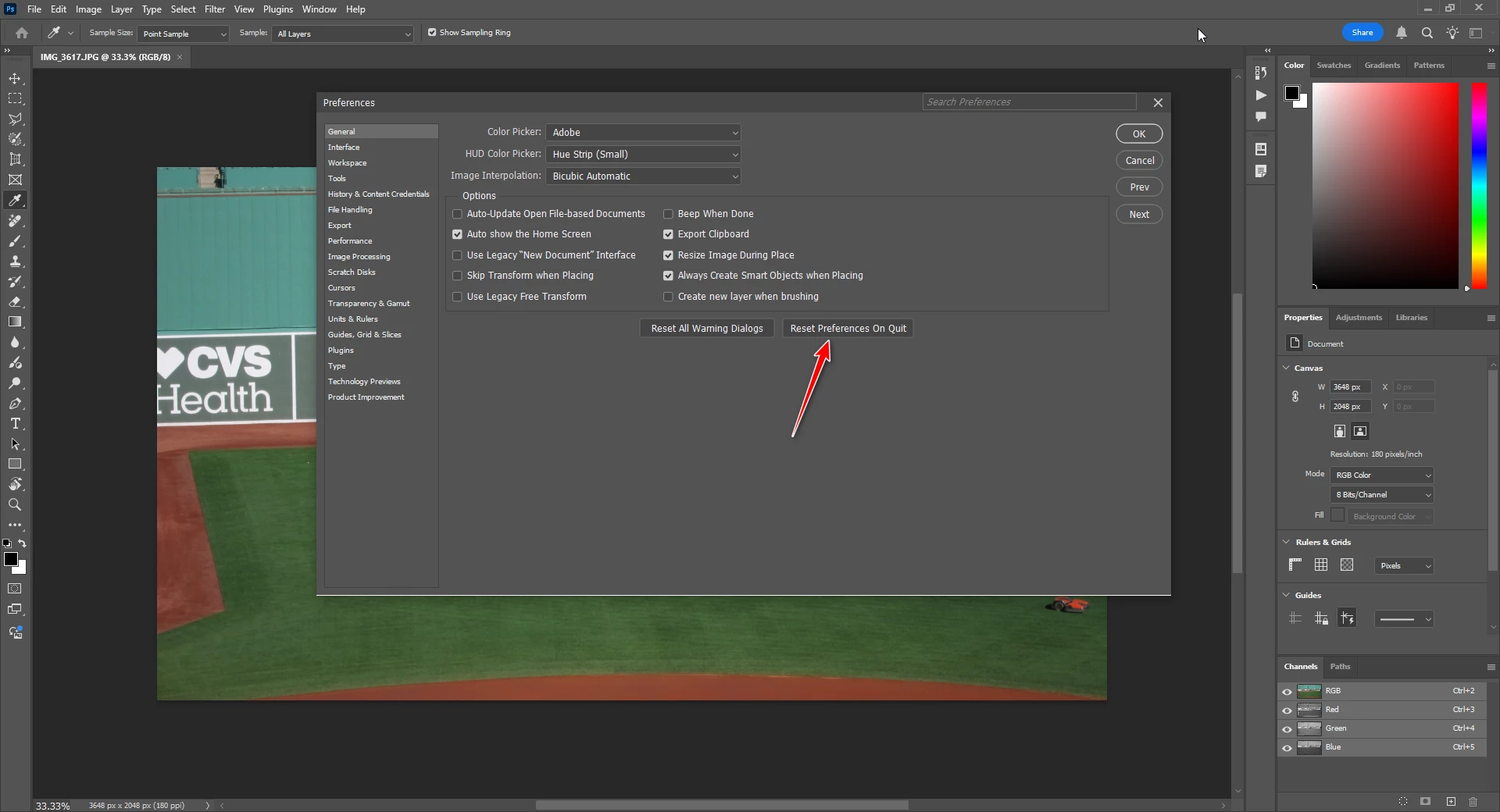
Try what the arrow is pointing to when you get a chance.

3 replies

Rob_Cullen
Community Expert
Community Expert
March 31, 2025

Is your image in Photoshop set to '8 bit' mode?   16bit files will show the Filter gallery greyed out.

I don't know the implications of -   Set to 8bit > Return to 16bit. - whether loss of detail occurs?

Regards. My System: Windows-11, Lightroom-Classic 15.0, Photoshop 27.0, ACR 18.0, Lightroom 9.0, Lr-iOS 10.4.0, Bridge 16.0 .
Klaus5F8DAuthor
Inspiring
March 31, 2025

Hello All,

first - yes, i used 8-bit images, jpgs and PSD.

I reset prefrences and ... everything works!!!

I'm not sure what it was ... a bug, settings or my own stupidity ... 🙂

Anyways,

thanks for your time and I apologize for the inconvenience.


Cheers

Tele55
Inspiring
March 29, 2025

Hi All,

I'll try this here again ... wasn't in PS Ecosystem and don't get rersponse / reply and edit not working


Just noticed  Filter Gallery is missing.

Link/button at the top is there but nothing opens!

Not just a part missing or working incorrectly .. just nothing!

It's PS 26.5 (work / office machine)


Also: I just tried the same here at home on another machine / same PS version ...

all works fine...???!!!

Both machines have the same Preferences.


Help Please.


Thansk

Glenn 8675309
Legend
March 29, 2025

You gotta have  an image open, then the filter galleries will work. 

Post a screenshot of when your problem happens. 

Screenshots help decribe an issue as well- show the entire program just not part of the screen when having a problem.
Try not to use your phone while making a screenshot- they often are blurry and do not show what the issue is

Tele55
Inspiring
March 29, 2025

of course I had an image open.

But I can't send you screenshot now since I'm at home (where it works) and not at work

where the problem occurs. 

kglad
Community Expert
Community Expert
March 28, 2025

what app?

Tele55
Inspiring
March 29, 2025

Sorry .. Photoshop 26.5.

Also: I just checked on my other machine at home (also just updated to 26.5) ... Filter Gallery opens as usual!

kglad
Community Expert
Community Expert
March 29, 2025

in the future, to find the best place to post your message, use the list here, https://community.adobe.com/

p.s. i don't think the adobe website, and forums in particular, are easy to navigate, so don't spend a lot of time searching that forum list. do your best and we'll move the post (like this one has already been moved) if it helps you get responses.


<"moved from cc desktop">