
damiano.f
Known Participant
October 13, 2026
Question

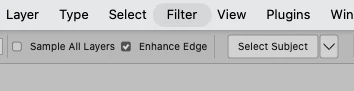
Filter menu greyed out randomly

At the top bar of Photoshop 27.11.0 randomly I get the “Filter” menu greyed out and I cannot click on it.

if I quit and reopen the app everything works and the glitch will only happen after some minutes of use.

 Photoshop version: 27.11.0 20260929.r.26 8c16e56  arm64 (final, Release)

Operating System: 27.0.1 (26A434)
 

    1 reply

    Anshul_Saini
    Community Manager
    Community Manager
    October 13, 2026

    Hi @damiano.f,

    Thanks for reporting this. Since quitting and reopening Photoshop temporarily restores the Filter menu, I’d like to narrow down what is leaving the menu in a disabled state.

    When it happens again, before restarting Photoshop, could you please try:

    • Press Esc once or twice, then click directly on the canvas and check the Filter menu again.

    • Switch to another tool, such as the Move tool (V), and check whether the menu becomes available.

    • Go to Photoshop > Settings > Technology Previews, disable Enable Modern User Interface, restart Photoshop, and let me know whether the issue still occurs during your normal workflow.

    Please also note what you were doing immediately before the Filter menu became disabled, for example, switching to another application, closing a document, using the Contextual Task Bar, typing in a panel/input field, or working from the Adjustments/Properties panels.

    If possible, please share a short screen recording when it occurs, and then go to Help > System Info > Copy & paste its content here. Since the problem develops after a few minutes, the actions immediately before it happens will be particularly useful for reproducing it.

    Best,
    Anshul Saini

    Translate