


Participant
August 24, 2026
Question

Firefly Image 5 / Generative Fill frequently fails in Photoshop 27.9.1

  • August 24, 2026
  • 16 replies
  • 281 views

Hello,

I am experiencing a serious and ongoing problem with Firefly Image 5 and Generative Fill in Photoshop.

I am using Photoshop version 27.9.1 on Windows 11.

The problem started on Friday, August 21, 2026. Before that, Firefly Image 5 worked normally for me.

Since then, generation in Photoshop has become very unstable. Sometimes it generates successfully once or a few times, but then it suddenly stops working.

I receive errors such as:

  • “Delays due to high demand. Please try again later.”

  • “There is no connection to the server. Please check your internet connection.”

My internet connection is stable, and other online services work normally.

Today, August 24, I started using Generative Fill at approximately 9:00 AM. The first three generations worked normally, but immediately after that the same problem returned. Further generations started failing with the “high demand” message and sometimes server connection errors.

The problem is not related to one specific Photoshop document. I also tested it by creating a completely new empty document and trying to generate content there.

For example:

  1. I create a new document.

  2. I select a layer or area.

  3. I choose Firefly Image 5.

  4. I enter a prompt.

  5. I click Generate.

Sometimes it works, but very often it fails with the errors mentioned above.

This is seriously affecting my work because I specifically need Firefly Image 5 and Generative Fill inside Photoshop for editing photos. I use it to select parts of an image and replace clothing, add objects, remove objects, or modify specific areas while keeping the rest of the image unchanged.

The Firefly web version is not a suitable replacement for this workflow because I need the direct Generative Fill integration inside Photoshop.

I have attached a screenshot showing the error.

Could you please investigate whether there is currently a problem with Firefly Image 5 or Generative Fill servers, or an issue affecting Photoshop 27.9.1?

This problem has been occurring intermittently since August 21 and makes the feature unreliable for normal work.

Thank you.
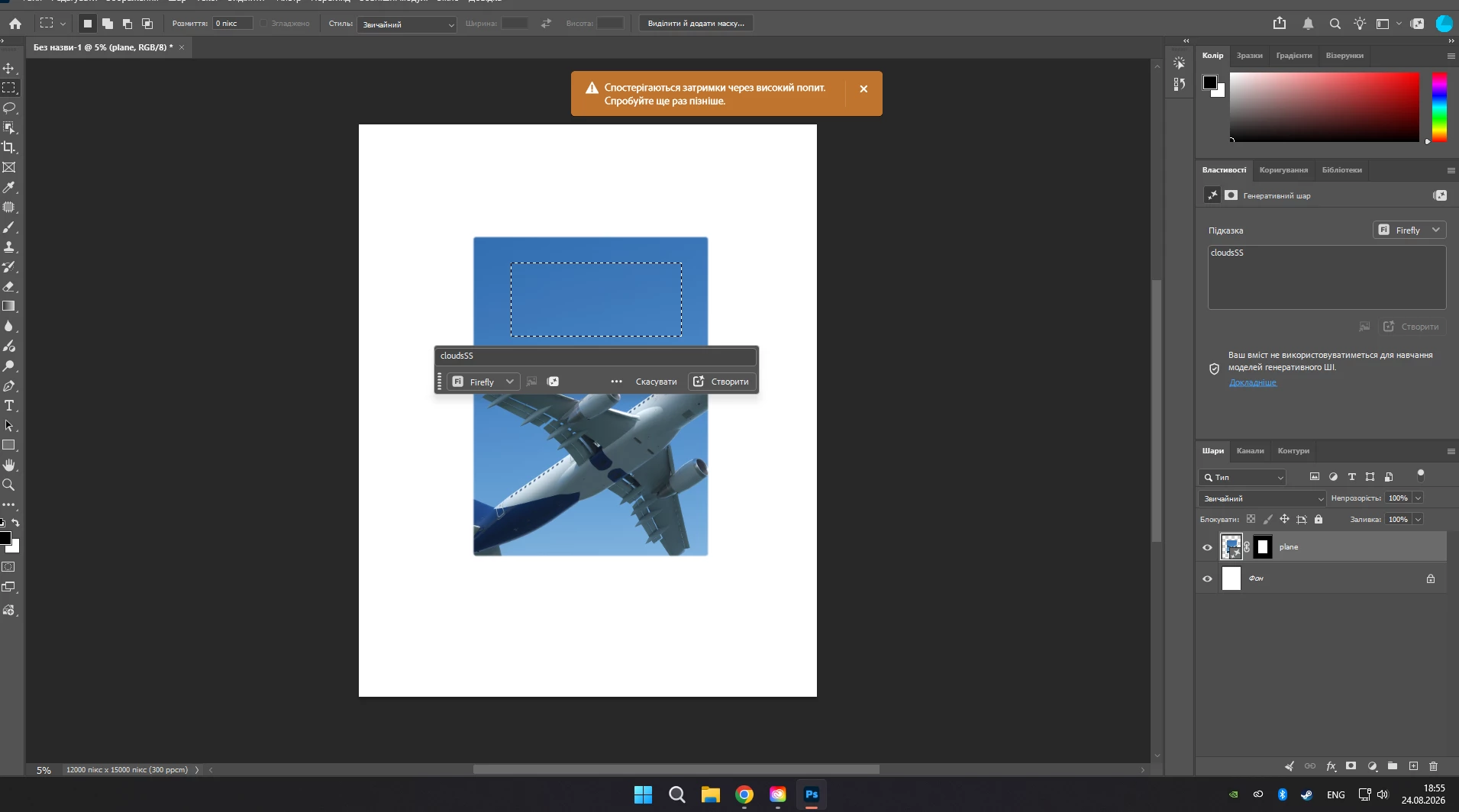
 

    16 replies

    Trebosia LLC
    Participant
    September 18, 2026

    it’s seriously bad. Tried 15 times to give up. Why are we paying for Firefly 5? It used to be so good!!!!

    Sameer K
    Community Manager
    Community Manager
    September 18, 2026

    Hey, @Trebosia LLC. Please check Anshul's response in this thread (highlighted) and provide the info as requested.


    Thanks!
    Sameer K
    (Type '@' and type my name to mention me when you reply)

    Trebosia LLC
    Participant
    September 18, 2026

    Thank you, Sameer! My issue now is not the “Delays due to high demand. Please try again later.” The issue are the results that Firefly 5 is having for this past month. Nothing matches my prompt, it has gone rogue. I’ve been reporting bad results but also tired to waste my credits.

    Trebosia LLC
    Participant
    September 18, 2026

    YES! the results are soooooo bad. Why are we paying for this :(

    Participant
    September 10, 2026

    So even firefly 5 model is broken in the latest version? Interesting. Adobe messed up so much this time. The whole AI is now crap. Fill and expand is blurry AF even when people claiming it can generate up to 2k. And firefly 1 which is old but superior to fill and expand is now broken totally. *Clap Adobe

    Participant
    September 10, 2026

    The same here, I used to get ok results with the previous version. Now the latest version gives far more worse results as when AI fill was introduced first time! I really don't understand, why are we still being charged for this feature if Adobe can't even deliver good results and its still under development 🤔😒

    Participant
    September 4, 2026

    Same here. Firefly 5 and Fill and expand has never worked for me. Only Firefly 1 works. I have the latest version of PS and Windows 11. Also, thhe new AI editors only uses credits and gives no results. Please efix this. 
     

    Srishti Bali
    Community Manager
    Community Manager
    September 3, 2026

    Hi ​@EYEImagery 


    Apologies for the inconvenience caused. You can back up your Photoshop preferences, presets, and actions using the guidance in the following articles:

    https://helpx.adobe.com/photoshop/desktop/get-started/settings-and-preferences/backup-and-restore-preferences.html

    https://helpx.adobe.com/photoshop/using/preset-migration.html

    Once you have backed everything up, you can roll back to Photoshop version 27.9.1 and check whether that gives you better results.

    I would also appreciate it if you could share a few screenshots comparing the results from the different versions, using the same image and the same prompt. This will help me better understand the quality degradation you mentioned and share your findings with our product teams for further review.

    Please note that Generative AI may not produce identical results each time, even when using the same image, prompt, and Photoshop version.

    However, the comparison will still be helpful in determining whether there is a noticeable difference in the overall quality of the generated results between versions.

    Thanks, Srishti Bali | Community & Engagement Strategist, Digital Imaging | Adobe
    Participant
    September 2, 2026

    My issues is that it’s not generating anything, and using up my credits.  I get the exact same picture.  This is super frustrating.


    Participant
    September 2, 2026


    this is the result of using old “ Firefly Fill & Expand 2023”
    I asked for extend landascape without signs, labels, people… 
    what’s goin’ on?

    Trevor.Dennis
    Community Expert
    Community Expert
    September 1, 2026

    The models are context sensitive depending on the active tool and any selections.  It can definitely be frustrating because of how quickly the AI tools are evolving, and there is a definite learning curve.  I’m a heavy user and I still have issues keeping up with things. :-(  I’ve attached a couple of guides (one Mac and the other Windows) to using the different models.  I _hope_ they are still relevant.


    Participant
    September 1, 2026

    I would regularly use Firefly 5 to add elements to my images. But now that I’ve updated Photoshop to v27.10, the results that Firefly 5 produces are unuseable. I would like to revert to the previous version of Photoshop, but I’m wondering if I’ll lose all of my settings if I do that.