
Participating Frequently
October 20, 2020
Answered

Fixed: Photoshop 22.0 neural filter style transfer not available

  • October 20, 2020
  • 42 replies
  • 124389 views

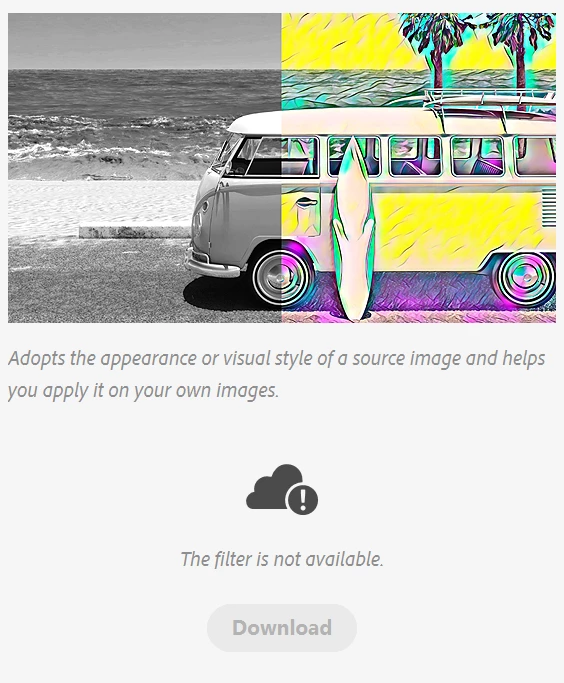
I am pumped for the style transfer feature in photoshop 2021, but it is the only neural filter that wont work. The download button is unclickable and greyed out and it says the filter is not available.
{Moderator Note: Edited thread title, LFP-1846, PS-57169}

Correct answer Corvette1968

Finally I could install these filters... First I had to set the temporary path (TEMP and TMP) to c:\windows\temp. Second I had to run PS as administrator. Then the download worked.


Then I started PS without admin-rights and the filters were not installed... So I had to change the rights for all of the directories in folder c:\users\....\Appdata\Roaming\Adobe\UXP\PluginsStorage\PHSP\22\Internal\com.adobe.nfp.gallery\ that I am authorised to access it.


Afterwords the filters worked!! *halleluja*

42 replies

Participant
October 22, 2020

This is a crosspost, but I wanted to share how I was finally able to solve this mysterious problem by modifying the advanced permissions for the Temp Adobe folder


  • disable inheritence
  • disable "delete" permissions for all accounts

After that I just clicked to download the filters and the temp folder filled up with tar files and folders.  Then I dragged the folders to their corresponding location in the AppData/Roaming folder and it works like a charm.  I saved the TAR files just in case.

richardondrovic
Inspiring
October 22, 2020

Brilliant, Megan,


How on earth did you ever find this? Fixed the problem for me, thank you SO much!


davids93793101
Participant
October 22, 2020

I was having this problem and restarted multiple times, deleted the cache folder etc with no luck.

What finally worked for me was going to the "Help" menu in Photoshop and picking "Manage My Account". This took me to the Adobe website where I had to accept some new terms & conditions, then login again. After that I was able to download the filters.

Hope that helps someone.

Ed589
Participant
October 21, 2020

Still trying to get the new neural filters. Updated Photoshop to 22.0.0. When Neural Filters comes up with a regular 8 bit image, the only filters I see are Skin Smoothing and Style Transfer. There is no option to do anything else. How do I get the filters? Second question, why is this so effed up?

Sahil.Chawla
Adobe Employee
Adobe Employee
October 21, 2020

Hi there,

We're sorry for the "The filter is not available" error. You should try restarting Photoshop multiple times and it should show you the neural filters. Actually, a lot of users trying to download the neural filters on the launch day at the same time and that caused the error message. We have fixed this issue from the backend.

Regards,
Sahil

Participating Frequently
October 21, 2020

Somehow fixing your backend does not fix my frontend!

abrambailey
Participant
October 21, 2020

For me v 22.0 installed as a second install when I did the update. So under all apps in adobe cc I could see v 21.2.4 and 22, so something weird happened, and I was actually in the older version of the software. I have uninstalled the old one and everything is fine in 22.

davescm
Community Expert
Community Expert
October 21, 2020

"........so something weird happened,........"


You are given the choice when updating from the CC desktop app to keep or delete old versions

Dave

Participating Frequently
October 21, 2020

I have restarted PS 2021 4 times and neural filter style transfer stiill is not available for download

Participating Frequently
October 21, 2020

I just tried to uninstall Photoshop, then reinstall Photoshop. Still cannot download Neural Filters! Sorry, this does not work.

Mohit Goyal
Community Manager
Community Manager
October 21, 2020

Hi all,


We're sorry for the "The filter is not available" error. You should try restarting Photoshop multiple times and it should show you the neural filters. Actually, a lot of users trying to download the neural filters on the launch day at the same time and that caused the error message. We have fixed this issue from the backend.


Thanks,

Mohit

Participant
October 21, 2020

hi 

my photoshop is up to date but i can't find neural filters...did someone have the same problem?

Best 🙂 

jane-e
Community Expert
Community Expert
October 21, 2020

Hi

Instead of "up to date", can you give us the exact version?

Mac: Photoshop > About

Win: Help > About

They are only in Photoshop 22 (2021), and you may have an older version open.

~ Jane

Participating Frequently
October 21, 2020

I also was not able to download the Neural Filters after Photoshop 22.0.0 update. Everytime I clicked on the cloud, it wold just stop and go back to a blue Download button. What gives?

Inspiring
October 21, 2020

My download button is just grayed out. There is definitely something wrong with these neural filters. Cannot even download them at all.

ndowAuthor
Participating Frequently
October 20, 2020

When I restarted for a third time, it worked.

Participant
October 20, 2020

Hey there,


Just watched the 2020 Adobe Max intro session on Neural Filters in Photoshop.

I just downloaded my most recent CC version of Photoshop on my Macbook Pro.

Neural Filters are not showing up upon opening Photoshop (also restarted and still don't show).

Can't find anywhere that tells me how to download, install, or just make them show up for me... please advise.


Thank you!

Participating Frequently
October 20, 2020

To clarify, can you not find the dialog or can't download the ones that need downloading? To find them

Then you'll see

Unfortuantely for me, many need to be downloaded and neither the cloud icon nor the 'download' button cause that to happen like it says it should here Neural Filters

PECourtejoie
Community Expert
Community Expert
October 20, 2020
davescm
Community Expert
Community Expert
October 20, 2020

Interesting that the path in the help article is not where the models were located on my PC.


C:\Users\<user>\AppData\Local\UXP\ PluginsStorage\PHSP\22\Internal\com.adobe.nfp.gallery\PluginData


my PC:


C: Users >user > AppData > Roaming >Adobe >UXP >PluginsStorage > PHSP >22 >Internal > com.adobe.nfp.gallery > Plugin Data


Dave


PECourtejoie
Community Expert
Community Expert
March 17, 2021

Hi, @davescm , did you report it to an official channel?