
Participant
Aug 19, 2020 7:01 AM UTC
Answered

Fixed: Photoshop creating a debug.log file when you open a PSD File

I just updated my photoshop to the latest version, 21.2.2.289, and I noticed that everytime I open a PSD file. Photoshop creates a debug.log file in the same folder as the PSD file. How do I turn this off?
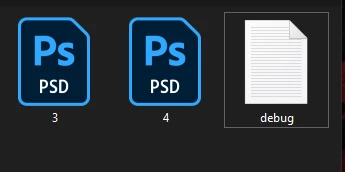
[Moderator note: PS-55193]

This topic is closed to new replies. Start a new post to keep the conversation going.
Pete.Green
Pete.GreenCorrect answer
Sep 29, 2020 4:28 AM UTC

Good news! Tonight's 21.2.4 update should fix the issue with new debug.log file creation. 
Look for the Photoshop update in the Updates section of the Creative Cloud desktop. For help, see Update Creative Cloud apps

Let us know if the update fixes it for you as well!

Regards,

Pete

104 replies

Participant
Aug 22, 2020 4:41 PM UTC

I have the same problem! 


[0822/183321.866angle_platform_impl.cc(52)] compileToBinary(230):
C:\fakepath(57,8-58): warning X3571: pow(f, e) will not work for negative f, use abs(f) or conditionally handle negative values if you expect them
C:\fakepath(65,8-28): warning X3571: pow(f, e) will not work for negative f, use abs(f) or conditionally handle negative values if you expect them

Translate
ampl43110085
Participating Frequently
Aug 22, 2020 1:15 PM UTC

Same here!

"[0821/191223.026:WARNING:angle_platform_impl.cc(52)] compileToBinary(230):
C:\fakepath(57,8-58): warning X3571: pow(f, e) will not work for negative f, use abs(f) or conditionally handle negative values if you expect them
C:\fakepath(65,8-27): warning X3571: pow(f, e) will not work for negative f, use abs(f) or conditionally handle negative values if you expect them

Translate
Odairjki
Participating Frequently
Aug 21, 2020 6:22 PM UTC

Adobe caught Microsoft's illness. It is amazing how many bugs and fixes are released. Each update fixes an error and creates another one. In fact, Adobe has not been the same for a long time. I think there is a lack of competition. I miss Photoshop 7 that just worked.

Translate
PacoD
Known Participant
Aug 21, 2020 1:48 PM UTC

Today is August 21 2020.
I'm experiencing the same issue, and have been for a few days now. I keep getting alerts from my cloud storage service about "unresolved issue; unable to sync" regarding this debug log file that is (automatically) created everytime I launch PsCC (version 21.2.2 20200807.r.289 2020/08/07: 287d0d87ec x64), and placed in the same folder of whatever Ps file I open...

What gives?
The debug file in question is devoid of content.


Translate
Андрей Шубин
Participant
Aug 21, 2020 1:14 PM UTC

It's strange, but Photoshop stopped creating the debug file when I installed the previous version of the program. Photoshop 20.0.10

Translate
Aug 21, 2020 11:37 AM UTC

Maybe it's worth reporting it as a bug on the Adobe Feedback Forum and add a link to this thread

Translate
Participant
Aug 21, 2020 11:28 AM UTC

Since most recent update August 2020 a debug.log appears in the location of the first PSD opened - on the desktop or in a folder.   I'm using Win 10 64 and its Photoshop version  21.2.2 20200807.r.289 2020/08/07: 287d0d87ec x64.  Shouldn't debug files be located in a Photoshop system folder?  

Translate
Adobel
Participant
Aug 21, 2020 8:49 AM UTC

Here as well.

Similar bug as a few months ago with Acrobat..

Translate
stevent76891219
Participating Frequently
Aug 21, 2020 12:00 AM UTC

My PS started doing the same after the latest update. It doesn't seem to cause any problems, but it may be indicative of a problem with the update. Sometimes the log is empty, sometimes not.

Translate
Андрей Шубин
Participant
Aug 20, 2020 9:08 PM UTC

Same here! But the file is empty.

Translate
andrewl84241848
Participant
Aug 20, 2020 9:23 PM UTC

Count me in. Mine is empty as well.

Translate