
Participant
April 9, 2023
Answered

flickering blank screen

  • April 9, 2023
  • 2 replies
  • 743 views

When I open any file or create a new one, automatically the entire working area turns white and blinks, strobe. I have disabled the video card but it has not worked. I have the version updated to 24.3.0. and windows11.
This topic has been closed for replies.
Correct answer Ged_Traynor

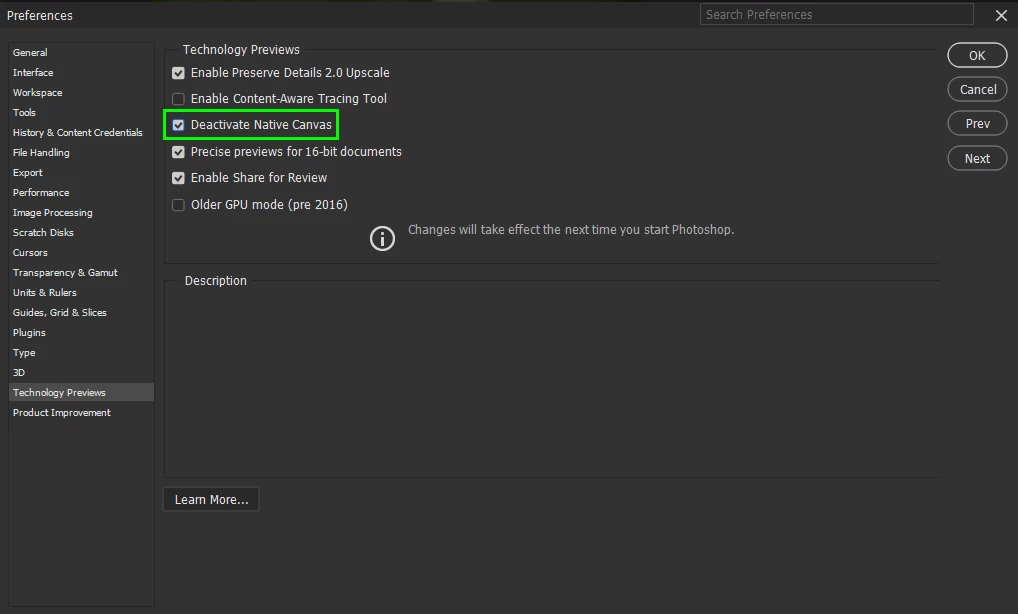
@Ángel5CAE go to Edit > Preferences > Technology Previews and enable this option, then restart Photoshop

There's no need to do what @Ahmed29317872gp3a suggest

2 replies

NB, colourmanagement
Community Expert
Community Expert
April 9, 2023

In case @Ged_Traynor s tip doesn't help here is some more info on such issues:

Adobe writing on GPU (video card) issues.

Here are some suggestions from Adobe for GPU issues.

First check the system requirements: https://helpx.adobe.com/photoshop/system-requirements.html

next:

https://helpx.adobe.com/photoshop/kb/troubleshoot-gpu-graphics-card.html

https://helpx.adobe.com/photoshop/kb/photoshop-cc-gpu-card-faq.html

Also:

Does turning on »Deactivate Native Canvas« (Photoshop > Preferences > Technology Previews)

and restarting Photoshop have any bearing on the issue?


And sometimes this helps:

Go to Preferences > Performance..., uncheck Multithreaded Compositing, and restart Photoshop.


Also try this:

Check your hardware acceleration settings and in particular turn off the Native Canvas.

Do that in Preferences>Technology Previews:

check the tickbox for 'Deactivate Native Canvas' and uncheck 'Enable Native Canvas ', then restart Photoshop


Next step would be to go to Preferences > Technology Previews... and enable "Older GPU mode (pre 2016)", then restart Photoshop

Next step would be to disable the GPU in Photoshop preferences, then restart Photoshop


Also consider updating your graphics driver


I hope this helps
neil barstow, colourmanagement net - adobe forum volunteer - co-author: 'getting colour right'
google me "neil barstow colourmanagement" for lots of free articles on colour management

Ged_Traynor
Community Expert
Community Expert
April 9, 2023

@NB, colourmanagement this issue has been well documented on the forum hundreds if not thousands of times since the release of version 24.3, the fix for people with older GPU's is to simply enable Deactivate Native Canvas as I mentioned in my post below!

Ged_Traynor
Community Expert
Ged_TraynorCommunity ExpertCorrect answer
Community Expert
April 9, 2023

@Ángel5CAE go to Edit > Preferences > Technology Previews and enable this option, then restart Photoshop

There's no need to do what @Ahmed29317872gp3a suggest