


floating jpeg & png
Dear Adobe Photoshop Product Team,
I am writing as a dedicated user and professional who utilizes Adobe Photoshop daily. My suggestion is aimed at significantly improving the efficiency and reducing friction for a core user activity: saving and exporting images for web and general use.
The current process of navigating to File > Export > Export As... or File > Save a Copy and then selecting JPEG or PNG from a lengthy dropdown list is repetitive and time-consuming. Given that JPEG and PNG are, by far, the most frequently used output formats for daily tasks, this multi-step process is a constant source of user frustration.
Proposed Solution: Floating Export Buttons
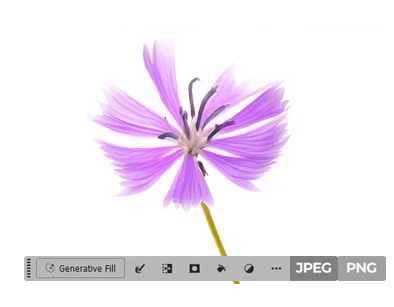
I propose adding two dedicated, one-click export buttons—one for JPEG and one for PNG—to a floating, contextual toolbar, similar to the one that appears for the Generative Fill feature.
As illustrated in the attached concept image, these buttons would offer the following advantages:
-
Immediate Access: They would be permanently visible or appear contextually when an image is ready for export, cutting the current save process down from three or more clicks to one.
-
Increased Efficiency: For users who save dozens of files daily, this small change translates into minutes of time saved per day, dramatically improving overall workflow.
-
Modern Workflow: It aligns with the modern trend of streamlined, accessible tools for common operations, reinforcing Photoshop’s position as the industry leader in efficiency.
These buttons would ideally trigger the standard "Export As" dialog but pre-select the appropriate format, allowing the user to quickly adjust quality settings, size, and metadata before final save.
This quality-of-life improvement would be greatly appreciated by the vast majority of your user base who regularly require quick, high-quality JPEG and PNG outputs.
Thank you for considering this request to enhance the daily productivity of the creative community.
Sincerely,
A Dedicated Adobe User
 AdChoices