
leeingrove
Known Participant
January 2, 2025
Answered

Floating Text Properties Bar in Photoshop 2025

  • January 2, 2025
  • 3 replies
  • 395 views

Hi I've only recently made the big jump from Photoshop 7 to the latest 2025 and as I have a 1000 questions one I would dearly love answered over everything else. You get a floating text properties bar. which I would like to know how to place it in one position and have it static as opposed to the floating properties bar following you around. 

Hope that makes sense  Thanks
Correct answer John Waller


3 replies

John Waller
Community Expert
John WallerCommunity ExpertCorrect answer
Community Expert
January 2, 2025


Kenneth Kawamoto
Community Expert
Community Expert
January 2, 2025

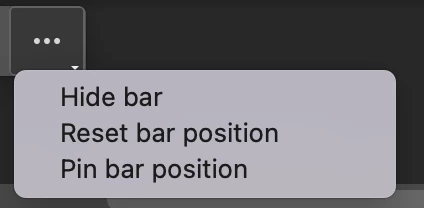
Try placing it to where you want, then meatballs > Pin bar position

kglad
Community Expert
Community Expert
January 2, 2025

in the future, to find the best place to post your message, use the list here, https://community.adobe.com/

p.s. i don't think the adobe website, and forums in particular, are easy to navigate, so don't spend a lot of time searching that forum list. do your best and we'll move the post (like this one has already been moved) if it helps you get responses.


<"moved from cc desktop">