
Inspiring
November 26, 2017
Answered

Folder Dropdown for Saving Edited File outside Current Path

  • November 26, 2017
  • 1 reply
  • 226 views

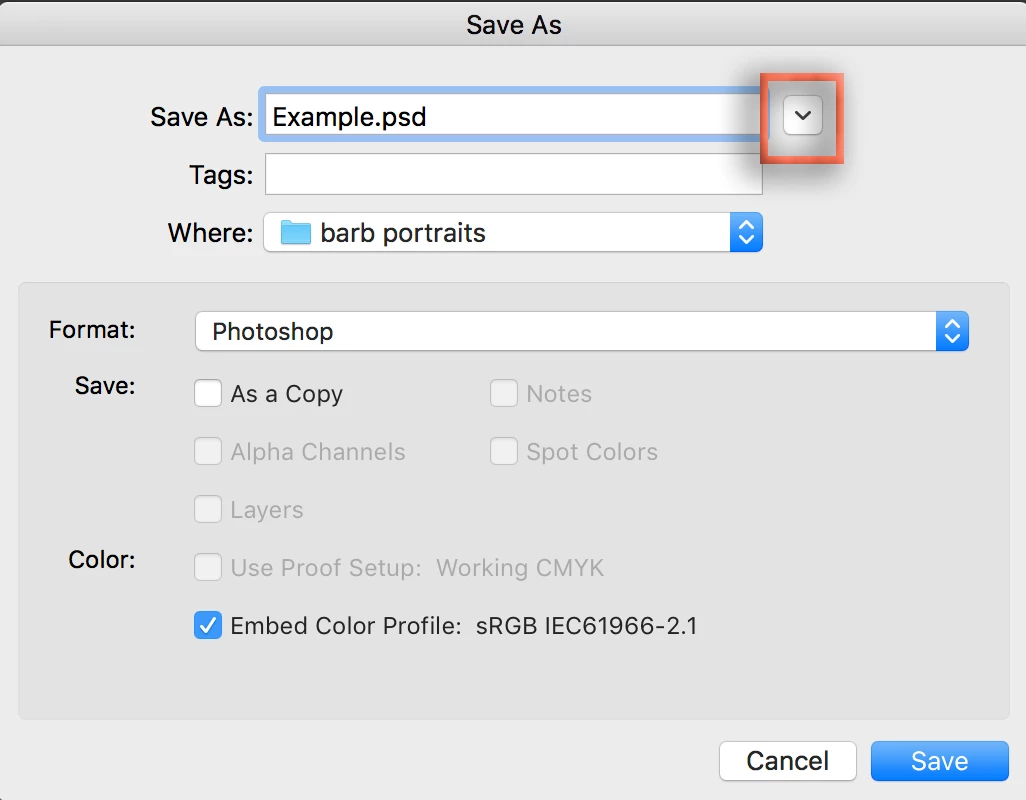
When I go to save an edited image to a location different from where the image was edited, the prompt goes only to the top-level folder of the selected drive. Would  one of you please show me how to dig deeper into the folder tree [if possible], in order to navigate to the desired location to save the altered file. I cannot imagine that Adobe does not offer this option, but if in fact it does not exist, I would urge Adobe to place it high on the queue for the next update.

Best,

jwc
    This topic has been closed for replies.
    Correct answer Barb Binder

    This is an operating system question. We can help, but we need to know if you are on Mac or Windows.

    My wild guess is that you are on a Mac and need to click the triangle to the right of the file name to see the folder navigation area.

    1 reply

    Barb Binder
    Community Expert
    Barb BinderCommunity ExpertCorrect answer
    Community Expert
    November 26, 2017

    This is an operating system question. We can help, but we need to know if you are on Mac or Windows.

    My wild guess is that you are on a Mac and need to click the triangle to the right of the file name to see the folder navigation area.

    ~Barb at Rocky Mountain Training