georgg22927561
Known Participant
October 25, 2018
Answered

frame tool is missing, no frame tool + no key "K"

  • October 25, 2018
  • 5 replies
  • 8507 views

there is no frame-tool (Rahmen-Werkzeug)  in my tool palette since update CC 2019 (20.0)

the key "K" doesn´t also work to launch the tool...

MacOs 10.13.6 High Sierra

Does anybody know why and how to solve the problem ?

regards

This topic has been closed for replies.
Correct answer gener7

This is unusual. I'm running 20.0 under 10.13.6 on a mid 2012 Macbook Pro. So far no bug like that on my side.

Here are a few suggestions to try:

Under the OK button is the Cancel (Abbrachen) button. Hold down your Option/Alt key and it will change to Reset. Click on Reset and see if the Error goes away.

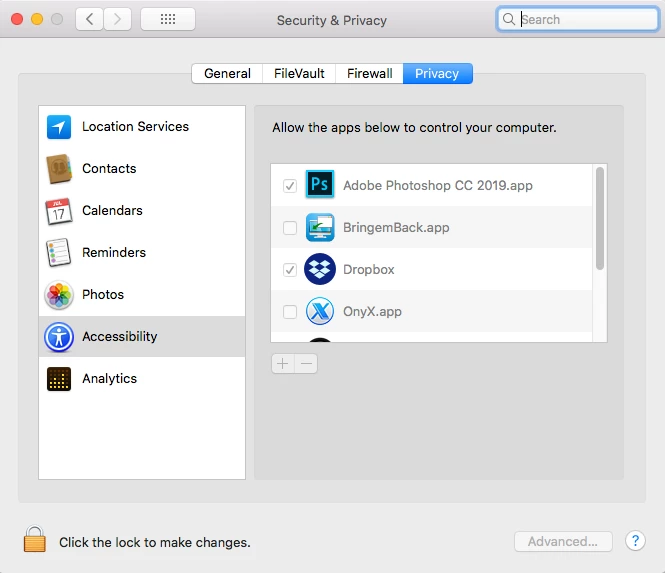
Be sure to assign Photoshop CC 2019 to Apple's accessibility dialog located in Apple System Preferences. Restart your Mac.

Let me know if that helps.

5 replies

georgg22927561
Known Participant
October 26, 2018

Thank you, gener7

that had helped

gener7
Community Expert
Community Expert
October 26, 2018

That's very good news, Georg. I hope there are no further problems. If there are, we will see what we can do.

Gene

georgg22927561
Known Participant
October 25, 2018

enjoy your meal, thank you so far, we have nearly midnight in Germany, closing time.

Unchecking the box and then save the default will bring this bug to appear

gener7
Community Expert
gener7Community ExpertCorrect answer
Community Expert
October 26, 2018

This is unusual. I'm running 20.0 under 10.13.6 on a mid 2012 Macbook Pro. So far no bug like that on my side.

Here are a few suggestions to try:

Under the OK button is the Cancel (Abbrachen) button. Hold down your Option/Alt key and it will change to Reset. Click on Reset and see if the Error goes away.

Be sure to assign Photoshop CC 2019 to Apple's accessibility dialog located in Apple System Preferences. Restart your Mac.

Let me know if that helps.

georgg22927561
Known Participant
October 25, 2018

Tank you very much, Gene

Now I found it, its in the german Version Menu Edit (Bearbeiten) ...Symbolleiste.

unfortunately it wont work correctly, we see this dialog, which means, that the app has a bug...

gener7
Community Expert
Community Expert
October 25, 2018

I'm out getting some food, but I'll get back to you as soon as I can. In the meantime see if unchecking the box helps.

georgg22927561
Known Participant
October 25, 2018

Hi gener7,

seems to look in an other way in the german version...

i´ve tried to activate the frame tool, bit it wont´t appear in the toolbar

gener7
Community Expert
Community Expert
October 25, 2018

You selected Edit > Keyboard Shortcuts, you need to select Edit > Toolbar, which is further down on the Edit menu in order to add the frame tool to the Toolbar.

Also if the Tool is hidden, the Shortcut is disabled, which is why K won't work, if you look at the bottom of  the "Customize Toolbar" dialog. I don't know what that is in German, but I hope you find it.

Gene

gener7
Community Expert
Community Expert
October 25, 2018

Try Edit > Toolbar... then when the dialog comes up, click on the Restore Defaults button.