
Frames not lining up exactly with playhead in Timeline
Really bizarre issue! and very specific to animation...
I've started a new animation project in which I composit my frames in photoshop's timeline, I've done this loads of times before and never had issue. But for some reason this time when I cut my images down to 2 frames long, they are seemingly cut to ever so slightly longer, like a fraction of a frame longer than 2 frames, so after a few seconds my images are completely out of sync with the actual timeline and I'm getting frames either not showing up or playing for too long.
Here's a screenshot of what I mean, see how the start of the frame is nowhere near the playhead when by all means it should be right on it if the frames were actually exactly 2 frames long:
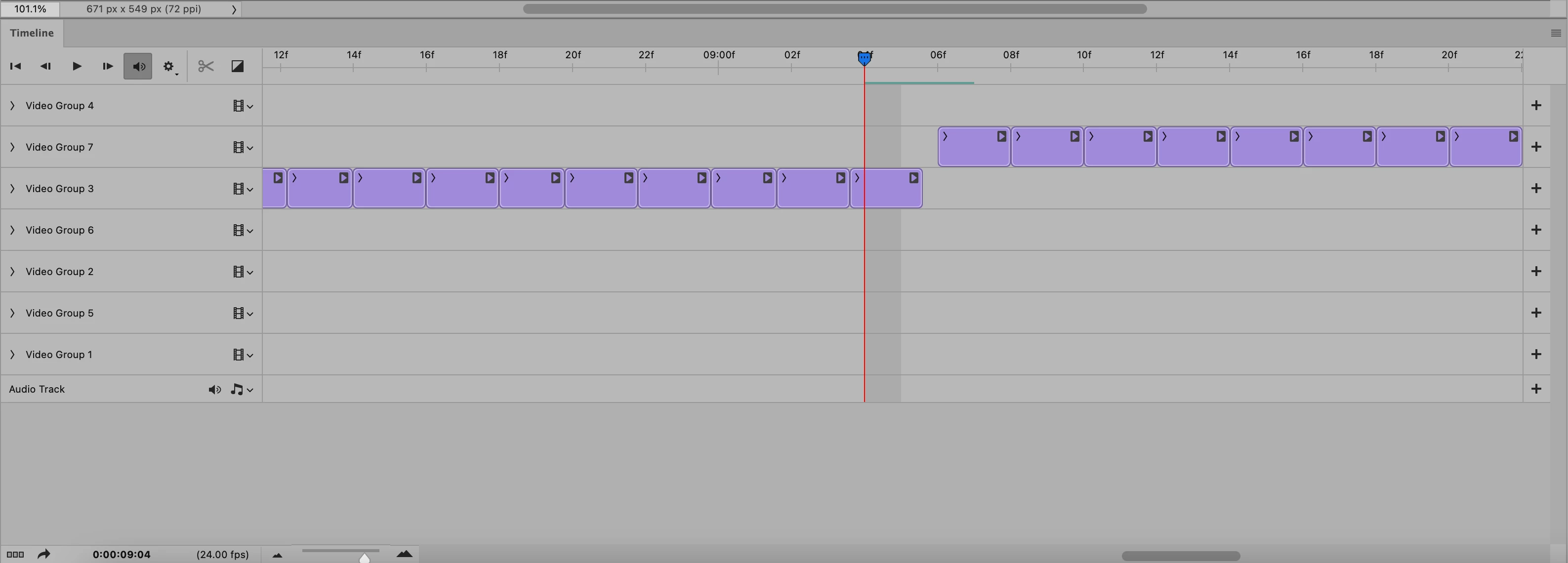
For context I animate on my Ipad, then import all the images onto my computer and drop them into photoshop, set my timeline to 24fps and cut the images down to 2 frames each, then drag them into their tracks.
As I said I have been doing it like this until very recently but now this issue is occuring.
Can anyone tell me what's going on here?
Thanks,
Tom
 AdChoices