Participant
January 16, 2025
Question

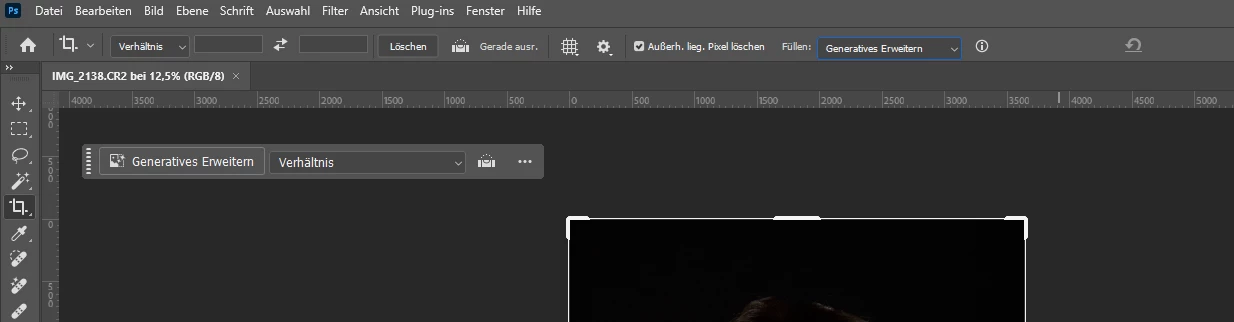
Freistellungswerkzeug Standard ändern
  • January 16, 2025
  • 3 replies
  • 360 views

Wie kann ich "Generatives Erweitern" im Freistellungswerkzeug als Standard setzen?


Liebe Grüße


Severin

3 replies

Stephen Marsh
Community Expert
Community Expert
January 17, 2025

@Severin33513486xvwl 


The following script is a bit of a hack/kludge. Perhaps another scripter can offer a more direct method of setting the tool properties without entering the interactive crop.


This code will interactively select the crop tool and set the default crop to the document width and height ready for extension in your preferred direction. Generative Expand is pre-selected.


var s2t = function (s) {
    return app.stringIDToTypeID(s);
};
var descriptor = new ActionDescriptor();
var descriptor2 = new ActionDescriptor();
descriptor2.putUnitDouble(s2t("top"), s2t("pixelsUnit"), 0.000000);
descriptor2.putUnitDouble(s2t("left"), s2t("pixelsUnit"), 0.000000);
descriptor2.putUnitDouble(s2t("bottom"), s2t("pixelsUnit"), app.activeDocument.height.as("px"));
descriptor2.putUnitDouble(s2t("right"), s2t("pixelsUnit"), app.activeDocument.width.as("px"));
descriptor.putObject(s2t("to"), s2t("rectangle"), descriptor2);
descriptor.putUnitDouble(s2t("angle"), s2t("angleUnit"), 0.000000);
descriptor.putBoolean(s2t("delete"), false);
descriptor.putInteger(s2t("AutoFillMethod"), 0);
descriptor.putEnumerated(s2t("cropFillMode"), s2t("cropFillMode"), s2t("generative"));
descriptor.putEnumerated(s2t("cropAspectRatioModeKey"), s2t("cropAspectRatioModeClass"), s2t("pureAspectRatio"));
descriptor.putBoolean(s2t("constrainProportions"), false);
executeAction(s2t("crop"), descriptor, DialogModes.ALL);


  1. Copy the code text to the clipboard
  2. Open a new blank file in a plain-text editor (not in a word processor)
  3. Paste the code in
  4. Save as a plain text format file – .txt
  5. Rename the saved file extension from .txt to .jsx
  6. Install or browse to the .jsx file to run (scripts are installed in the application's /Presets/Scripts folder or use File > Scripts > Browse)


https://prepression.blogspot.com/2017/11/downloading-and-installing-adobe-scripts.html

c.pfaffenbichler
Community Expert
Community Expert
January 17, 2025

And when the Script is installed at the default location it can be assigned a Keyboard Shortcut. 

Stephen Marsh
Community Expert
Community Expert
January 17, 2025
quote

And when the Script is installed at the default location it can be assigned a Keyboard Shortcut. 


By @c.pfaffenbichler


100%!


And it can also be recorded into an action and a modifier F-key shortcut can also be used.

Bojan Živković11378569
Community Expert
Community Expert
January 17, 2025

From my testing, it is only sticky per session. Perhaps a script can achieve this, but I am not a scripter. I will tag scripters who can provide the answer. If they can write a script to change to Generative Expand, then you can use File > Scripts > Script Events Manager to run the script on Photoshop Event > Start Application.

@c.pfaffenbichler @Stephen Marsh 

Participant
January 17, 2025

Da muss es eine einachere Möglichkeit geben. ich bin sicher, dass ich eine Lösung schon gesehen habe. Leider weiß ich nicht mehr wie es geht.

jane-e
Community Expert
Community Expert
January 16, 2025

@Severin33513486xvwl 


I've moved your post from Creative Cloud Desktop to the Photoshop forum.


Jane