

Pavla
Participating Frequently
August 4, 2026
Question

Funkce pro míchání kanálů ve Photoshop už delší dobu nefunguje správně. Potřebuji ve formátu CMYK dát obrázek do kanálu černé barvy a je to příšerný problém.

  • August 4, 2026
  • 18 replies
  • 50 views


    18 replies

    Stephen Marsh
    Community Expert
    Community Expert
    August 4, 2026

    The channel mixer may not be the ideal approach when working from CMYK for this task.


    Although working non-destructively with adjustment layers is a good thing to do, you may need to work on a duplicated layer that has the colour channels destructively applied.


    Sometimes you don't want a K channel only image (apart from the bit that's red of course), what you need is a Heavy GCR ICC profile conversion where neutrals bias more K but still contain some CMY.


    c.pfaffenbichler
    Community Expert
    Community Expert
    August 4, 2026

    You appear to be using Photoshop (Beta) which would explain the different Panels. 


    There is a dedicated Forum for Photoshop (Beta). 

    https://community.adobe.com/photoshop-beta-697

    Pavla
    PavlaAuthor
    Participating Frequently
    August 4, 2026

    I am not using the Beta version.

    c.pfaffenbichler
    Community Expert
    Community Expert
    August 4, 2026

    Sorry, then the difference in Panel appearance is probably indeed a Windows/Mac-difference. 

    Pavla
    PavlaAuthor
    Participating Frequently
    August 4, 2026

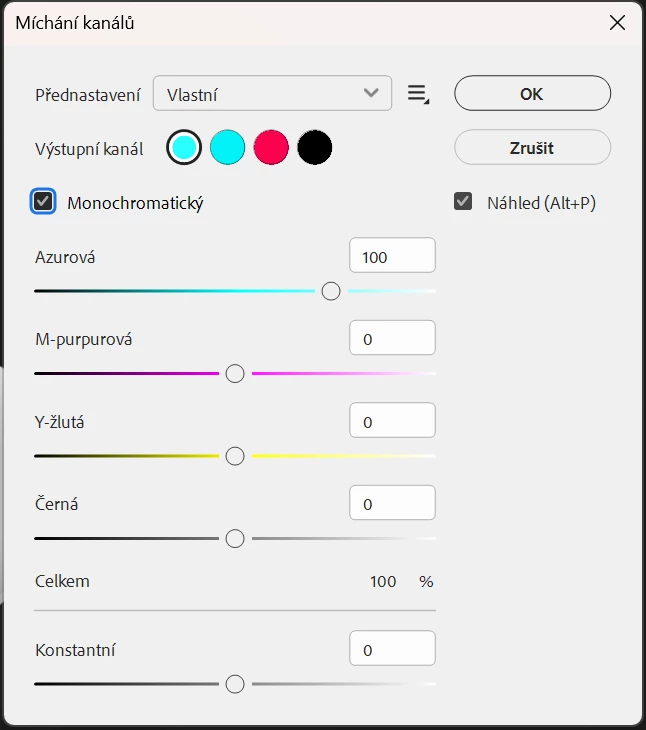
    I have now uploaded a video sample. When I needed to convert the image of a charger to the black channel, for some incomprehensible reason, there are 2 blue circles, red and black. The channels should be blue, yellow, purple and black. If I need to convert something to the black channel, as I did, I paradoxically have the blue circle set, because the other colors do not work at all. If I select, for example, the black circle - there is no change at all, even if I move with different sliders. Pavla

    c.pfaffenbichler
    Community Expert
    Community Expert
    August 4, 2026

    Thanks for the videos. 

    They seem to be missing the UI elements you are manipulating, though, strangely enough. 


    Are you applying the Adjustment destructively? 

    If so I would recommend using a Clipping Masked Adjustment Layer instead. 

    And unless you have a preferred mixture of the four process colors to arrive at your grayscale I wonder if Hue/Saturation Adjustment layer might not serve just as well. (see screenshots)


    Pavla
    PavlaAuthor
    Participating Frequently
    August 4, 2026

    Photoshop probably doesn't work properly only on Windows. Maybe the feature is only good for Apple environments. I have Win 11 and I'm using the latest Photoshop from Adobe.

    Sameer K
    Community Manager
    Community Manager
    August 4, 2026

    Hey, @Pavla. Welcome to the Photoshop Community. I’ll need more info to help you figure this out.
    Could you record a short video and share it with me, along with the system info from Photoshop Help > System info > Copy & paste into a text document > upload & attach here. 


    Awaiting hearing from you. 

    Thanks!
    Sameer K

    Pavla
    PavlaAuthor
    Participating Frequently
    August 4, 2026

    I'm sorry, but I'm very busy with work, and I don't know how to film the video and I need to do a lot of work now. If you try to convert a color image in CMYK format by mixing channels, for example, to the black channel, you will immediately understand how badly Photoshop works. The problem is obvious to anyone who needs to use this function. I need black to be really black in print only in grayscale, but I need the other elements in the file to be colored. I'm not solving anything else, just the malfunctioning of the program. I need Photoshop to finally be fixed and this function to work properly.

    c.pfaffenbichler
    Community Expert
    Community Expert
    August 4, 2026

    Is that the modal dialog for the destructive application of the Adjustment? 

    Looks different here, but have you tried using the Adjustment Layer? 


    If you try to convert a color image in CMYK format by mixing channels, for example, to the black channel, you will immediately understand how badly Photoshop works. 

    I don’t understand what you mean, what are you trying to achieve exactly?

    I fail to recognise the problem here.