Inspiring
January 29, 2025
Question

fx in camera raw

  • January 29, 2025
  • 2 replies
  • 450 views

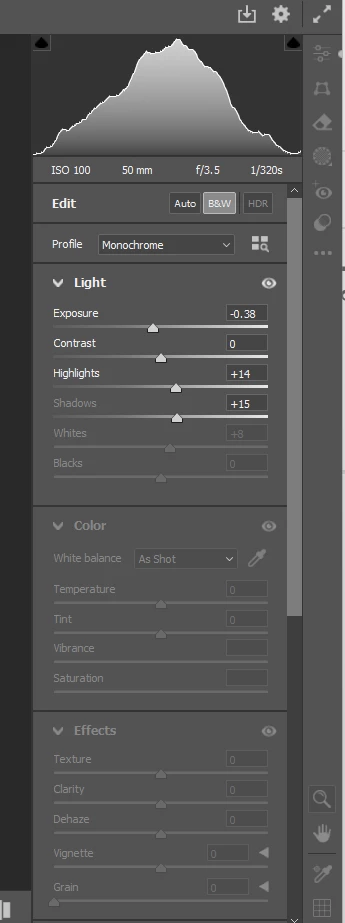
Where did the fx - effects option in camera raw go to??
 

2 replies

davescm
Community Expert
Community Expert
January 29, 2025

@hendy_5450 I'm not sure why some control tabs, such as color and effects,  are greyed on your screenshot. You have a profile applied, I would try resetting that profile first and also scroll down to the calibration tab and set Process to version 6.

@Trevor.Dennis Grain is under the Effects section of the normal edit controls (below vignette)


Dave

Trevor.Dennis
Community Expert
Community Expert
January 29, 2025
quote

@Trevor.Dennis Grain is under the Effects section of the normal edit controls (below vignette)


Dave


By @davescm


🙂  Thanks Dave.  I was making the point that the new Grain is not quite as useful as the previous fx > Grain as we have less control over it.  I still use the new one, although Filter gallery > Teexture > Grain has more control.

davescm
Community Expert
Community Expert
January 29, 2025

@Trevor.Dennis Did you know you can use the arrow next to Grain, in Camera Raw, to get access to the old Size and Roughness controls. If you did, others may not 🙂  It is the same with Vignette, the old controls are there they are just hidden behind that arrow.

Dave

Trevor.Dennis
Community Expert
Community Expert
January 29, 2025

We used to have fx > Grain which I was a big fan of.  We still have Grain in the Effects tab, but it has less options.

I can't remember when this changed, but it was a good few major versions back.

Trevor.Dennis
Community Expert
Community Expert
January 29, 2025

You can still install 22.2 which they are keeping available for the users who want its 3D tools, and don't want to take the Substance route.  I have no idea if that version has the old ACR layout, but my gut tells me the change was before that.  Worth a look see if it's important to you.
