

Soulza
Participant
January 4, 2024
Question

Galeria de filtros troca a cor de imagem

  • January 4, 2024
  • 6 replies
  • 285 views

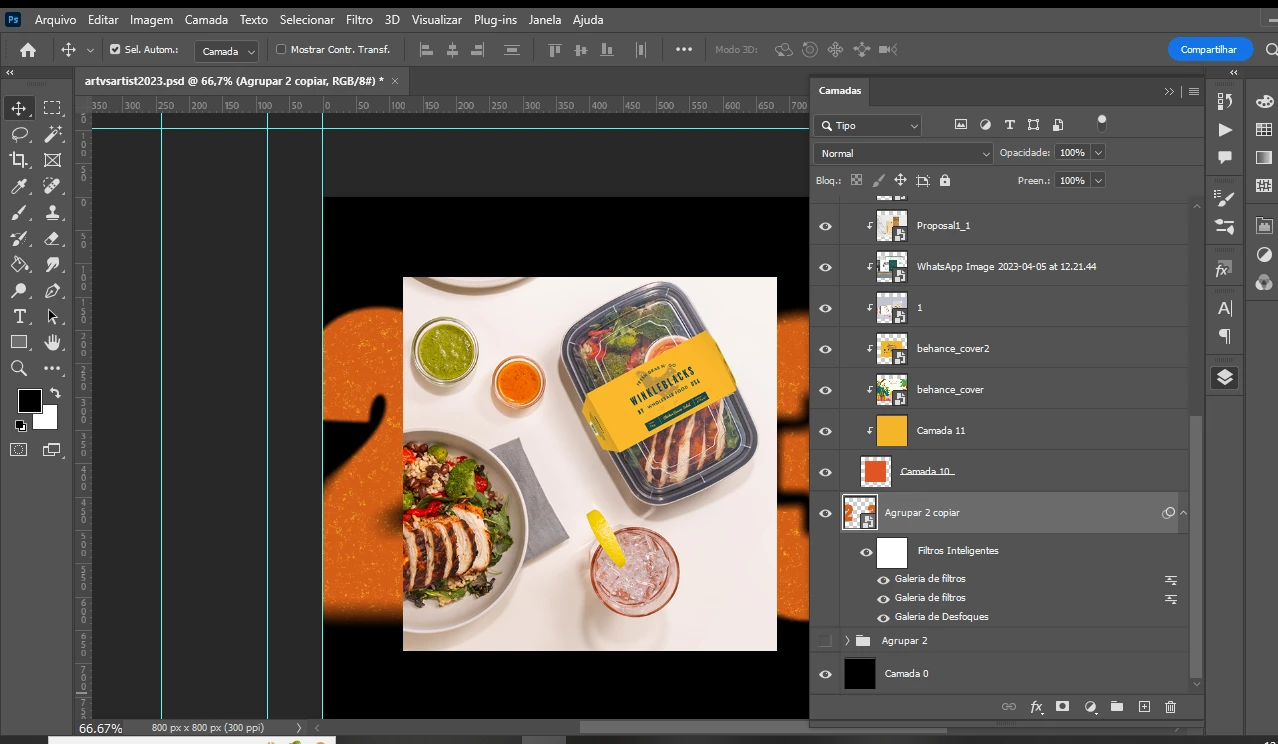
Sempre que eu adiciono filtros à minha imagem ela passa a ter essa cor laranja. Estou trabalhando em 8bit, rgb, com as cores de background preto e branco e ainda assim o número que era para ser branco se torna laranja do nada.


Gostaria de saber como solucionar isso.


This topic has been closed for replies.

6 replies

Myra Ferguson
Community Expert
Community Expert
January 9, 2024

It's possible that Camada 10 or Camada 11 (or another layer, but those are both orangish) might have a Blend mode applied or has lowered opacity that is affecting the color. If you select either of those layers, you can see what is applied in the Layers panel.

Jeff Arola
Community Expert
Community Expert
January 8, 2024

I ment if you turn off all the visibility of the Layers above your Agrupar 2 copier layer.


Soulza
SoulzaAuthor
Participant
January 8, 2024

Here.

If I turn off the visibility of all filter layers it becomes white again. But each one I turn on it becomes orange


Jeff Arola
Community Expert
Community Expert
January 4, 2024

Which Blur Gallery filter?

What are the Noise settings?


Have you changed any of the Filter Blending Options?


Does turning off the visibility of all the layers above it make any difference?

Soulza
SoulzaAuthor
Participant
January 4, 2024

Noise, torn edges and graphic pen

Jeff Arola
Community Expert
Community Expert
January 4, 2024

Which specific filters are you using?