
Participant
Aug 5, 2024 7:04 PM UTC
Answered

"Generate image assets with layers" is now missing

Wondering if this is a big that Adobe needs to fix. The ability to generate files using "Image assets" is now missing. It should just be file> generate > Image assets, but that is now gone. I confirmed it with one other coworker. Anyone else have this experience and want it back?

Ged_Traynor
Ged_TraynorCorrect answer
Community Expert
Aug 6, 2024 8:51 AM UTC

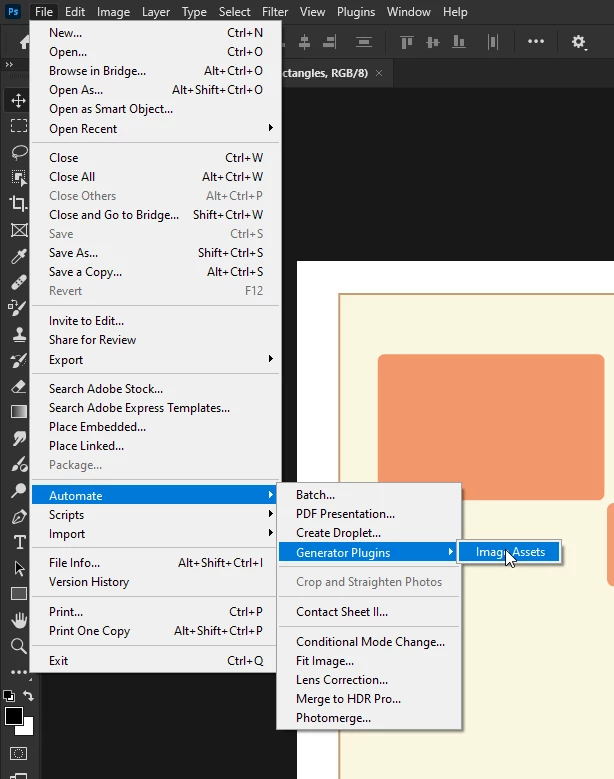
@defaultwzfjcggm344j it has been moved

10 replies

Known Participant
Feb 20, 2025 10:38 PM UTC

Yeah, not a great solution. Buried away where nobody can find it as this thread will testify... UX 101 Fail Adobe.

Found it only after reading a number of threads like this one, unfortunately it appears to be permanently disabled and greyed out for me. Nothing I try will enable the generate feature, it always used to work with my files before it was moved.
Everything is labelled correctly... no clue.

Do I have to do a special Adobe incantation to the photoshop gods??... or search for another button to activate and start the thing generating? Very perplexed. Clearly not enough thought has gone into relocating this item so it makes sense for the regular user.

I've just resorted to Quick Export to PNG - to get my work done.

Translate
Known Participant
Feb 20, 2025 11:01 PM UTC

Ahhhh, after some hair pulling... there is an extra step to get this working if the menu is greyed out... (this is so stupid.)
You have to enable Generator in - Settings / Plugins / Generator

It's odd you can see it disabled in the menu? (Why show it if it's unavailable and inactive, at least provide a hint), you need to go and manually activate it if you want it to function as it once did.

Hey Adobe here is a free UX tip.... if someone opens a file with the image .tags applied to their individual layers there is a 'good chance' this generate item should be activated automatically - no user input required. Alternatively have the Generate plugin activation in the Automate menu, call me crazy.

Making users fumble around and dig for the answers on the interwebs is a really bad experience.

Translate
Known Participant
Feb 20, 2025 11:04 PM UTC

Oh.. and make sure the file is saved before trying to generate, wont work unless the file has been saved.

Translate
Participant
Aug 12, 2024 8:12 AM UTC
Stephen Marsh
Community Expert
Community Expert
Aug 12, 2024 8:18 AM UTC
quote

This helped me, hallelujah! 
https://helpx.adobe.com/photoshop/using/generate-assets-layers.html?src=community


By @ClaudiaRodas


Yes, that's exactly where @Ged_Traynor indicated via screenshot that it had moved to.


This move was a surprise (it does make sense though) and it took Adobe a little longer than expected to document the change from File > Generate > Image Assets to the new File > Automate > Generator Plugins > Image Assets location, but now that we all know where it is and the HelpX documentation has been updated there is no need for dismay.

Translate
Ged_Traynor
Community Expert
Ged_TraynorCommunity ExpertCorrect answer
Community Expert
Aug 6, 2024 8:51 AM UTC

@defaultwzfjcggm344j it has been moved

Translate
Participant
Aug 12, 2024 8:06 AM UTC

I use this feature every day, I cant believe this, must be an error?

Translate
Stephen Marsh
Community Expert
Community Expert
Aug 6, 2024 8:31 AM UTC

Is the feature available in preferences/settings? Are you on Intel or Silicon chipset? If the latter, try running Photoshop in Rosetta.

Translate