
Participant
March 4, 2024
Answered

Generate Normal Map doesn't work

  • March 4, 2024
  • 4 replies
  • 18651 views

Hello Everyone,


I am using Photoshop 25.5.0, I am trying to generate a normal map for my brickwall tecture, when I go to Filters > 3D > Generate Normal Map, I get this message which I took with my phone because photoshop disables the print screen button when photoshop is on the screen which is annoying.
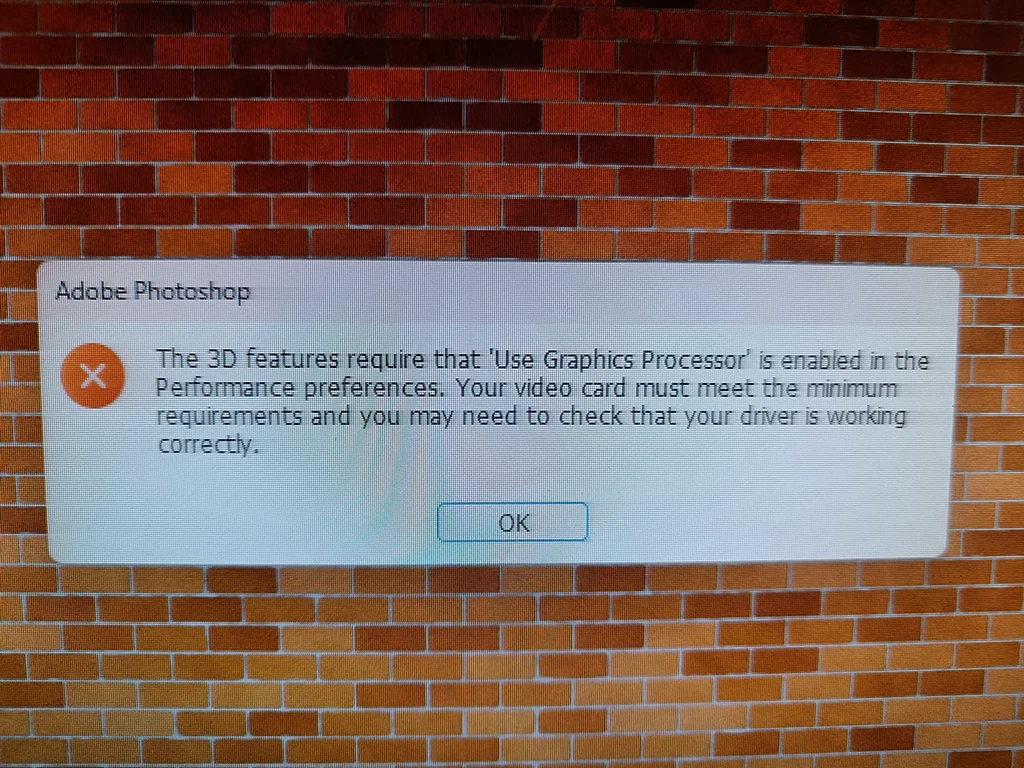
 

I already did the reset preferences in vain.


This is my system:

Ryzen 5 2600X - 32G RAM - 1660 SUPER - Samsung EVO M2


The Use Graphics Processor is checked and on the GPU compatibility window everything is green.


Thank you for your help in advance.

Correct answer Jeff Arola

Adobe is in the process of getting rid of 3D and related functions in Photoshop.

With every update a few more 3D related items are removed or disabled and as it happens in 25.5 Adobe removed the ability to run the Filter>3D filters on the Windows side by displaying the message you got . On the Mac side there is no message they just crash Photoshop.


If you want a Photoshop version that has fully functional 3D, install Photoshop 22.2 from the Adobe Creative Cloud Application.

https://helpx.adobe.com/kr/photoshop/kb/3d-faq.html

4 replies

Participant
September 6, 2024

You can also use this as a lightweight webbased Photoshop-Clone:

https://www.photopea.com/


rayek.elfin
Legend
March 16, 2024

Do yourself a favour and ditch Photoshop's ancient normal map generator. Instead, download Materialize (free single image to full material tool) to generate height, normal, metallic, smoothness, edge, and AO maps. Easy, quick, and much more controllable than Photoshop's normal map generator. 🙂


https://boundingboxsoftware.com/materialize/index.php


Import a colour texture, first create a height map, then a normal map. Adjust parameters. Preview the full material, and make more changes until you are happy. Save the texture images. Done.

Have fun!


PS runs fine on Mac via Parallels.

Patrickb1864637
Participating Frequently
July 31, 2024


Got intel 5960X + RTX 3090 + SSD 2TB 7000MB/s and it like to hang up for 10 seconds in simple height map loading, interface looks more ancient  than photoshop, and it is not intuitive.
Is there anything else to try? This materialize is too slow for my workflow

rayek.elfin
Legend
July 31, 2024

Other options are:


I wouldn't want to use CrazyBump anymore: it's a rather old and no longer updated tool. The site is not secured either, so I did not link to it.


ModLab works fine and is free. But just as fast (or slow) as Materialize. The gui is much less intuitive in my opinion.


AwesomeBump seems much faster loading texture maps compared to either Materialize or ModLab, but crashes a lot on my machine and the opengl view self-destructs often. The interface is (sorry!) atrocious.


I work with 8K maps in Materialize, and on my system (3900x, 128GB, 3080ti) it can take around 25 seconds to open the initial 8K diffuse map. Opening a height map takes around 10 seconds for me.


But following that creating a height map (if I only have a diffuse map) takes a few seconds, and the normal map, AO map, and other maps take a second to complete.


Then I save the maps which takes a few seconds for each map. It's actually quite fast, and allows me to finish a texture based on 1 diffuse map within 2 minutes. Same with quick tiled setups. I do keep a texture set in its own folder, however, because Materialize's open and save dialogs take a long time to generate thumbnails.


From your comments I feel that you are having more difficulties with the actual workflow in Materialize rather than the speed itself? Did you watch the tutorials?

https://www.youtube.com/watch?v=QMrWNe2EWAk


The only other tool that I feel is equivalent is ModLab. I don't like that GUI personally, but it may jive better for you.

Participant
March 15, 2024

Unfortunately, useless functions are being added.. and what is really useful is removed..

Jeff Arola
Community Expert
Jeff ArolaCommunity ExpertCorrect answer
Community Expert
March 4, 2024

Adobe is in the process of getting rid of 3D and related functions in Photoshop.

With every update a few more 3D related items are removed or disabled and as it happens in 25.5 Adobe removed the ability to run the Filter>3D filters on the Windows side by displaying the message you got . On the Mac side there is no message they just crash Photoshop.


If you want a Photoshop version that has fully functional 3D, install Photoshop 22.2 from the Adobe Creative Cloud Application.

https://helpx.adobe.com/kr/photoshop/kb/3d-faq.html

Participant
March 4, 2024

First of all, thank you for clearing my confusion.


SECOND, " On the Mac side there is no message they just crash Photoshop." hahahahahah [cursing removed] to that hahahah what a fantastic user experience hahahah.


I already resolved the issue by using the Nvidia Texture Tool, well thank you so much for answer 🙂