Participant
Jul 23, 2026 9:19 AM UTC
Answered

Generative Expand

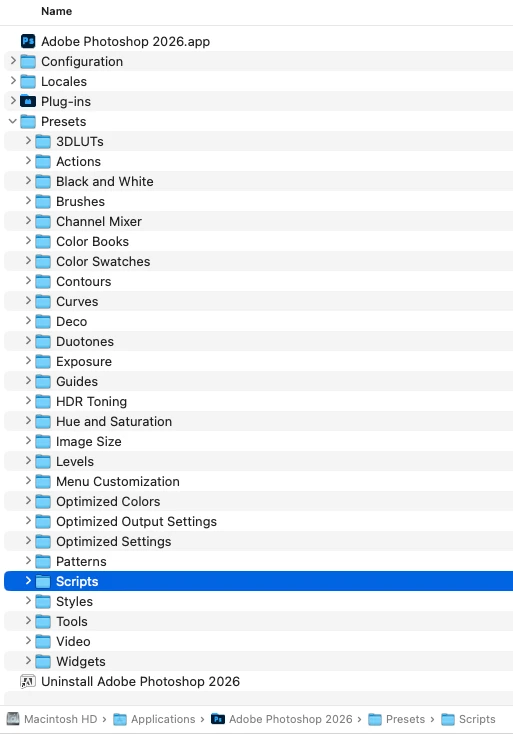
Generative Expand. error code 1200 description Line: 13 -> var g_StackScriptFolderPath = app.path + "/"+ localize("$$$/ScriptingSupport/InstalledScripts=Presets/Scripts") any suggestions as to how I can fix this? 

    c.pfaffenbichler
    c.pfaffenbichlerCorrect answer
    Community Expert
    Jul 23, 2026 9:46 AM UTC

    Could you please post screenshots including all pertinent Panels (Toolbar, Layers, Options Bar, …)? 

    What is your OS language? 

    Have you made sure the Scripts-Folder does exist? 


    What have you done for all-purpose trouble-shooting so far?

    Restoring Preferences after making sure all customized presets like Actions, Patterns, Brushes etc. have been saved might be a good starting point:

    https://helpx.adobe.com/photoshop/using/preferences.html

    https://helpx.adobe.com/photoshop/kb/basic-trouble-shooting-steps.html

    1 reply

    c.pfaffenbichler
    Community Expert
    c.pfaffenbichlerCommunity ExpertCorrect answer
    Community Expert
    Jul 23, 2026 9:46 AM UTC

    Could you please post screenshots including all pertinent Panels (Toolbar, Layers, Options Bar, …)? 

    What is your OS language? 

    Have you made sure the Scripts-Folder does exist? 


    What have you done for all-purpose trouble-shooting so far?

    Restoring Preferences after making sure all customized presets like Actions, Patterns, Brushes etc. have been saved might be a good starting point:

    https://helpx.adobe.com/photoshop/using/preferences.html

    https://helpx.adobe.com/photoshop/kb/basic-trouble-shooting-steps.html

    Translate