
Participant
March 23, 2026
Question

generative fill

  • March 23, 2026
  • 1 reply
  • 59 views

The generative fill has been stopped working for a week, and it says "try later" when it fails, and sometimes it says "not working in your region." I'm using the latest version of Photoshop, and I've tried installing previous versions, but I'm still experi
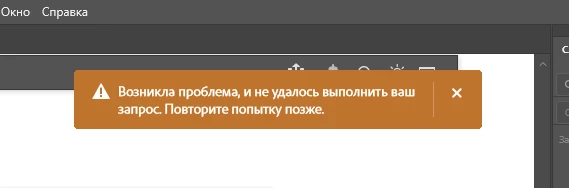
encing the same issues. What's the problem?

    1 reply

    J E L
    Community Expert
    Community Expert
    March 23, 2026

    Hi ​@natalia_randle, what is your region? Keep in mind that Generative AI will not work in some countries due to licensing, regulatory, or legal constraints. This includes China, Russia, Belarus, Cuba, Iran, North Korea, and Syria. If you are not in that type of region, and it was working for you before, then it’s possible something else is blocking or disabling the feature. Have you possibly run out of credits for the month? You can also find common issues and fixes here: https://helpx.adobe.com/photoshop/kb/troubleshoot-generative-ai-features.html.

    Participant
    March 24, 2026

    Germany, but but when I was in Russia, everything was working fine for a few years. Credits is ok. Also I even tried using a VPN to try other countries, but it didn't work

    J E L
    Community Expert
    Community Expert
    March 24, 2026

    Okay, thanks for that extra information. Did you try all the suggestions for troubleshooting in the Adobe Helpx article I linked to? It could be your IP address is being blocked, maybe by antivirus software or other third-party apps. Are you able to use the Generative AI tools on Adobe Firefly (https://firefly.adobe.com/)? Also, make sure you are first launching Photoshop from the Creative Cloud Desktop app. Make sure you are logged in with your Adobe ID. You might want to log all the way out and come back in. Finally, you can check your account status here: https://account.adobe.com/.