For me, the generative expand is at a different brightness and contrast than the original image, they do not blend correctly... worked well in the past. I am using the latest version of PS 25.2
I have the exact same issue (exactly the same in the Beta and the latest PS update). If I use generative fill or generative expand, the generated part of the image is significantly darker than the rest and does not blend at all. I have to play around with brightness/contrast/curves of the generated layer to get it to anywhere near matching the rest of the image. It's very frustrating and makes using generative fill almost useless. Using content aware fill always matches the brightness/tones of the original image, so this is definitely just an issue relevant to generative fill/expand.
Can you show us a screen shot of your workspace window with the pertinent panels visible? This might help!
Is this the Beta version? Are you working in Layers and do you have the correct layer targeted? Also, is the layer clipped to another layer? Generative Fill won't work if the layer is locked or if the layer is clipped to another layer. How large is the area that you are trying to fill? And what is the resolution of your image? If the area is too large, or the resolution is too low, both of these could be a problem.
I have been searching to see if I can find a definitive answer, but I am at a loss as to why this is happening. Here is one other thing I found, but I am not sure if it will help, because this is working with the Beta version. https://windowsreport.com/generative-fill-not-working-in-adobe-photoshop/
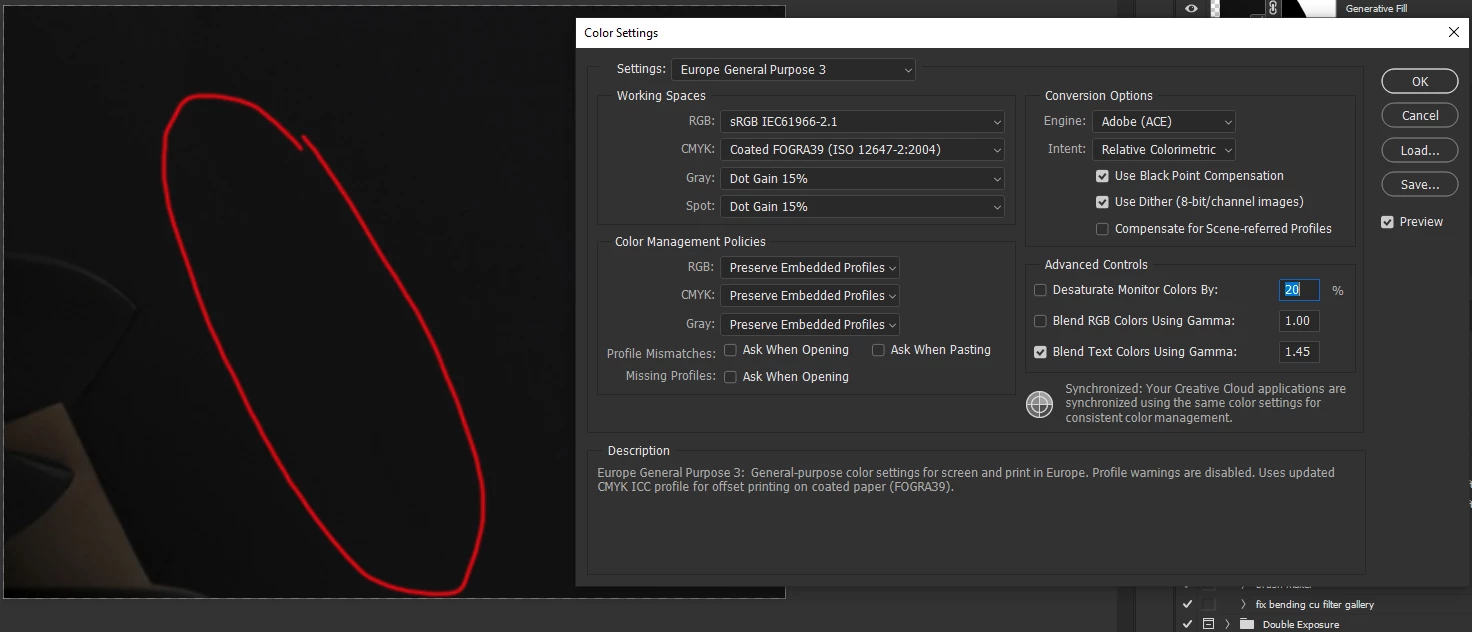
So basically in the left side of the image highlited with red there are two tones one is darker than the other one. The darker one is the output of generative fill, meaning the result doesn't blend correctly into the image.
This happens also when I try to extend an image.
In the right side of the image I'm showing that my color settings are set to Europe 3 and srgb (somone suggested this as a fix for the problem).
I'm trying to accomplish a smooth blend of the tones between the original image and the generated one. (The image I get from generative fill is always darker so it doesn't blend in the picture.)
I hope this explained better what I'm showing in the image. Do you have any idea of what could be causing this?
Also my graphic driver is up to date and photoshop is freshly installed.
It would be helpful if you could give us a little more explanation of what is going on in your image, what the issue is, and what you are trying to accomplish.



 AdChoices