benym9079178
Participant
August 3, 2026
Question

Generative Fill Causes Full System Shutdown (Ryzen 7 7700 + RX 6800 XT)

  • August 3, 2026
  • 2 replies
  • 16 views

I'm experiencing a serious issue when using Generative Fill in Adobe Photoshop.

Whenever I use the AI Generative Fill feature, my computer suddenly powers off completely. It is not just Photoshop crashing—the entire PC shuts down instantly. After that, I cannot turn the computer back on unless I switch off the power supply or unplug the power cable for a few seconds before turning it on again.

This issue only happens when I use Generative Fill. Other Photoshop features work normally.
 

Has anyone experienced the same issue?

I'm trying to determine whether this is a known compatibility issue with Photoshop's AI features, an AMD GPU driver problem, a hardware issue, or something else.

If you've encountered this before, I'd really appreciate hearing what caused it and how you resolved it. Are there any recommended settings, BIOS updates, GPU driver versions, or troubleshooting steps that I should try?

Thank you in advance for any suggestions or advice.

    2 replies

    D Fosse
    Community Expert
    Community Expert
    August 3, 2026

    I don’t have an answer - but Photoshop does in fact not process Generative Fill at all, so this is hard to explain. It is sent to Adobe’s servers for processing, then the processed file is returned to the user’s machine. So it would have to be somewhere in that send/receive interface.


    How big are these files (pixels w x h)?


    I’d start with standard troubleshooting - first a complete reset of preferences, then if that doesn’t help, uninstall/reinstall.


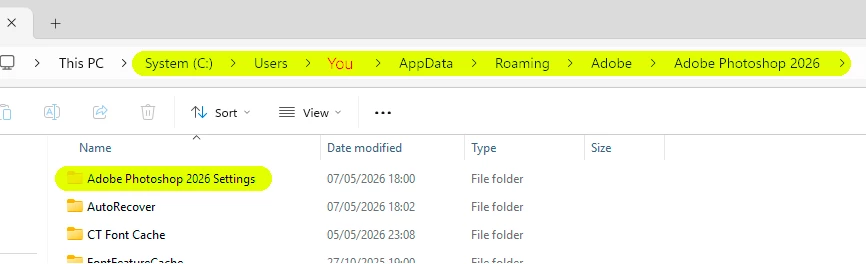
    Go into your user account and find the “Adobe Photoshop 2026 Settings” folder. Move it to your desktop, so that a fresh new settings folder can be built. This is the safest and most complete method, a standard reset will only reset a subset.


    lambiloon
    Community Expert
    Community Expert
    August 3, 2026

    Hi i think you should try a older version of photoshop and Generative fill if that works then maybe some bug in latest version or your hardware need some update...regards

    Ali Sajjad / Graphic Design Trainer / Freelancer / Adobe Certified Professional