Participant
July 28, 2026
Pergunta

generative fill firefly 5 not working with a selection

  • July 28, 2026
  • 1 resposta
  • 29 Visualizações
  • Issue summary: When I use generative fill set to firefly 5 engine, I make a selection, but the generation appears at the very edge of the selection, as though the selection is cutting off the generation.
  • Product and version: Photoshop 27.8.0
  • Operating system: Mac
  • Steps to reproduce: 
    • Make a selection around an object or area of image
    • right click>generative fill
    • engine is set to firefly 5
    • enter “fire” into dialogue box
    • tiny flame appears at the very edge of selection, almost appears to avoid anything I’ve selected around
  • Expected result: a flame or fire within the boundaries of the selection, blending with the rest of the image
  • Actual result:
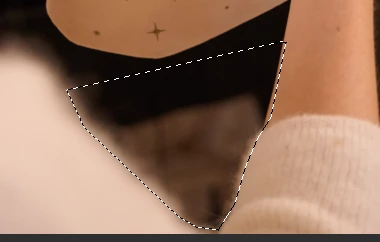
    Before generation, selected area
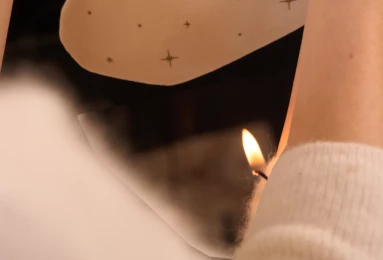
    after generation; background hasn’t changed, flame appearing at edge of selection and not blended with the rest of the image

     

    1 Resposta

    Anshul_Saini
    Community Manager
    Community Manager
    August 21, 2026

    Hi ​@Effielyons,

    Thanks for the clear reproduction steps and screenshots. I can see what you mean: rather than generating the requested fire within the selected region, Firefly Image 5 is placing a small flame almost entirely at the edge of the selection.

    Since this was reported on Photoshop 27.8, could you first update to the latest v27.9.1 and test the same image, selection, and prompt again?

    Could you also install the latest Photoshop Beta 27.11 from Creative Cloud Desktop > Apps > Beta and repeat the exact test there?

    If it still happens, could you try the same test again with a more descriptive prompt, rather than just "fire"?

    For example: “small realistic flame burning, with natural lighting and soft blending into the surrounding scene”. Please keep the same selection and compare the result.

    This will help us determine whether Firefly is interpreting the short prompt as an instruction to add fire near an existing boundary, or whether it is actually failing to constrain the generation to the selected area correctly.

    If it still doesn’t work, please also paste your Help > System Info > Copy information here. Also, share a screenshot of the layer panel.
     

    Let us know how it goes, and we’ll have a much more specific case to take forward.
     

    Best,
    Anshul Saini