
Participant
Jan 22, 2025 12:15 PM UTC
Question

Generative fill in Photoshop creates black pictures

Hello. I really need your help.
Generative fill in Photoshop has stopped working. On any files and layers in the selected area a black fill is generated. I attach a screenshot with an example. And recently everything worked correctly.
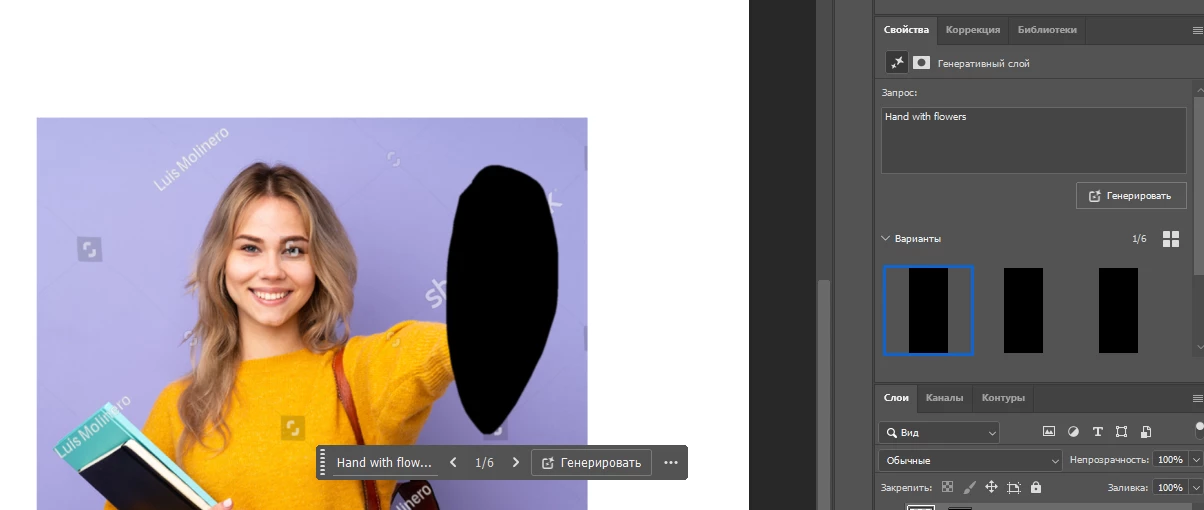
6 replies

Participant
Jan 24, 2025 6:50 AM UTC

Thank you very much for your superficial opinion. The example was taken with watermarks just for the sake of example))) In commercial activities, our company always buys already approved images. But you probably don’t know about such a process. No offense.

Translate
c.pfaffenbichler
Community Expert
Community Expert
Jan 24, 2025 7:09 AM UTC

Please mind your manners, adding »no offense« does not help. 


The Cyrillic letters in your name make me wonder if you might be working in one of the countries where Firefly is not available. 

https://helpx.adobe.com/firefly/get-set-up/learn-the-basics/adobe-firefly-faq.html#:~:text=Adobe%20Firefly%20isn%27t%20available,Donetsk%20and%20Luhansk%20People%27s%20Republics.


Otherwise please check whether your firewall might be interfering and provide the requested screenshots. 

Translate
c.pfaffenbichler
Community Expert
Community Expert
Jan 23, 2025 12:33 PM UTC

Could you please post screenshots with the pertinent Panels (Toolbar, Layers, Properties, Options Bar, …) visible? 

Translate
kglad
Community Expert
Community Expert
Jan 22, 2025 2:33 PM UTC

in the future, to find the best place to post your message, use the list here, https://community.adobe.com/

p.s. i don't think the adobe website, and forums in particular, are easy to navigate, so don't spend a lot of time searching that forum list. do your best and we'll move the post (like this one has already been moved) if it helps you get responses.


<"moved from cc desktop">
Translate