
Participant
October 3, 2025
Question

Generative Fill not working: This feature is currently not available

  • October 3, 2025
  • 2 replies
  • 931 views

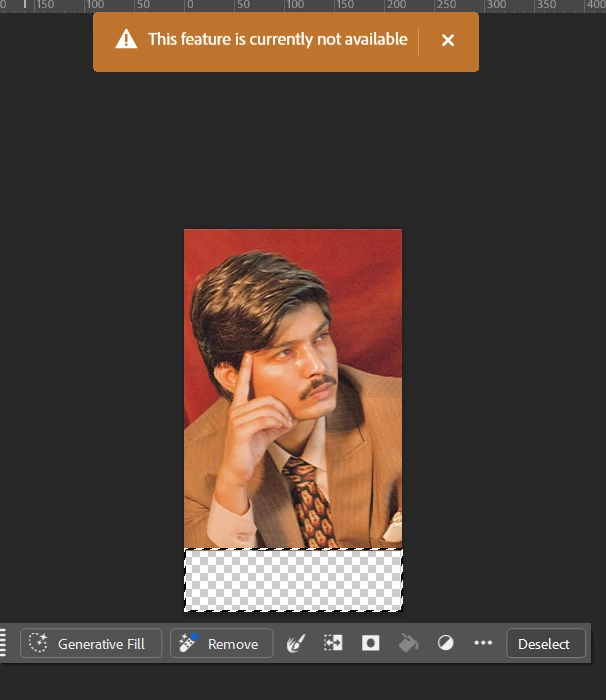
I’m trying to use the Generative Fill tool in Photoshop, but I keep getting the error message: “This feature is currently not available.” I selected the transparent area under my photo and clicked on Generative Fill, but it won’t work. Could someone help me understand why this is happening and how I can fix it?
2 replies

Inspiring
October 3, 2025

Make sure you’re using the latest Photoshop version, because Generative Fill only works in the current release, not in older ones. Also check that your file is in RGB 8-bit mode, and that you’ve unlocked the background layer or converted it to a normal layer. The tool won’t show if you’re in CMYK, 16-bit, or on a locked/smart object. Lastly, you need to be signed in with an Adobe account that has Firefly access. These are the most common reasons for the “feature not available” message.

Ged_Traynor
Community Expert
Community Expert
October 3, 2025

@Zack_Kev8642 "because Generative Fill only works in the current release" that statement is not true,

generative fill has been available since September 2023 and is available on versions released after that date

Inspiring
November 11, 2025

Good point @Ged_Traynor, you are right. Generative Fill has been in Photoshop since the 2023 update, not only the newest version. Thank you for correcting me.

Sameer K
Community Manager
Community Manager
October 3, 2025

Hey, @pursottam_4465. Welcome to the Photoshop Community. I reviewed the account you used to log in, and I found an active subscription.


Does this happen with specific images or subjects? You can try using Photoshop Web (https://adobe.ly/3WkhVFm) on an alternate device & internet network to rule out that it is a network issue. 


Thanks!
Sameer K

(Type '@' and type my name to mention me when you reply)