
til5
Participating Frequently
April 20, 2018
解決済み

Get x/y position (and width/height) of the transform box of a layer (not chopped off bounds)

  • April 20, 2018
  • 返信数 1.
  • 12076 ビュー

Hi there,

There are tons of great scripts out there to query the position and size of layers (e.g. outlined in this thread Export layer coordinates, layer width and height? )
However, I can't seem to find a way / to get the top left anchor position of the transfrom bounding box. All scripts I could find use "bounds" which chopps off everything that's not visible in the layer. But I would need the actual values that do show up in the info box while working in Photoshop. Is there any way to get those values out to a text file. Batch/Script would be awesome, but any hint helps. Thanks!

I hope this picture clarifies what I am after. Notice that the box is way bigger than the actual layer content (I don't need the precisely cut-out bat that "bounds" gives you!)
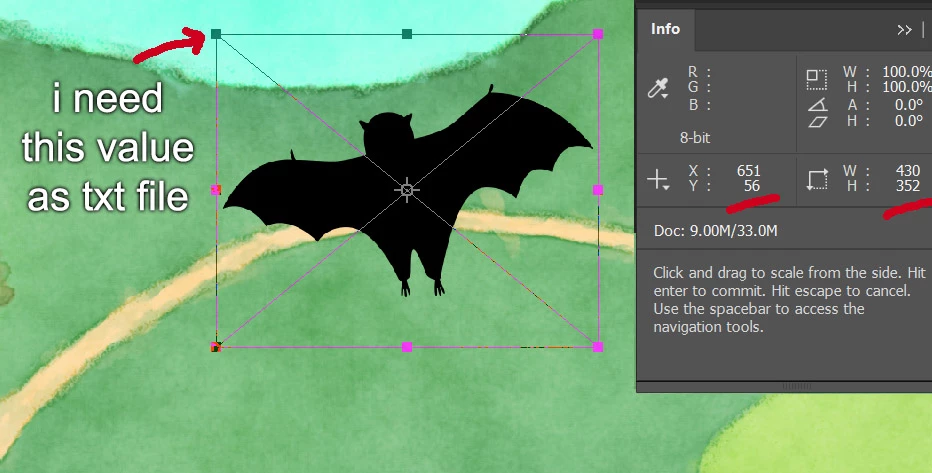
Cheers,
Til

このトピックへの返信は締め切られました。
解決に役立った回答 r-bin

Read this topic. Maybe this is it

Get Layer Transform X Y Top Left Coordinate Position

返信数 1

Legend
April 20, 2018

If the layer is normal and has only a mask, then you can try.

var tmp = activeDocument.activeLayer.layerMaskDensity;

activeDocument.activeLayer.layerMaskDensity = 0;

alert(activeDocument.activeLayer.bounds)

activeDocument.activeLayer.layerMaskDensity = tmp;

You can also get the "boundsNoMask" property for the layer via the AM code.

til5
til5作成者
Participating Frequently
April 20, 2018

Hi r-bin,
Thanks a lot for your message and suggestion! So sorry, I totally forgot to mention the layer is a smart object that does not have a mask. Then your suggestion wouldn`t work, right? ...maybe I should edit the post and mention it as it is probably important to know (hm, can`t edit the original post).
Cheers,
Til

r-bin解決!
Legend
April 20, 2018