Participant
February 23, 2015
Answered

Getting error 150:30 opening Photoshop cs4 on Macbook Pro

  • February 23, 2015
  • 21 replies
  • 76893 views

I've bought a new Macbook Pro with Yosemite 10.10.2. Installed old favorite programs from my old compute with time capsule. Sadly though I can´t start Indesign and photoshop, both bought in the CS4 versions. Bridge works though.

When Indesign or Photoshop starts, I get a note saying: The licenses for the product doesn't works, try to restart your computer. If the message appear again, contact Adobes technical support and quote the error code 150:30.

Ive tried to delete the FlexNet Publisher according to information given on the adobe site  [hard drive]/Library/Application Support/FlexNet Publisher/

But  the problem is I don't have a folder named FlexNet Publisher.

Help please?

This topic has been closed for replies.
Correct answer gener7

Update: I'm glad this procedure has helped many Mac owners of CS4 over the years.

Apple has announced that Mojave (10.14) will be the last MacOS to support 32 bit apps such as Photoshop CS4.

Do not upgrade to 10.15 if you intend to stay with CS4.

Now on to the License Repair procedure:

This can be avoided with the Terminal python script fix that will eliminate the 150:30 error, fix your install with out harming anything.

I can step you through with screenshots if you want to try it.

You account must allow you to administer your computer so your password will work and the Terminal prompt must have the $ sign.

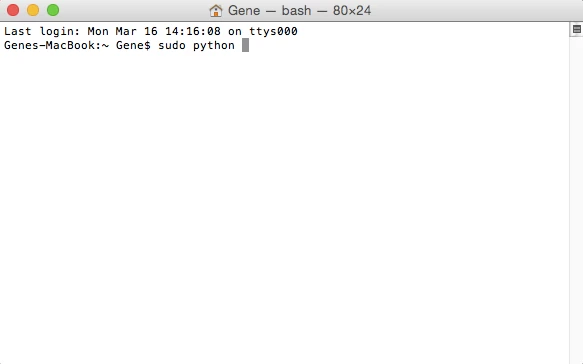
So go into Spotlight, type in Terminal and click to bring it up.  Type in sudo python and leave a space:

Get back to me when you have the below results.

21 replies

Participant
March 14, 2022

I just followed your steps from 7 years in the future and it solved my issue. Thank you!!

gener7
Community Expert
Community Expert
March 15, 2022

Thanks for letting me know. Activation servers for CS4 are said to be gone offline so now a reinstall/activation might not be possible. This makes License Recovery all the more valuable if you want to hold on to the old Photoshop. Just know if you are using MacOS, 10.15 onwards locks out the entire CS series.

Participating Frequently
March 17, 2022

I just did it today 3-17-22 and it worked! Can we start an online tip jar for gener7? LOL. But seriously I  feel like I owe you something.... adobe phone support was completely useless yesterday. You saved me! Thanks

Known Participant
August 4, 2021

Nice! Thanks Gener, this has been a great help!

Known Participant
July 15, 2020

Gener7 directions work like a champ.  It's quick and straight forward.  Thank you, Gene!

Participant
April 21, 2020

Thanks so much for this solution and clear steps.  This worked perfectly for me.  Thank you!

January 12, 2020

Thank you Gener7. Worked perfectly. 

I read the official adobe web page with this solution, but it lacked SIGNIFICANT information and said to drag the LicenceRecovery.app into terminal after the sudo python, not the LicenseRecovery.py. It also had a confusing list of solutions for different MacOS - but nothing specific after 10.7.  So, your added directions where the answer.  

I'm recoving a 2008 CS4 version 6 on a 2012 MBP running 10.12.6.  So glad I didn't have to drag the disks out of storage.  Been using this program since it was Aldus Pagemaker 1.2. 

July 2, 2019

Thank you for your informed content. Altho' some of it is confusing for me to follow, at least I know somebody's on the ball regarding this problem. I hope that my somewhat different problem applies and that you will be able to help me, too.
I have an older iMac, and am also sight impaired. Familiarity helps me greatly.
My PSE8 helps me visually, for it allows deep zoom ins. I can feel confident using it due to years of use and familiarity along with its basic simplicity. I don't have to strain my delicate eyes to know where to click due to having already memorized where everything is during tomes past when my eyesight was still OK.
I am also a free lance digital artist with files that belong to a Foundation for the Disabled that may no longer be accessed at this point.  Error Message 150:30 has frustrated my efforts. This began once I had to do a big backup using Time Machine a number of weeks ago. (lightning storm - long story) I cannot reinstall PSE8 even when I have the disk it came on, in that I'd risk losing all my work.
I am running Yosemite 10.10.3 on a very elderly but still good 2009 iMac. I have not even attempted to update to Mojave. I have been advised against doing so.
I downloaded Adobe's License Repair and am looking at it. I confess I do not know what I am doing at all. This is all new to me. I've never had to use a Terminal Window before this way. I am worried I may cause an even bigger problem if i do even one small thing incorrectly. Please consider me a total noob.
And please, please Help.

gener7
Community Expert
Community Expert
July 3, 2019

My inbox indicated you also posted here. I didn't know and was wondering why you were chiding me for not paying attention.

Simply place your work files in another folder, either on your Desktop or in Pictures. Reinstalls do not remove work files, but just in case.

Just do a simple reinstall if the Terminal is too much to handle.

July 3, 2019

I wasn't interested in chiding anyone, either here or anywhere. I cannot reinstall PSE8 in that I would risk losing all of my PSE8 work. That would happen even were I to put my PSDs into a different folder since PSDs are all connected to whatever PS program one is using. Hope this clarifies that point. It might also jettison at least some of my fonts and [nearly all of the brushes I've collected for 8+ years. You see my quandary here, i'm certain.

Legend
February 3, 2019

Just remember that if you want to keep running your old CS4 you must NEVER update to the next version of Mac OS, 10.15, nor buy a new Mac EVER after the end of the year. Apple have made it their policy that the old software won't work from then, and we expect Apple to keep their promise to stop CS4 from working.

tiphaineo
Participant
January 17, 2019

Thank you so much Gener7, it helped me too!

gener7
Community Expert
Community Expert
January 18, 2019

I'm glad it did. I guess fewer are using CS4 now, and we'll likely see less of this problem.

Participating Frequently
February 1, 2019

Hello gener7, I just tried unsuccessfully to open CS4 on my new iMac running OS Mojave 10.14.2  The message says the licence has expired.

Will your recovery method still work at this late stage or has that ship sailed? Thank you.

Legend
October 7, 2018

Apple take Macs through complete generation changes that need all new apps. For a while they allow overlaps, then they take them away. For example, CS2 and earlier cannot run any later than Mac OS 10.7. Some argue that this willingness to embrace the new and throw away the old keeps them fresh and up to date. Others assert it is a cynical marketing strategy. Either way, doesn't seem to have hurt Apple much. It means that Mac OS upgrades are much more expensive than they might seem because of the likelihood of many app upgrades. Microsoft is going the same way with Windows 10 now, except it upgrades itself without warning or opt out.

Participant
August 16, 2017

got there