


Ghosting? Remnants of closed files showing in new file
I have created a new file, the only one open, and when I added a photo to the file, 'ghost' images from closed files show up. Before creating the file, I had opened another file and noticed that there were two large patches of red and blue on the screen. I closed that file since it seemed to be affecting my computer memory (not sure really what was going on, but there was a problem). Now I get this image. 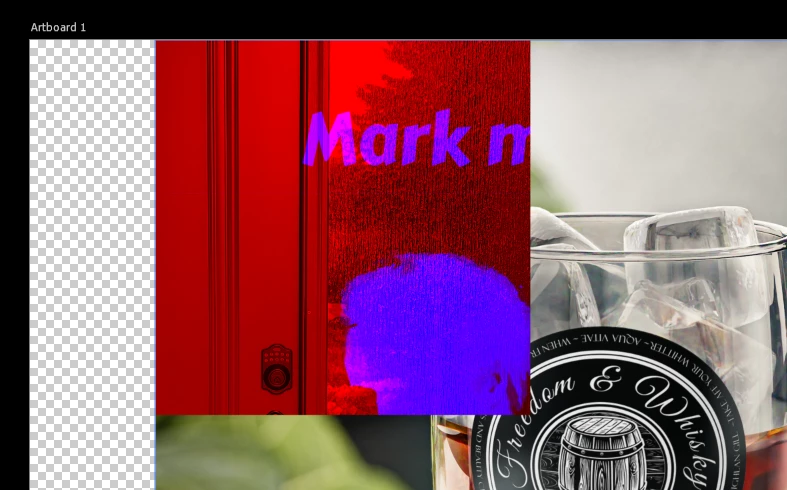
The two images I notice are a photo of my front door I had edited and another graphics file I created.
The new file is 3000px x 2250px, RGB, 8 bits, transparent background.
My RAM is good: 25040 MB and ideal range says 13772-18028, with photoshop using 70%.
I am on a Windows 11 64 bit PC (V. 24H2, OS build 26100.4946) running Photoshop 26.10.0 CC.
My graphics card is working right and no issues: Pass: DirectX available Pass: DirectX feature level 12.2 available, feature level 12.0 required Pass: Above required VRAM (12115 MB of 1500 MB required) GPU Detected: NVIDIA GeForce RTX 3060 (NVIDIA).
I saved, closed, and reopened the file and the problem persists. This isn't the first time I have noticed these red/blue patches and I am not sure how to resolve the problem. It seems to be a memory/cache issue??
 AdChoices