December 27, 2025
Answered

Good enough GPU for LR/PS?

  • December 27, 2025
  • 2 replies
  • 655 views

Hello!


I've always been a gamer who usually buys higher end GPUs but stopped gaming and bought a PC without GPU for editing and general surfing, but now when I'm editing with the on-board GPU on my CPU I can really feel the difference from my latest 7800 XT from my last gaming pc.

I'm looking for a good enough GPU for LR/PS with some lighter AI features


Current setup is;
R5 7600
32gb DDR5
1TB M.2


Are cards like 3060 12gb or 5060 Ti (8gb version) good enough?

Photos are 24MP raw


Thanks in advance.

Correct answer Trevor.Dennis

You might like to look through the Puget Systems articles. You can filter by app and hardware, and home in on the most relevant information.  https://www.pugetsystems.com/all-articles/?filter=photoshop


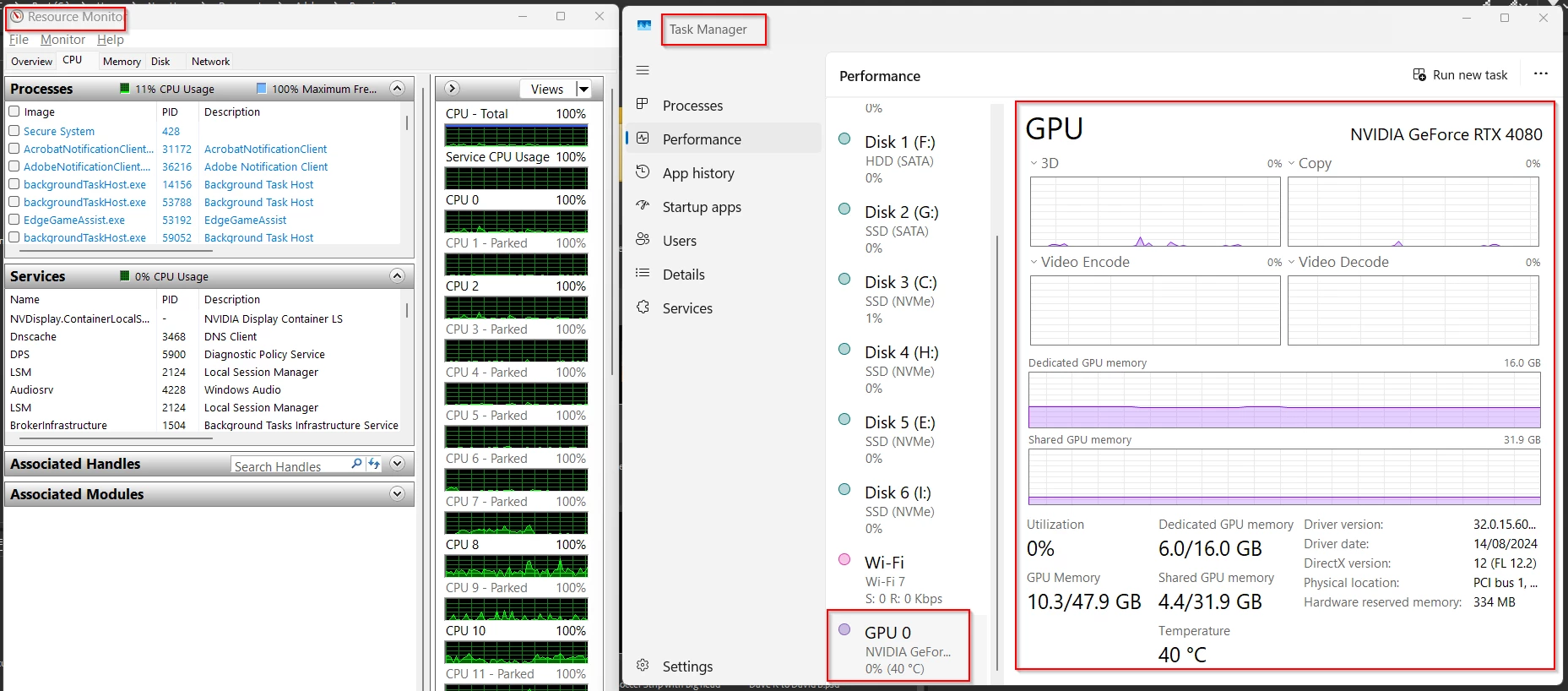
You can also see what sort of use your current hardware is getting with the Windows Device Manager > Resource Monitor.

Check the Photoshop GPU FAQ page to find functions that are heavy on GPU usage.

https://helpx.adobe.com/nz/photoshop/desktop/get-started/technical-requirements-installation/photoshop-and-graphics-processor-gpu-card-usage.html


Run some of those functions on a large image with high variation in tones and colours, and see if it is maxing out your current GPU.  Note: I don't have anything running in this screen shot.  Just FYI I have had 64GB memory in my last two builds, and never seen Photoshop max out its alocated RAM.  Personally, I'd rather have a VERY fast drive for Photoshop scratch space than a turbo-nutter-b@st@rd GPU

image.png


2 replies

Trevor.Dennis
Community Expert
Trevor.DennisCommunity ExpertCorrect answer
Community Expert
December 28, 2025

You might like to look through the Puget Systems articles. You can filter by app and hardware, and home in on the most relevant information.  https://www.pugetsystems.com/all-articles/?filter=photoshop


You can also see what sort of use your current hardware is getting with the Windows Device Manager > Resource Monitor.

Check the Photoshop GPU FAQ page to find functions that are heavy on GPU usage.

https://helpx.adobe.com/nz/photoshop/desktop/get-started/technical-requirements-installation/photoshop-and-graphics-processor-gpu-card-usage.html


Run some of those functions on a large image with high variation in tones and colours, and see if it is maxing out your current GPU.  Note: I don't have anything running in this screen shot.  Just FYI I have had 64GB memory in my last two builds, and never seen Photoshop max out its alocated RAM.  Personally, I'd rather have a VERY fast drive for Photoshop scratch space than a turbo-nutter-b@st@rd GPU

image.png


December 28, 2025

You are right, and I do have a fast drive. Actually most of what I do in PS can be done with my cpu/ram/drive only, but with some features and when I batch edit, I can feel the difference. I'm going for the 5060 Ti 16gb today and hoping that will be fine. Thanks!

D Fosse
Community Expert
Community Expert
December 27, 2025

You can't go  wrong with the Nvidia RTX-series. Rock solid and handles whatever you throw at them.


The x060 models are the sweet spot. Capable and yet fairly inexpensive. The higher model numbers will perform some functions faster, even a lot faster - but it's questionable whether it's worth the rapidly increasing prices.


Some newer LrC functions now require 16 GB VRAM or more, so probably aim for that.

December 27, 2025

Thanks for the answer. I feel like 16gb for sure is what to aim for, but since gaming isn't really my thing any longer and photography is so far only a hobby of mine.
With lighter AI features I mean denoise, sharpen etc.

It kinda annoy me though that the new cards today still is 8gb, maybe a 3060 12gb for now and upgrade later is the way to go.

Chris 486
Community Expert
Community Expert
December 27, 2025

HI @niklas_4056 ,


You will notice the performance improvement even with the graphics card you mention above. From a hobbyist perspective, your budget will come first. You will get diminishing returns from spending more money after a point. It's up to you to decide what "time" you want to save. I'd say start with what you can comfortably afford. If you find it too slow, then you know what your new baseline is and can save up to purchase a higher end card and sell that one down teh road. If you are comfortable with computers and used equipment, you can also probably find a deal on a used graphics card - buyer beware of course.