


krcarson03
Participant
October 1, 2023
Answered

Gradient colors not changing with color picker PS2024 (25.0)

  • October 1, 2023
  • 4 replies
  • 1639 views

My gradient tool is not changing colors when I use the color picker. It worked once and now seems to be stuck on those colors. I saw on this forum that this bug occurred in the previous Photoshop version, also. I removed all my preferences and had the same problem in the default settings. 

System: Mac, Ventura 13.6

App: Photoshop 2024 (25.0)
Correct answer benlil

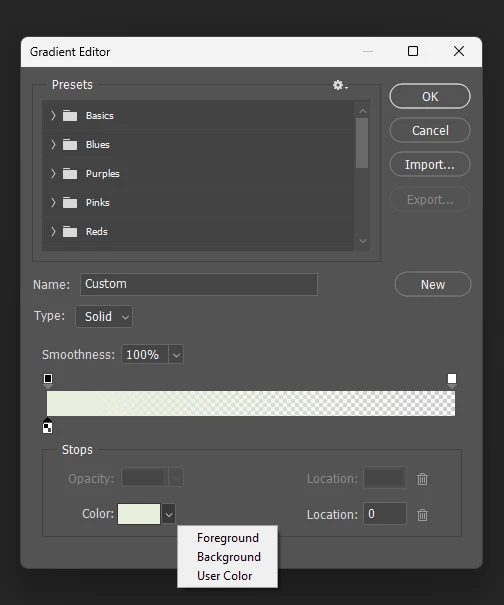
The setting I was looking for to fix the gradient tool comes up when you double click the gradient at the top of the screen (when the tool is selected). This opens a gradient window to change a number of settings. The option I needed was in the color selection dropdown - I needed to change from user color to foreground color. This allows me to change the color of the gradient wiht the eyedropper tool.


4 replies

studio KLOROFORM
Participating Frequently
October 23, 2024

This might be the solution to your poblem: https://youtu.be/DfAEunnVbHY?si=kaxGFRoHvWfHuQ6E

benlil
benlilCorrect answer
Participant
March 8, 2024

The setting I was looking for to fix the gradient tool comes up when you double click the gradient at the top of the screen (when the tool is selected). This opens a gradient window to change a number of settings. The option I needed was in the color selection dropdown - I needed to change from user color to foreground color. This allows me to change the color of the gradient wiht the eyedropper tool.


krcarson03
Participant
March 10, 2024

Thank you so much!!! This was my issue and now it's fixed!

Participating Frequently
October 1, 2023

To rerpair this rebuild your preferences file. 

https://helpx.adobe.com/ca/photoshop/using/preferences.html

Participating Frequently
October 1, 2023

Same here.