
peter33161
Participant
March 20, 2020
Answered

gradient dialogue funky

  • March 20, 2020
  • 2 replies
  • 235 views

I just installed the latest update 21.1 and now my gradient dialogue is weird. No gradient thumbs just a long list of folders with text descriptions beside them. I have to open each one individually and the standard set of gradients is either not there or spread throughout all of the folders. I've tried everything to get it back to the default but no luck. If I select "restore defaults" it just adds another identical list of folders to the existing one.


Am I missing something??


Thanks,


Peter
This topic has been closed for replies.
Correct answer davescm

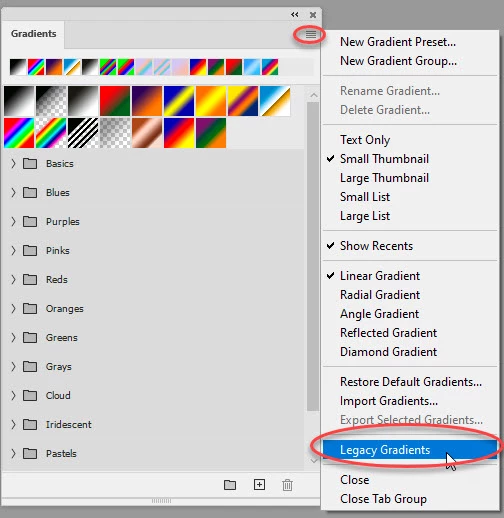
In Window >Gradients click here to see the old ones :


If you prefer to have them outside folders you can drag each set to the top


Dave


2 replies

peter33161
Participant
March 21, 2020

Dave,


Thank you very much, I wasn't getting this menu because I was going in by clicking on the gradient itself in the menu bar.

You nailed it.


Peter

davescm
Community Expert
Community Expert
March 21, 2020

You're welcome 🙂

Dave

davescm
Community Expert
davescmCommunity ExpertCorrect answer
Community Expert
March 20, 2020

In Window >Gradients click here to see the old ones :


If you prefer to have them outside folders you can drag each set to the top


Dave