
Inspiring
Sep 6, 2021 5:29 PM UTC
Answered

Gradient won't save

I'm using Photoshop 22.5.0 on MacOS Big Sur 11.5.2.

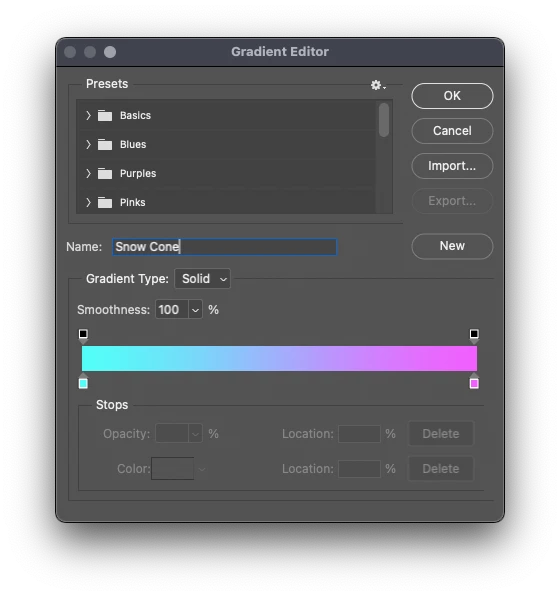
I have created a gradient on a Photoshop file, but if I assign it a name and press OK, it will not save, meaning if I go back to the gradient window, the name now says "Custom" and my previous name I assigned it cannot be found. I have also tried to click on the folder "Basics" and pressed OK to try to save it there, but nothing is there when I go back to this window. I have also tried exporting it into the gradients folder.


exactspaceCorrect answer
Inspiring
Sep 6, 2021 5:32 PM UTC

I just figured it out. You have to press "New" after you enter a name. 
I feel this thread should be closed or removed, but I also think this is a really misleading design choice. People will lose their work thinking that it was saved. 

6 replies

Participant
Jul 20, 2024 12:29 PM UTC

Thank goodness you didn't delete this. What a hideous UI design! The user has already clicked + to create a new gradient - why on earth don't they make "OK" function as a save when you have a new file. This is still an issue in Photoshop beta in July 2024

Translate
Participant
Sep 9, 2025 2:31 PM UTC

Still an issue as of September 2025. Enraging.

Translate
exactspaceAuthorCorrect answer
Inspiring
Sep 6, 2021 5:32 PM UTC

I just figured it out. You have to press "New" after you enter a name. 
I feel this thread should be closed or removed, but I also think this is a really misleading design choice. People will lose their work thinking that it was saved. 

Translate
Participant
Jul 19, 2022 12:52 AM UTC

This post should not be deleted. Almost everyone who will try it on their own will just click the OK button and be confused.

Translate
Participant
Dec 23, 2022 9:36 PM UTC

just happened to me, thanks for leaving open

Translate